
Pricing


How to Let AI Learn Your LinkedIn Audience (2026)

September 3, 2026

7
min read

 Open in ChatGPT
 Open in Claude
 Open in Perplexity
Key Takeaways
- Analytics fail at the remembering, not the reading: the lessons evaporate before your next draft, so the fix is memory, not more charts.
- One Monday 9AM scheduled task closes the loop: the Taplio LinkedIn MCP pulls 30 days of analytics and your recent posts, then the LinkedIn Analytics Interpreter and LinkedIn Post Performance Critic skills turn them into a diagnosis and per-post grades.
- The lessons are saved to Claude's permanent memory: memory works on every plan and is shared between chats and cloud runs, so every future draft starts from what your numbers proved.
- You get a one-page artifact briefing, not a chat wall: trend, post grades, three lessons and three actions, waiting in the Scheduled tab every Monday.
- Nothing posts without you: the routine only reads numbers and writes lessons. You stay the publisher.
You can check your LinkedIn analytics every week. By the time you sit down to write your next post, you have forgotten everything they told you.
That is the real problem with analytics. Not reading them, remembering them. Every post you publish is a test your audience grades: impressions, comments, saves. That grade is the most honest content advice you will ever get, and it evaporates before your next draft.
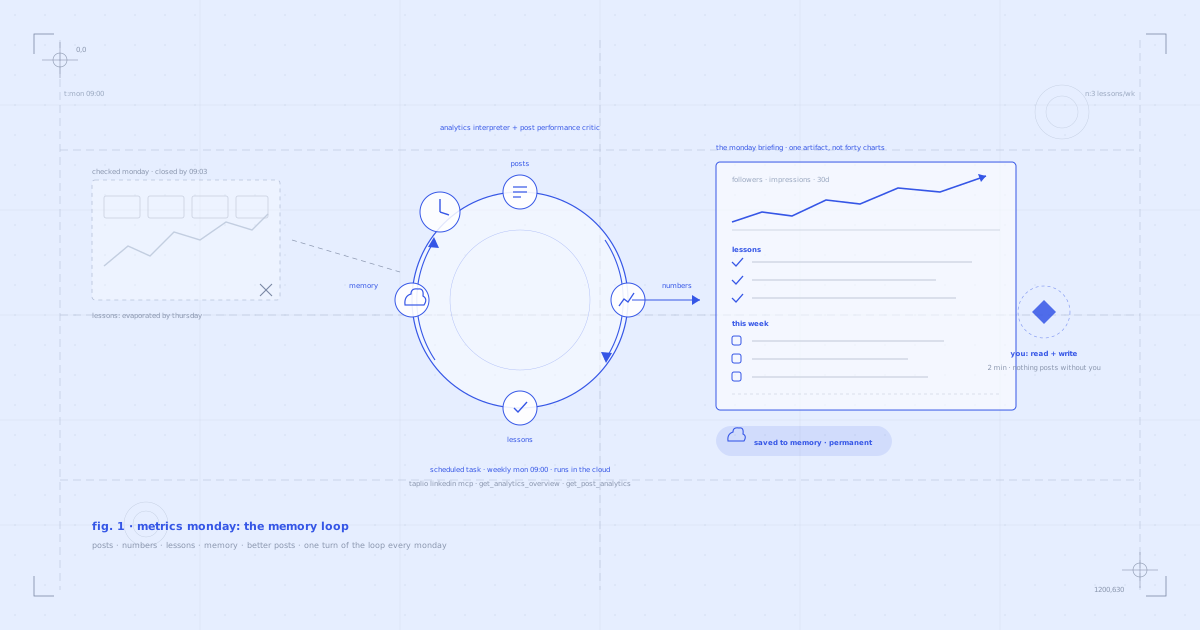
This guide shows you the fix: Metrics Monday. A scheduled Claude task that runs every Monday at 9AM, pulls your analytics and recent posts through the Taplio LinkedIn MCP, diagnoses them with two skills, and saves the lessons to Claude's permanent memory. Every post Claude writes for you from then on starts from what your numbers already proved.
Why your analytics keep failing you
Nobody ignores their analytics on purpose. You open them, you nod at the charts, you close them. The reading happens. The remembering does not.
The lessons live in a dashboard, and your writing happens somewhere else, days later. By Thursday's draft you are back to writing on vibes: topics you assume work, hooks you feel like writing, formats you default to. The data that could correct all three sits unread in a tab you closed on Monday.
So the fix is not more discipline, and it is definitely not more charts. The fix is moving the lessons to where the writing happens.
What changes when your AI knows your audience
Two things, and they are bigger than they sound.
You get to focus on the content. When the AI carries the audience knowledge, your job becomes making things that are interesting to you, while it shapes the story for the people reading it. You bring the story. It brings the audience.
It debiases you. Left alone, every creator self-selects: you talk about what you assume works, which quietly narrows to what you enjoy talking about. A memory built from your actual numbers cuts through that. The numbers decide what works. You decide what is worth saying.
What you need
- The Taplio LinkedIn MCP connected to Claude. This is what lets Claude pull your real analytics and your posts with their performance numbers. 19 tools, two-minute setup.
- Claude Skills for LinkedIn. Free instruction sets that make Claude better at specific tasks. Two matter here: the LinkedIn Analytics Interpreter, which turns raw numbers into a diagnosis, and the LinkedIn Post Performance Critic, which grades individual posts.
- A paid Claude plan. The prompt runs anywhere, but the automatic Monday version uses Claude scheduled tasks, which are included on Pro, Max, Team and Enterprise plans.
- Memory switched on. It is on by default, on every Claude plan, including free. You can see everything Claude remembers in Settings.
Connect the Taplio LinkedIn MCP (2-minute setup)
Download all 17 Claude Skills for free
You can connect the MCP entirely inside Claude, no terminal needed. Here is the two-minute setup on Claude.
Prefer to watch the whole routine first, from setup to the first briefing?
The two Claude features this runs on (yes, both are new)
Most people have not tried either of these yet, so before the prompt, the reveals.
A scheduled task is a prompt Claude runs by itself at a time you pick: daily, weekly, whenever. It runs in the cloud, which means it keeps going even when your laptop is closed and the app is shut. When you open Claude, the finished run is waiting in the Scheduled tab. Scheduled tasks can use your connected tools and skills, and they are included on every paid Claude plan.
Memory is the newer one, and it is what makes this routine compound. Claude now keeps what matters about you and uses it in every future conversation, on every plan. You can see, edit and delete everything it remembers in Settings. Crucially, memory is shared between your normal chats and cloud task runs: a lesson saved by Monday's scheduled task is right there when you draft a post on Thursday.
Put together: your Monday numbers permanently teach your AI how to write for your audience. Posts, numbers, lessons, memory, better posts. One turn of the loop every week.
The prompt
This is the entire routine. Nothing to edit, it runs on your own data. Paste it as is.
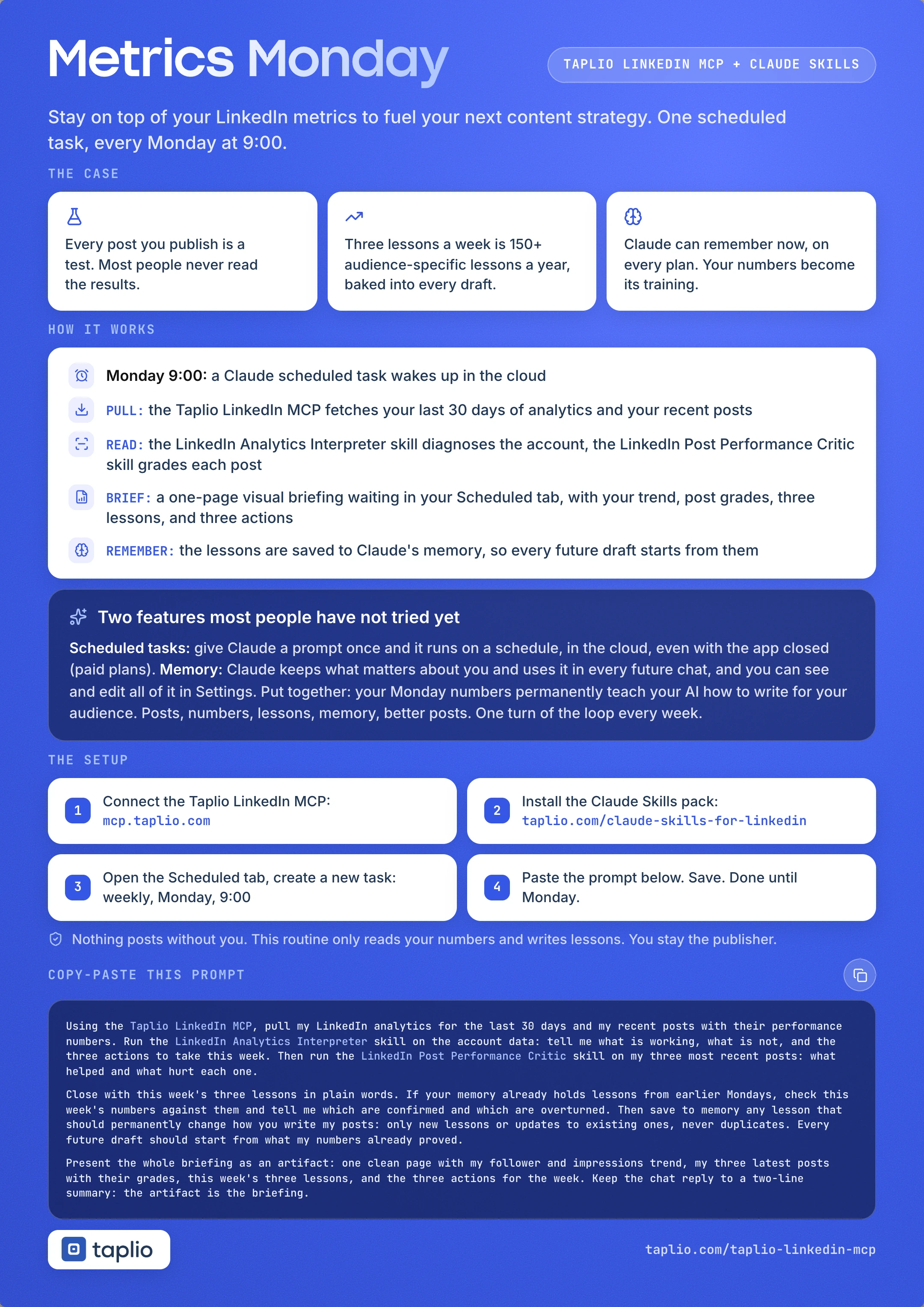
Using the Taplio LinkedIn MCP, pull my LinkedIn analytics for the last 30 days and my recent posts with their performance numbers. Run the LinkedIn Analytics Interpreter skill on the account data: tell me what is working, what is not, and the three actions to take this week. Then run the LinkedIn Post Performance Critic skill on my three most recent posts: what helped and what hurt each one.

Close with this week's three lessons in plain words. If your memory already holds lessons from earlier Mondays, check this week's numbers against them and tell me which are confirmed and which are overturned. Then save to memory any lesson that should permanently change how you write my posts: only new lessons or updates to existing ones, never duplicates. Every future draft should start from what my numbers already proved.

Present the whole briefing as an artifact: one clean page with my follower and impressions trend, my three latest posts with their grades, this week's three lessons, and the three actions for the week. Keep the chat reply to a two-line summary: the artifact is the briefing.
Here is the whole routine on one page, if you would rather save it than scroll back:
Set it to run every Monday
This is the part that turns a good prompt into a weekly ritual, and it takes about a minute.
- In Claude, click Scheduled in the left sidebar.
- Create a New task.
- Paste the prompt above.
- Set the frequency to Weekly, Monday, 9:00 AM.
- Keep it set to run in the cloud, and save.
That is the entire setup. If you do not want to wait for Monday, hit "Run now" on the task and watch the first briefing build itself. Running it once before the schedule starts has a bonus: your second run will already have memory to check against, so you will see lessons marked confirmed or overturned from week two.
What happens when it runs
Step 1: It pulls your numbers
What fires under the hood:
- MCP tools:
get_analytics_overviewfor your follower and impressions time series,get_post_analyticsandlist_postsfor every recent post with its engagement numbers.
No dashboard, no CSV export, no spreadsheet. The 30-day window is deliberate: wide enough for real patterns, recent enough to still be about the audience you have now.
Step 2: Two skills do the interpreting
What fires under the hood:
- LinkedIn Analytics Interpreter: reads the account-level data and answers the three questions that matter: what is working, what is not, and what to do about it this week.
- LinkedIn Post Performance Critic: cold-reads your three most recent posts against their numbers: what helped each one, what hurt it.
This is the part you used to do in your head, badly, on a Monday morning. Now it happens before you wake up.
Step 3: The lessons become memory
The run closes with three lessons in plain words, then saves the ones that should permanently change how Claude writes for you. The prompt's dedupe rule matters here: only new lessons or updates to existing ones, never duplicates, so the memory stays sharp instead of silting up. From week two onward, it also checks the new numbers against the old lessons and tells you which are confirmed and which are overturned.
Step 4: You get a briefing, not homework
The output is a one-page artifact: your trend, your three latest posts with grades, the three lessons, and the three actions for the week. It waits in the Scheduled tab. Reading it takes two minutes, and nothing in this routine posts anything: it reads your numbers and writes lessons. You stay the publisher.
Connect the Taplio LinkedIn MCP and set up your Metrics Monday
Why this compounds
A dashboard resets every week. Memory accumulates.
Three lessons a week is over one hundred and fifty a year, all specific to your audience, all earned by your own posts. No generic AI has any of them. And they are not sitting in a document you have to remember to paste into a chat: they are part of what Claude knows about you, applied automatically the next time you ask it to write.
That is the difference between an AI assistant and an AI that is actually yours. The generic model everyone uses writes from averages. Yours writes from proof.
What's happening under the hood
A quick reference for the MCP tools and Skills this routine uses:
Pull the numbersget_analytics_overview returns your daily follower and impressions series; get_post_analytics and list_posts return per-post engagement.
Read them
The LinkedIn Analytics Interpreter and LinkedIn Post Performance Critic skills turn raw numbers into a diagnosis and per-post grades.
Remember them
Claude's memory stores the lessons and shares them across every chat and every cloud run, on every plan.
Run without you
Claude's scheduled tasks trigger the whole thing every Monday morning in the cloud.
The Taplio LinkedIn MCP has 19 tools total. This routine uses three of them. Others power different workflows, like the daily engagement radar that drafts your comments or rebuilding your best post into six new ones.
5 tips for better results
1. Run it once today, manually. "Run now" gives you your first briefing in minutes, and it seeds the memory so next Monday's run can already confirm or overturn something. The loop starts compounding one week earlier.
2. Read the briefing before you write, not after. The whole point is that the lessons reach your next draft. Monday briefing, then the week's writing. Order matters.
3. Audit the memory once a month. Settings, Memory, two minutes. You will mostly nod, occasionally prune, and sometimes find a lesson so sharp you will want to build a whole series on it.
4. Do the three actions. The briefing ends with three things to do this week. They are small on purpose. A routine that produces insight without action is a dashboard with extra steps.
5. Keep the cadence weekly. Daily analytics are noise, and noise writes bad lessons into memory. A week is the shortest window where LinkedIn numbers mean something.
FAQ
Does this post anything to LinkedIn?
No. The routine reads your analytics and writes lessons. There is no publishing step anywhere in it, and the prompt asks for nothing but analysis. When you want to turn a lesson into a post, you ask Claude to draft one and you publish it yourself.
Do I need a paid Claude plan?
For the automatic Monday version, yes: scheduled tasks are included on paid Claude plans (Pro, Max, Team, Enterprise). Memory, though, works on every plan, including free. So on a free plan you can run the same prompt manually each Monday and still build the permanent memory. It just will not run itself.
Where do the lessons go? Can I see them?
In Claude's memory. Open Settings, then Memory, and everything Claude remembers about you is listed, editable and deletable. The lessons this routine saves sit alongside the rest, and you are always allowed to prune them.
Will it really use the lessons when it writes for me?
Yes, that is what Claude's memory is for: what it remembers about you is applied in future conversations without you repeating it. Memory is also shared between normal chats and cloud task runs, so a lesson saved by Monday's task is available in Thursday's chat. If you want to check, ask Claude what it remembers about your LinkedIn audience before asking for a draft.
What if I have barely posted recently?
The critic reads your three most recent posts, however old they are, and the account trend still says plenty. But the loop feeds on posts: the more tests you publish, the better the lessons. If your pipeline is empty, start with a posting routine and let Metrics Monday grade it from week one.
Does it work with ChatGPT?
The Taplio LinkedIn MCP works with ChatGPT too, so you can pull your analytics there manually. The Skills, scheduled tasks and memory as used here are Claude features, which is why the automatic, compounding version of this routine lives in Claude.
Can I change the day, the time, or the window?
All three. The schedule lives in the task settings; the 30-day window and the number of posts to critique live in the prompt. The only rule worth keeping is weekly cadence: shorter windows grade noise, not patterns.
How long does setup take?
About three minutes total: two for the Taplio LinkedIn MCP, one for the scheduled task.
- In Claude: add the MCP from your connector settings. Watch the two-minute setup.
- The URL to paste:
https://mcp.taplio.com - Then: Scheduled tab, New task, paste the prompt, Weekly on Monday at 9AM, save.
- Product page: taplio.com/taplio-linkedin-mcp
Your numbers already know. Now your AI will too.
Growth on LinkedIn is a feedback problem. The feedback exists, every week, in your analytics. It just never survives the trip to your next draft.
So stop carrying it yourself.
- Connect the Taplio LinkedIn MCP: 2-minute setup, 19 tools
- Install the free Claude Skills: 17 skills, free for everyone
- Create the scheduled task, paste the prompt, set it to Monday at 9AM
Next Monday at 9:01, your briefing is waiting: the trend, the grades, three lessons, three actions. And an AI that knows your audience a little better than it did last week. It is better off this way. So are you.


Keep reading
All articlesRelated Articles
.avif)
Your Linkedin AI coach is waiting for you
Join 12,000+ creators who let their coach turn the blank page into a plan and watch their audience compound.
7-day free trial · 30 day money back · Cancel anytime
AVG. VIEWS
2,979
-1.5%
ENGAGEMENT
3.2%
+0.8%

Free Monthly Report
How does your LinkedIn compare?
Get free monthly benchmarks on reach, engagement, and content format performance.
Get the Benchmark