
Pricing


How to Let AI Write Your LinkedIn Comments (2026)

August 20, 2026

7
min read

 Open in ChatGPT
 Open in Claude
 Open in Perplexity
Key Takeaways
- Comments are the highest-leverage move on LinkedIn: a good comment borrows the reach of a post that is already travelling, with zero content creation on your side.
- The habit dies in the hunting, not the writing: finding five posts worth commenting on costs 30 minutes of scrolling a day, so almost nobody sustains it past the first week.
- Claude scheduled tasks remove the hunting entirely: a daily 9AM task runs in the cloud, calls the Taplio LinkedIn MCP, and delivers five rising posts with a drafted comment under each.
- Three prompt instructions keep the drafts human: strip AI tells, stay concise, and skip the context re-statement so every comment aims at starting a discussion.
- Nothing posts without you: the Taplio LinkedIn MCP has no comment-posting tool, so you review and paste every comment yourself.
Everyone tells you to comment more on LinkedIn. Nobody tells you how to keep it up past Thursday.
Commenting is the highest-leverage move on the platform: a good comment puts you in front of someone else's audience, with zero content creation. The problem was never writing the comments. It is finding the right posts to comment on, which means thirty minutes of scrolling. Every single day.
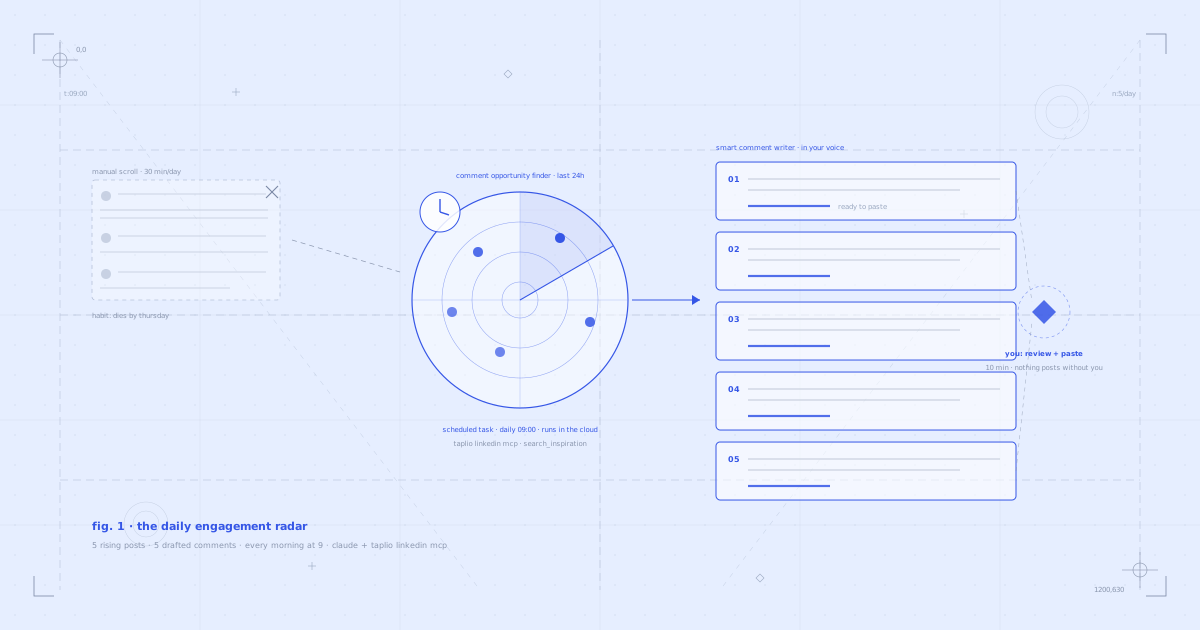
This guide shows you the fix: a daily engagement radar. A scheduled Claude task that runs every morning at 9AM, scans your niche through the Taplio LinkedIn MCP, picks the five posts worth commenting on, and drafts a comment for each one in your voice. You review, tweak, paste. Ten minutes, done.
Why comments grow you faster than posts
A post has to earn its own distribution. A comment borrows distribution someone else already earned.
When you leave a sharp comment on a post that is gaining traction, you are visible to that author's entire audience at the exact moment they are paying attention. No algorithm to fight, no content calendar to feed. It is low effort, high leverage, and it is the strategy most people quietly neglect while they obsess over their own posts.
Comments also compound differently. Five comments a day is one hundred and fifty touches a month in your niche: the same names keep seeing yours, in threads they care about. That is how strangers become profile visits, and profile visits become followers.
The real reason nobody does it consistently
The habit does not die because writing comments is hard. It dies in the hunting.
To comment well you need posts that are recent, relevant to your niche, gaining traction right now, and where you actually have something to add. Finding five of those means scrolling the feed for half an hour, and the feed is engineered to distract you. Most people do it enthusiastically for four days and never again.
So the fix is not discipline. The fix is making the hunting happen before you wake up.
What you need
- The Taplio LinkedIn MCP connected to Claude. This is what lets Claude search Taplio's live index of what is rising in your niche, read your posts so it knows your voice, and work inside your Taplio account. 19 tools, two-minute setup.
- Claude Skills for LinkedIn (optional but recommended). Free instruction sets that make Claude better at specific tasks. One matters here: the LinkedIn Trending Topics Scanner, which tunes how Claude reads what is rising in your niche.
- A paid Claude plan. The manual prompt runs anywhere, but the automatic 9AM version uses Claude scheduled tasks, which are included on Pro, Max, Team and Enterprise plans.
Connect the Taplio LinkedIn MCP (2-minute setup)
Download all 17 Claude Skills for free
You can connect the MCP entirely inside Claude, no terminal needed. Here is the two-minute setup on Claude.
Prefer to watch first? Here is the full routine, from setup to pasting the first comment:
The Claude feature this runs on (yes, this is new)
Most people have no idea Claude can do this, so before the prompt, the reveal.
A scheduled task is a prompt Claude runs by itself at a time you pick: daily, weekly, whenever. No reminder, no opening a chat. It runs in the cloud, which means it keeps going even when your laptop is closed and the app is shut. When you open Claude, the finished run is waiting for you in the Scheduled tab.
Scheduled tasks can use your connected tools and skills, which is exactly why this routine works: the 9AM run connects to your Taplio account through the Taplio LinkedIn MCP without you touching anything. They are included on every paid Claude plan, fully rolled out in the Claude desktop app, and in beta on claude.ai and mobile.
The prompt
This is the entire routine. One prompt, five posts, five drafted comments.
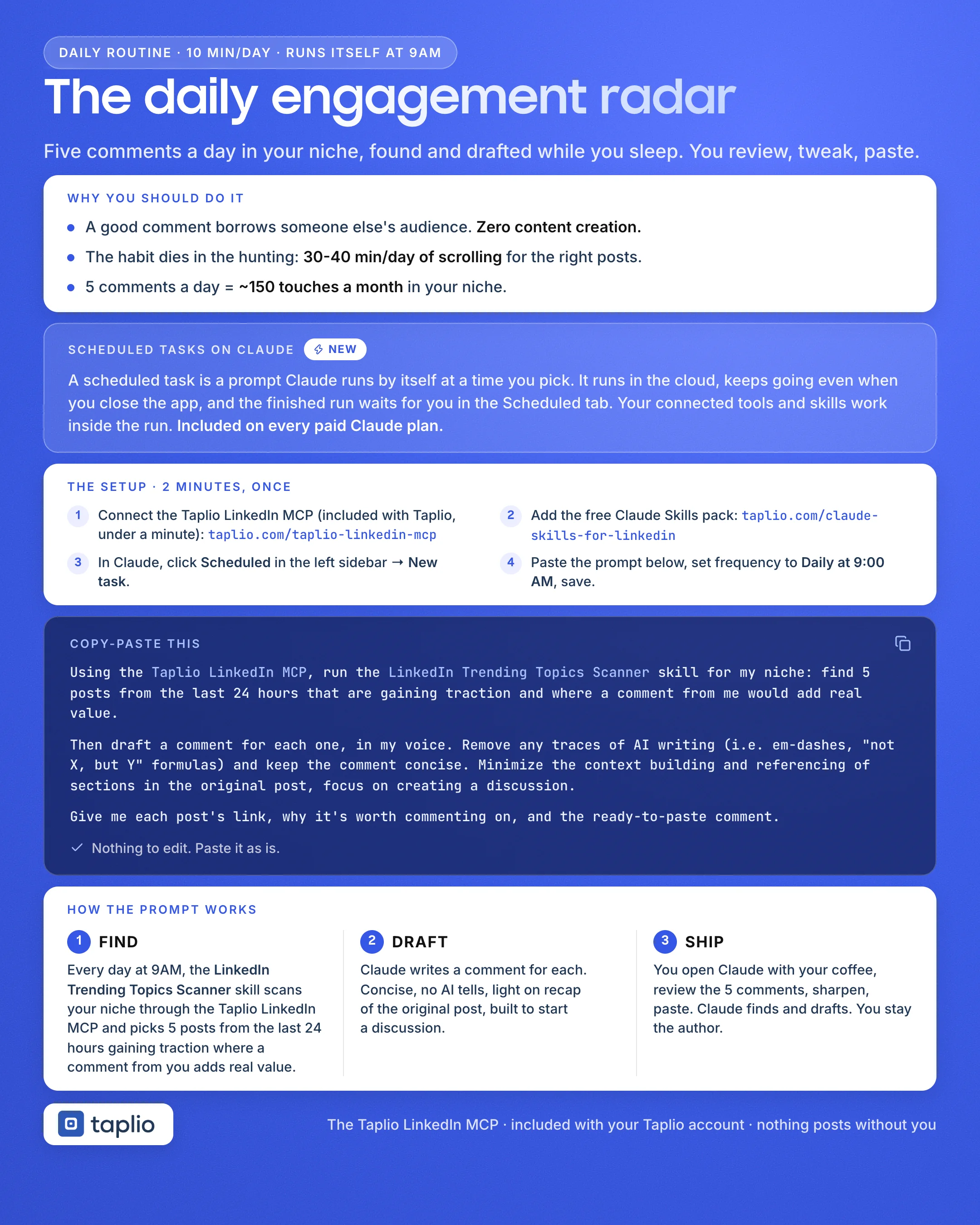
Using the Taplio LinkedIn MCP, run the LinkedIn Trending Topics Scanner skill for [your niche]: find 5 posts from the last 24 hours that are gaining traction and where a comment from me would add real value. Then draft a comment for each one, in my voice. Remove any traces of AI writing (i.e. em-dashes, "not X, but Y" formulas) and keep the comment concise. Minimize the context building and referencing of sections in the original post, focus on creating a discussion. Give me each post's link, why it's worth commenting on, and the ready-to-paste comment.One line to edit before you run it: [your niche]. Be specific. "B2B SaaS founders" is a different radar to "marketing".
Here is the whole routine on one page, if you would rather save it than scroll back:
Set it to run every morning
This is the part that turns a good prompt into a daily briefing, and it takes about a minute.
- In Claude, click Scheduled in the left sidebar.
- Create a New task.
- Paste the prompt above, with your niche filled in.
- Set the frequency to Daily at 9:00 AM, or whenever your coffee happens.
- Keep it set to run in the cloud, and save.
That is the entire setup. From tomorrow, the briefing is waiting for you every morning: five posts, why each one matters, and a ready-to-paste comment under each. If you do not want to wait for tomorrow, hit "Run now" on the task and watch the first briefing build itself.
What happens when it runs
Step 1: The radar finds the posts
What fires under the hood:
- Claude Skill (optional): LinkedIn Trending Topics Scanner. Tunes how Claude reads your niche: what is rising right now and which conversations are worth joining.
- MCP tool:
search_inspiration. Searches Taplio's live index of LinkedIn posts for what is gaining traction in your niche in the last 24 hours.
The 24-hour window is deliberate. Commenting on a three-day-old viral post puts you at the bottom of a thread nobody is reading anymore. Commenting in the first day puts you in the conversation while it is still compounding.
Step 2: The writer drafts your comments
What fires under the hood:
- MCP tools:
get_meandlist_posts. Your profile, positioning and published posts are what "in my voice" resolves to. - No separate skill needed: the drafting instructions in the prompt do the work, so every comment lands with a point of view, grounded in how you actually write.
Not "Great post!" Not a summary of what the author already said. A comment with an opinion, an addition, or a sharp question: the kind that starts a reply thread.
Step 3: You do the only part that matters
Open the finished run, read the five comments, sharpen the ones worth sharpening, click each post link, paste. Ten minutes, and every comment went through your hands before it went anywhere near LinkedIn.
That is by design, not a limitation. The Taplio LinkedIn MCP has no tool for posting comments, so nothing can be published on your behalf. Claude finds and drafts. You stay the author.
Connect the Taplio LinkedIn MCP and set up your radar today
Why the comments don't sound like AI
Three instructions in the prompt do the heavy lifting, and they are worth understanding before you edit them out.
"Remove any traces of AI writing" strips the tells: the em dashes, the "not X, but Y" constructions, the "great point!" openers. What survives reads like a person typing on their phone, which is what a comment is supposed to be.
"Keep the comment concise" keeps you out of mini-essay territory. Long comments read as self-promotion. Short ones read as conversation.
"Minimize the context building, focus on creating a discussion" is the subtle one. Weak comments spend two lines re-stating the post before saying anything. Strong comments assume everyone read it and go straight to the point that invites a reply. Replies are the whole game: a comment that starts a thread keeps surfacing for days.
What's happening under the hood
A quick reference for the MCP tools and Skills this routine uses:
Find the opportunities
The LinkedIn Trending Topics Scanner skill leans on search_inspiration against your niche, filtered to the last 24 hours.
Sound like you
The prompt's drafting rules plus get_me and list_posts keep every comment in your voice, not the model's.
Run without you
Claude's scheduled tasks trigger the whole thing every morning in the cloud. Your connected tools work inside the run.
The Taplio LinkedIn MCP has 19 tools total. This routine uses two or three of them. Others like get_post_analytics and create_draft power different workflows, like rebuilding your best post into six new ones.
The 17 Claude Skills span five categories: content writing, research and inspiration, strategy, profile optimization, and analytics. The one that matters here is the LinkedIn Trending Topics Scanner.
5 tips for better results
1. Narrow your niche string. The radar is only as sharp as the niche you give it. "AI tools for recruiters" beats "HR". If the five posts feel generic, your niche string is too wide.
2. Edit at least one comment hard, every day. The drafts are good, but the habit of rewriting one in your own words keeps your voice in charge and teaches you what to ask for. Your edits are also the best feedback for tightening the prompt.
3. Comment, then stay ten extra seconds. If the author replies within the hour, reply back. A two-message thread under a rising post is worth more than five drive-by comments.
4. Watch profile views for two weeks. Comments convert to profile visits before they convert to followers. If views are climbing, the radar is working, even before the follower graph moves.
5. Keep posting. The radar is what you do between posts, not instead of them. Comments make strangers curious. Your posts are what they find when they click through.
FAQ
Does Claude post the comments for me?
No, and that is deliberate. The Taplio LinkedIn MCP has no comment-posting tool, so nothing can go out on your behalf. The scheduled task delivers five drafted comments; you review each one and paste it yourself. You stay the author of every word that appears under your name.
Is this against LinkedIn's rules? Will it get my account banned?
You are the one posting, manually, through LinkedIn itself. There is no browser automation, no scraping, and no bot activity on your account. The AI part happens entirely in Claude and Taplio: finding posts and drafting text. That is account-safe by design.
Do I need a paid Claude plan?
For the automatic 9AM version, yes: scheduled tasks are included on paid Claude plans (Pro, Max, Team, Enterprise). On a free plan you can still run the same prompt manually each morning; it just will not run itself.
Does it work with ChatGPT?
The Taplio LinkedIn MCP works with ChatGPT too, so you can run the prompt there manually. The Skills and the scheduled task are Claude features, which is why the automatic version of this routine lives in Claude.
Won't people notice the comments are AI-written?
They will notice bad comments, AI-written or not. The prompt strips the AI tells, keeps drafts short, and grounds them in your published writing, and you edit before posting. If a draft does not sound like you, that is your cue to rewrite one line, not to skip the day.
What if my niche is too small for five posts a day?
Widen the time window or the niche. Change "last 24 hours" to "last 48 hours", or move one level up: "LinkedIn tools for recruiters" becomes "recruiting". You can also lower the count. Three sharp comments beat five forced ones.
Can I change the number of comments or the time?
Yes to both. The count lives in the prompt; the time lives in the schedule. Some people run it twice a day with three comments each. The only rule that matters is a number you will actually clear daily.
How long does setup take?
About three minutes total: two for the Taplio LinkedIn MCP, one for the scheduled task.
- In Claude: add the MCP from your connector settings. Watch the two-minute setup.
- The URL to paste:
https://mcp.taplio.com - Then: Scheduled tab, New task, paste the prompt, Daily at 9AM, save.
- Product page: taplio.com/taplio-linkedin-mcp
Show up before your coffee cools
Growth on LinkedIn is mostly a visibility problem, and comments are the cheapest visibility on the platform. The only thing that ever kills the habit is the hunting.
So delete the hunting.
- Connect the Taplio LinkedIn MCP: 2-minute setup, 19 tools
- Install the free Claude Skills: 17 skills, free for everyone
- Create the scheduled task, paste the prompt, set it to daily at 9AM
Tomorrow at 9:01, five posts and five comments are waiting. All you have to do is show up and paste.


Keep reading
All articlesRelated Articles
.avif)
Your Linkedin AI coach is waiting for you
Join 12,000+ creators who let their coach turn the blank page into a plan and watch their audience compound.
7-day free trial · 30 day money back · Cancel anytime
AVG. VIEWS
2,979
-1.5%
ENGAGEMENT
3.2%
+0.8%

Free Monthly Report
How does your LinkedIn compare?
Get free monthly benchmarks on reach, engagement, and content format performance.
Get the Benchmark