
Pricing


AI writer

Taplio
MCP
Taplio MCP connects your AI assistant to your LinkedIn account. It learns what works in your niche, then drafts and schedules posts in your voice.

How to Keep 3 Weeks of LinkedIn Posts Scheduled With AI (2026)

September 10, 2026

8
min read

 Open in ChatGPT
 Open in Claude
 Open in Perplexity
Key Takeaways
- The empty week kills LinkedIn accounts, not the missed day: two or three good posts a week, never missed, beats any daily streak.
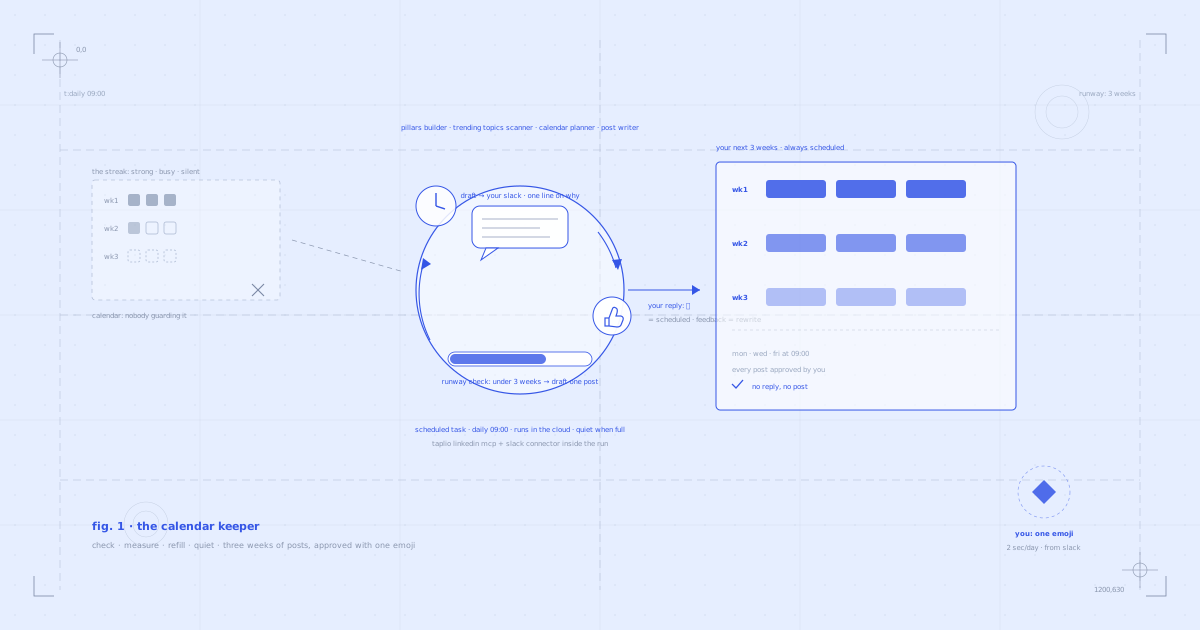
- One daily scheduled task keeps your calendar 3 weeks deep: it reads your Slack replies, counts your scheduled runway through the Taplio LinkedIn MCP, and only drafts when cover drops under 3 weeks.
- Four Claude Skills write like you: the LinkedIn Content Pillars Builder derives your niche from your own posts, the Trending Topics Scanner and Content Calendar Planner pick the topic, the Post Writer drafts in your voice.
- Your entire job is a thumbs-up reply in Slack: approve and the post takes its slot, give feedback and it comes back rewritten, stay silent and nothing moves.
- Quiet when full: when the calendar covers 3 weeks, the run ends silently. Nothing is scheduled without your thumbs up.
You do not need to post on LinkedIn every day. You need to never miss a week, and that is the part nobody has solved.
The pattern is always the same: two strong weeks, one busy week, then a silent month. The problem was never the writing. It is that showing up means deciding what to say, from zero, every time, and your calendar has no one guarding it.
This guide shows you the fix: the calendar keeper. A scheduled Claude task that keeps your next 3 weeks of LinkedIn posts scheduled through the Taplio LinkedIn MCP, drafts in your voice when the runway gets short, and asks for exactly one thing from you: a thumbs up in Slack.
Consistency beats intensity
Daily-posting advice sounds impressive and dies in week two. Streaks are fragile: one loud week at work and yours is gone, and with it the momentum you spent a month building.
Two or three good posts a week, never missed, beats any daily streak. That cadence is sustainable through busy weeks, it is enough volume to keep testing what your audience responds to, and it compounds: three posts a week is 150+ tests a year.
The enemy is not the missed day. It is the empty week. So the fix is not more discipline. It is a calendar that refuses to go empty.
What you need
- The Taplio LinkedIn MCP connected to Claude. This is what lets Claude read your content calendar, save drafts, and schedule approved posts into your slots. 19 tools, two-minute setup.
- Claude Skills for LinkedIn. Free instruction sets that make Claude better at specific tasks. Four matter here: the LinkedIn Content Pillars Builder, the LinkedIn Trending Topics Scanner, the LinkedIn Content Calendar Planner, and the LinkedIn Post Writer.
- Slack connected to Claude. The keeper delivers drafts to a Slack channel you pick, and your reply in the thread is the control surface. Connect it in Claude under Settings, then Connectors.
- A paid Claude plan. The prompt runs anywhere, but the automatic morning version uses Claude scheduled tasks, included on Pro, Max, Team and Enterprise plans.
Connect the Taplio LinkedIn MCP (2-minute setup)
Download all 17 Claude Skills for free
You can connect the MCP entirely inside Claude, no terminal needed. Here is the two-minute setup on Claude.
Prefer to watch the whole thing first, from setup to the first approved post landing on the calendar?
The two Claude features this runs on (yes, both are new)
Most people have not tried either of these yet, so before the prompt, the reveals.
A scheduled task is a prompt Claude runs by itself at a time you pick. It runs in the cloud, which means it keeps going even when your laptop is closed and the app is shut, and the finished run waits in the Scheduled tab. Scheduled tasks are included on every paid Claude plan.
Connectors work inside the run. This is the part that makes the keeper possible: the same run that reads your Taplio calendar can also send a message to your Slack and read your replies. The draft comes to where you already work, and answering it takes two seconds. That is why this routine survives the busy weeks that kill every posting streak.
The prompt
This is the entire routine. Three things to fill in before you save it: your Slack channel, your posting slots, and that is it. The niche comes from your own posts.
Every morning, keep my LinkedIn content calendar full using the Taplio LinkedIn MCP and my Slack.

First, handle my replies: find your most recent draft message in [#my-linkedin-posts] and read its thread. If I replied with a thumbs up, schedule that draft into my next open posting slot. If I replied with feedback, rewrite the draft accordingly, update it in Taplio, and send the new version to the same thread. If there is no reply yet, leave it as a draft.

Then check the runway: I post [3] times a week, on [Monday, Wednesday and Friday at 9:00]. Read my scheduled posts and work out how many weeks ahead my calendar covers. If it covers less than 3 weeks, draft one new post: check my latest posts and use the LinkedIn Content Pillars Builder to identify the 3 buckets that define my niche.

Use the LinkedIn Trending Topics Scanner skill to check what's trending in each bucket.

Use the LinkedIn Content Calendar Planner skill to pick the topic that best balances what is already scheduled, and write the post with the LinkedIn Post Writer skill, in my voice, grounded in my published posts.

Remove any traces of AI writing (i.e. em-dashes, "not X, but Y" formulas). Save it as a draft in Taplio and send it to [#my-linkedin-posts] with one line on why this topic and which slot it is meant for. If the calendar already covers 3 weeks, reply with nothing and end the run quietly.
Here is the whole routine on one page, if you would rather save it than scroll back:

Set it up once
About four minutes, start to finish.
- Connect the Taplio LinkedIn MCP and install the Claude Skills pack (links above).
- Connect Slack to Claude (Settings, then Connectors) and pick or create your posts channel.
- In Claude, click Scheduled in the left sidebar and create a New task.
- Paste the prompt with your channel and slots filled in. Set the frequency to Daily at 9:00 AM, keep it running in the cloud, and save.
If you do not want to wait until tomorrow, hit "Run now" and watch the first draft land in your Slack. Reply with a thumbs up, run it once more, and you will see the post take its slot on your calendar: the whole loop, compressed into two minutes.
What happens when it runs
Step 1: CHECK, it reads your replies
What fires under the hood: the Slack connector reads the thread on its last message; schedule_draft moves an approved draft into your next open slot; update_draft applies your feedback.
A thumbs up schedules the draft. Feedback gets it rewritten and sent back. Silence leaves it waiting. Your reply is the only control surface this routine has, which is exactly the point.
Step 2: MEASURE, it counts your runway
What fires under the hood: list_posts filtered to your scheduled queue.
Three weeks of cover at your cadence is the target. Over that, the run ends quietly: no message, no busywork, nothing to dismiss. Under it, the keeper gets to work.
Step 3: REFILL, it drafts one post
What fires under the hood: the LinkedIn Content Pillars Builder reads your latest posts and identifies the 3 buckets that define your niche; the LinkedIn Trending Topics Scanner checks what is rising in each bucket; the LinkedIn Content Calendar Planner picks the topic that best balances what is already queued; the LinkedIn Post Writer drafts it in your voice, grounded in your published posts; create_draft saves it to Taplio.
The pillars step is why the drafts stay on-brand without you ever typing a niche description: your own recent posts define the buckets, so the keeper drifts with you as your content evolves.
Step 4: DELIVER, it lands in your Slack
The draft arrives in your channel with one line on why this topic today and which slot it is meant for. Reading it takes thirty seconds. Answering takes two.
And to be precise about the safety design: nothing is scheduled without your thumbs up. No reply, no post. Every approval is in writing, in your own Slack history.
Connect the Taplio LinkedIn MCP and give your calendar a keeper
Why this survives busy weeks
Every posting system fails the same test: the week you have no time. A daily-writing habit fails it immediately. A batching Sunday fails it the first Sunday something else matters more.
The keeper passes because the runway absorbs the chaos. Your calendar covers three weeks, so a brutal week costs you nothing: posts keep going out, and the pipeline refills when you resurface. The routine asks for two seconds a day at most, from an app you already have open, and when the calendar is full it does not even do that.
Quiet when full. Loud only when it needs a decision. Most automations spam you into ignoring them; this one earns the notification.
What's happening under the hood
A quick reference for the MCP tools and Skills this routine uses:
Read the calendarlist_posts returns your scheduled queue; the runway math happens on top of it.
Act on your replies
The Slack connector reads the thread; schedule_draft and update_draft do what your reply asked.
Draft like you
The LinkedIn Content Pillars Builder, LinkedIn Trending Topics Scanner and LinkedIn Content Calendar Planner pick the right topic; the LinkedIn Post Writer writes it from your published posts; create_draft saves it.
Run without you
Claude's scheduled tasks trigger the whole loop every morning in the cloud, with your connectors working inside the run.
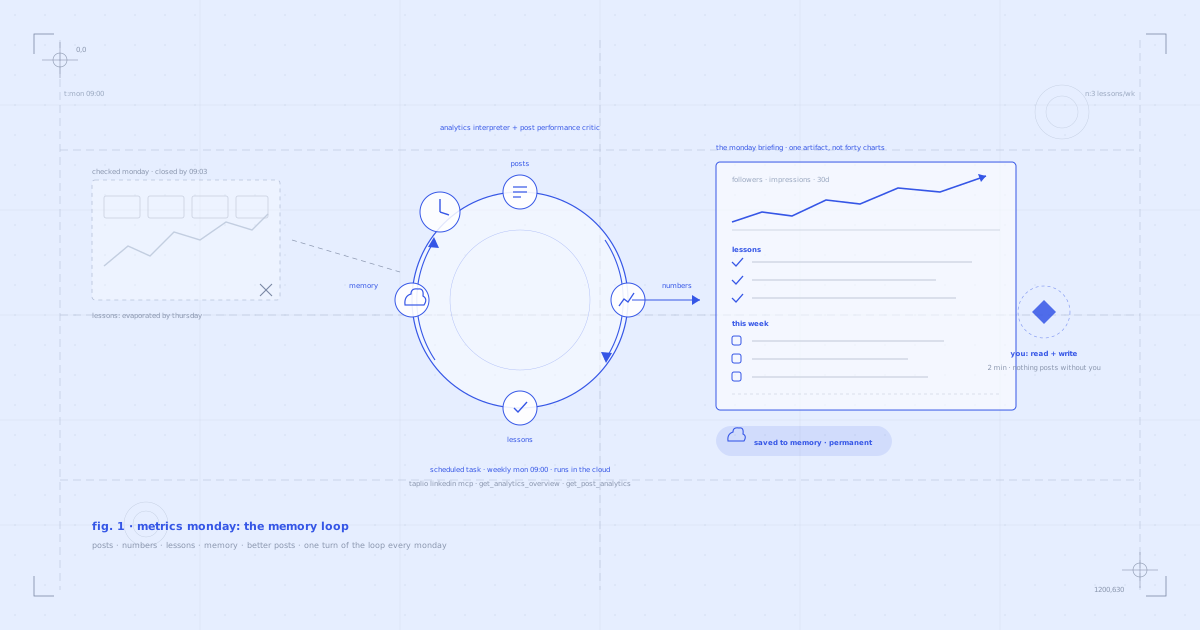
The Taplio LinkedIn MCP has 19 tools total. This routine uses about five. Others power different workflows, like the daily engagement radar that drafts your comments or the Monday briefing that teaches your AI what your audience wants.
5 tips for better results
1. Run it twice on day one. "Run now" gets you the first draft in minutes. Approve it, run again, and watch it take a slot. Seeing the full loop once builds the trust that makes you actually reply every morning.
2. Reply with feedback instead of silence. Silence stalls the pipeline: the draft waits and the runway does not fill. One line of feedback gets you a rewrite by the next run, and every note teaches the next draft what your voice is not.
3. Keep your published posts fresh before you start. The pillars come from your latest posts. If your last ten posts are old or off-topic, the first drafts will be too: either publish a few current ones first, or name your three pillars directly in the prompt.
4. Review the queue in Taplio once a month. The Calendar Planner balances topics, but you steer the mix. Ten minutes in the queue view tells you whether the three buckets still match where you want the account to go.
5. Let your numbers grade the keeper. Pair it with the Metrics Monday routine: the keeper fills the calendar, Metrics Monday reads the results and permanently teaches your AI what worked. The two loops close each other.
FAQ
Does this post to LinkedIn without me?
Only what you approved. A thumbs up in the thread is you pressing publish, on a delay: the approved draft takes a slot on your calendar and goes out at that time through Taplio's scheduler. No reply means no post, always. There is no path from draft to published that does not pass through your thumbs.
Can I approve with an emoji reaction instead of a reply?
Reply, not reaction. Claude's Slack connector reads messages and threads, not reaction taps, so send the thumbs up as a reply in the thread. Two taps more, and it doubles as a written approval log in your own Slack history.
Do I need Slack?
For the hands-off version, yes: the loop needs a place where drafts reach you and your replies reach it, and Slack is what the prompt uses. No Slack? You can run the same prompt manually in Claude each morning and approve in the chat, or connect a different messaging connector and adapt the prompt. The routine's logic does not change.
Do I need a paid Claude plan?
For the automatic morning version, yes: scheduled tasks are included on paid Claude plans (Pro, Max, Team, Enterprise). On a free plan you can run the same prompt manually; it just will not run itself.
Will the posts actually sound like me?
The drafts are grounded three ways: the pillars come from your own latest posts, the LinkedIn Post Writer writes from your published voice, and the prompt strips the AI tells (em dashes, "not X, but Y" constructions) before you ever see a draft. And you hold the pen last: feedback in the thread gets a rewrite, and nothing ships without your approval.
Can I change the cadence, the slots, or the runway depth?
All three live in the prompt: how many posts a week, which days and times, and how many weeks of cover the keeper maintains. Two a week with a two-week runway is a perfectly good starting shape. The only rule worth keeping: pick slots you can commit to, because the whole point is never missing them.
Does it work with ChatGPT?
The Taplio LinkedIn MCP works with ChatGPT too, so you can draft and schedule manually there. The scheduled task, the Slack loop and the Skills as used here are Claude features, which is why the automatic version of this routine lives in Claude.
How long does setup take?
About four minutes: two for the Taplio LinkedIn MCP, one for Slack, one for the scheduled task.
- In Claude: add the MCP from your connector settings. Watch the two-minute setup.
- The URL to paste:
https://mcp.taplio.com - Then: connect Slack (Settings, then Connectors), create the scheduled task, paste the prompt, Daily at 9AM, save.
- Product page: taplio.com/taplio-linkedin-mcp
Give your calendar a keeper
Nobody quits LinkedIn because writing is hard. They quit because deciding what to say, every time, from zero, is homework that never ends, and one busy week is all it takes.
So stop guarding the calendar yourself.
- Connect the Taplio LinkedIn MCP: 2-minute setup, 19 tools
- Install the free Claude Skills: 17 skills, free for everyone
- Connect Slack, create the scheduled task, paste the prompt
Tomorrow at 9:01 there is a draft in your Slack, written like you, with a reason to exist and a slot to fill. Read it. Thumbs up. That is the whole job, and your calendar never goes empty again.


Keep reading
All articlesRelated Articles

.avif)
Your Linkedin AI coach is waiting for you
Join 12,000+ creators who let their coach turn the blank page into a plan and watch their audience compound.
7-day free trial · 30 day money back · Cancel anytime
AVG. VIEWS
2,979
-1.5%
ENGAGEMENT
3.2%
+0.8%

Free Monthly Report
How does your LinkedIn compare?
Get free monthly benchmarks on reach, engagement, and content format performance.
Get the Benchmark