
Pricing


AI writer

Taplio
MCP V2
New: Engage tools
Taplio MCP V2 now available, try it out
Your AI can now comment and reply for you. It finds the posts worth engaging, drafts in your voice and queues them on your Taplio account. Nothing posts until you confirm.

Creator account on LinkedIn: what replaced creator mode


7
min read

 Open in ChatGPT
 Open in Claude
 Open in Perplexity
Key Takeaways
- LinkedIn creator mode: LinkedIn removed the creator mode on/off toggle from the Resources section in March 2024, one month after profile hashtags were removed in February 2024, so there is no creator account type to switch on today.
- The closest equivalent setup: On desktop open the Me icon, Settings and Privacy, Visibility, then Followers and turn on "Make follow primary", then add a Featured section and publish a Newsletter or go Live if you meet LinkedIn's access criteria; on mobile the same path starts from your profile photo and the Settings gear.
- The number that decides: Five of the seven old creator mode features became a setting or a default per LinkedIn's "Updates to Creator Mode" notice, and only the toggle and the profile hashtags are gone for good.
- What a creator setup will not do: It gives no feed boost, and Taplio's LinkedIn Benchmark, which analyzes 60,000+ LinkedIn posts each month, finds one post format earning more than double the engagement of another, a gap no profile button produces.
- Decision rule: Turn on Follow primary if you publish every week, keep Connect primary if you are job hunting or selling, and if cadence is the real gap a tool like Taplio starts at $39/month with a 7-day trial and no free plan.
A creator account on LinkedIn is not a separate account type. It is the name people give to the sharing tools, follower count and analytics that used to sit behind a creator mode toggle, and that toggle no longer exists.
LinkedIn removed the on/off switch in March 2024, and most of what creator mode unlocked is now on for every member by default. By the end of this page you will know what changed, how to set up the closest equivalent on desktop and mobile, and whether it is worth doing for your goal.
What creator mode changed on your LinkedIn profile
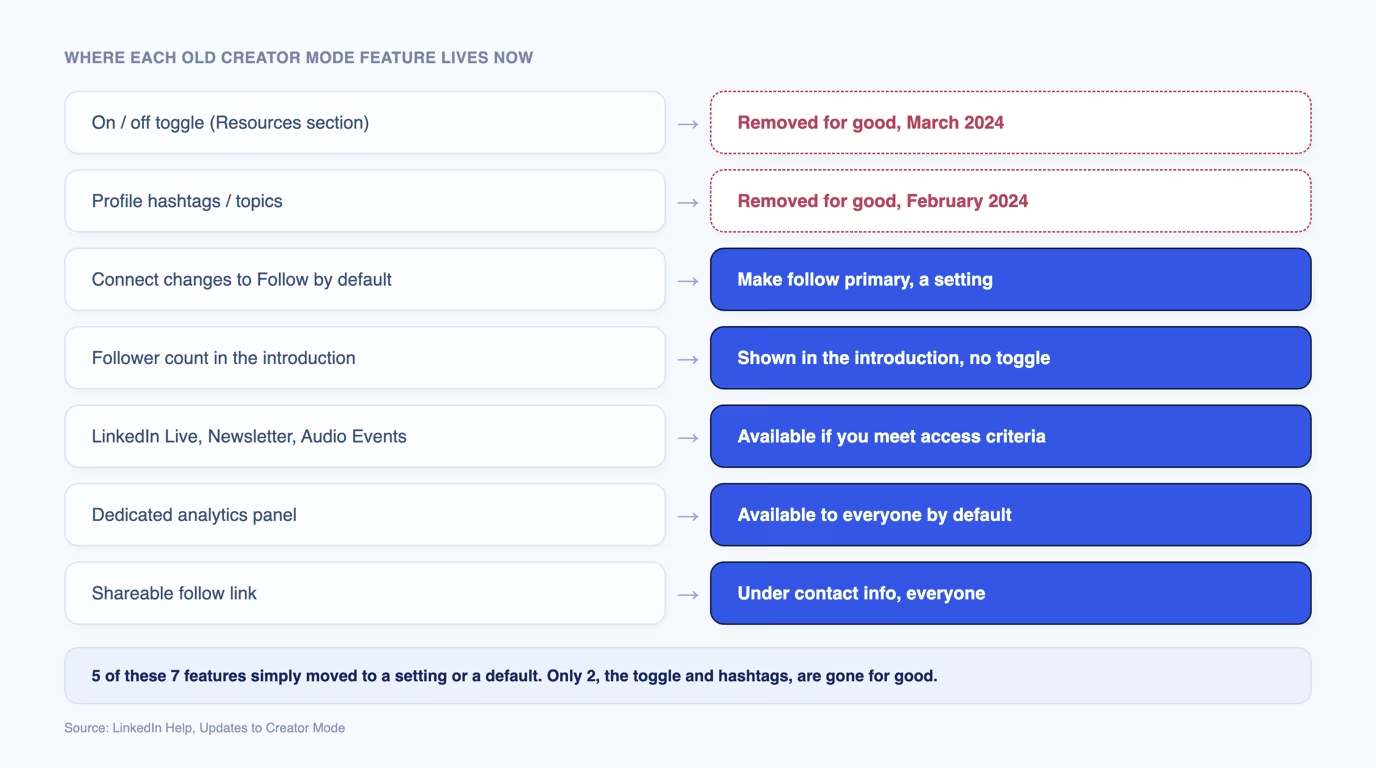
Creator mode changed five things on a profile: the primary button (Follow instead of Connect), a visible follower count, access to Live, Newsletter and Audio Events, a dedicated analytics panel, and hashtags describing what you post about. LinkedIn's official "Updates to Creator Mode" notice confirms the on/off toggle left the Resources section in March 2024, one month after profile hashtags were removed in February 2024.
Only the hashtags disappeared for good. Everything else stopped being a toggle and became either a setting or a default. The table below maps each old creator mode feature to where it lives today.
| Old creator mode feature | Where it lives now |
|---|---|
| On/off toggle in the Resources section | Removed in March 2024. There is no creator mode switch anywhere in settings. |
| Profile hashtags describing topics | Removed in February 2024. No replacement field exists. |
| Connect changes to Follow as the default button | A "Make follow primary" choice under Settings and Privacy, open to any profile. Connect stays available either way. |
| Follower count shown in the introduction | Displayed in the introduction section since March 2024, according to LinkedIn's notice. No toggle involved. |
| LinkedIn Live, Newsletter, Audio Events | Open to any member who meets LinkedIn's access criteria, not gated behind a creator setting. |
| Dedicated analytics panel | Open to everyone, from the post impressions count in the left pane of the feed. |
| A shareable Follow link | Open to everyone, under Contact info in the introduction section. |
LinkedIn Creator Marketplace and Creator program are not the same thing
Neither LinkedIn Creator Marketplace nor the LinkedIn Creator Accelerator Program is a profile setting. Both share the word "creator" with the old toggle, and neither is what you need if you want the Follow button and analytics.
LinkedIn Creator Marketplace is a discovery tool inside Campaign Manager, launched on June 10, 2026, that lets B2B brands find and contact creators for paid partnerships such as Thought Leader Ads. Access is by invitation, and it changes nothing on your profile.
The LinkedIn Creator Accelerator Program is a separate cohort program: a fixed-length coaching initiative with an application window that opens periodically, for a small group of selected creators. It is not a status you switch on. To look and function like a creator on LinkedIn, the settings in the next section are all you need.
How to set up the creator account equivalent today (and how to turn it off)
There is no single switch anymore, so the setup means three separate changes: the primary button, a Featured section, and the sharing tools. On desktop:
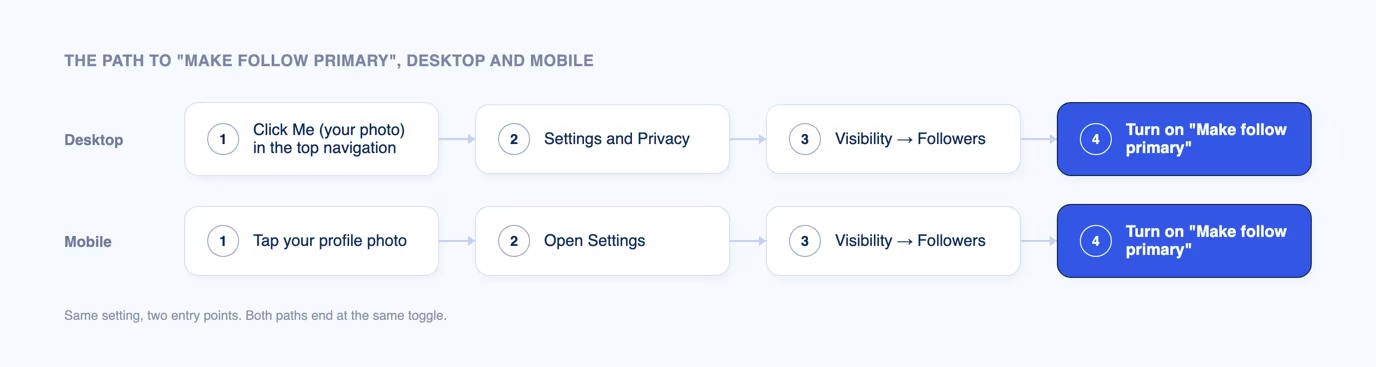
- Click the Me icon (your photo) in the top navigation and open Settings and Privacy.
- Go to Visibility, then Followers.
- Turn on "Make follow primary" to show Follow instead of Connect as your main button.
- Back on your profile, add a Featured section from the "Add profile section" menu to pin your strongest posts or a newsletter.
- Publish a newsletter or go Live from the post composer if you meet LinkedIn's access criteria.
On mobile, the setting is the same under a different entry point: tap your profile photo, tap the Settings gear, then Visibility, then Followers, and switch "Make follow primary" on.
To turn it off, reverse step 3: return to Settings and Privacy, Visibility, Followers, and switch "Make follow primary" off. Connect becomes your primary button again. Nothing else on your profile moves, because the other features were never behind a switch.
Should you set your profile up as a creator?
Set Follow primary if you publish regularly, keep Connect primary if you are job hunting or selling. The right answer depends on what the profile has to do for you, not on whether "creator" sounds appealing.
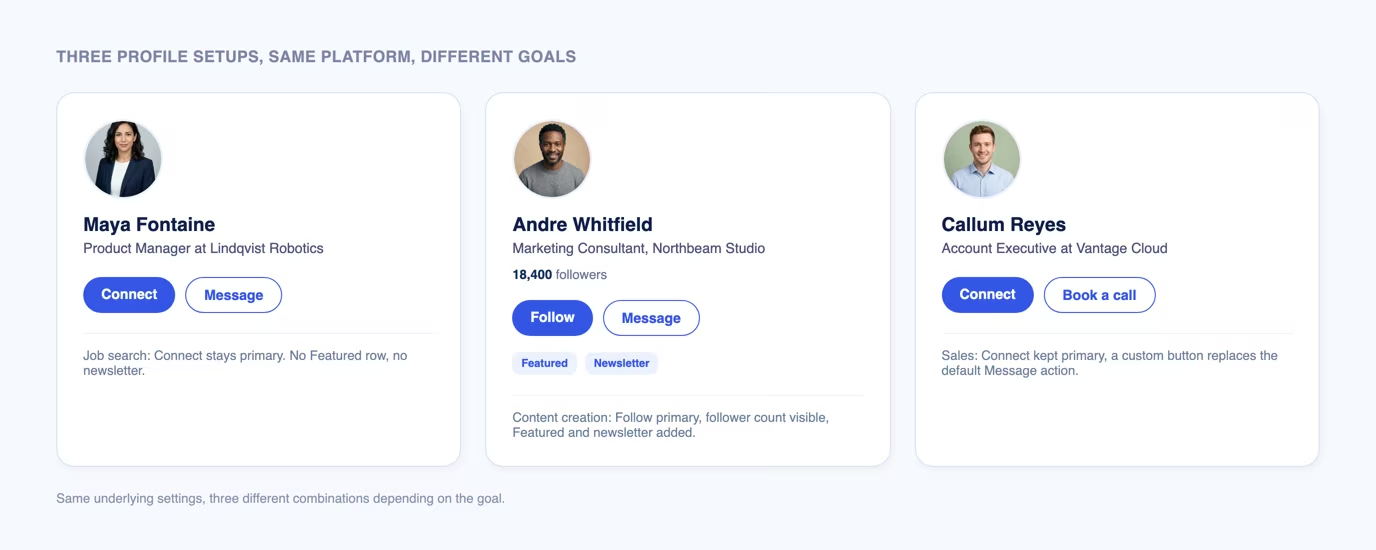
If you are job searching, keep Connect as your primary button. Recruiters and hiring managers expect to connect directly, and a public follower count adds nothing to an application.
If you publish content every week, Follow primary makes sense. Readers can follow your posts without waiting for you to accept a connection request, which matters once your network outgrows what you can review by hand.
If you are in sales, use a hybrid: keep Connect primary because it starts a direct relationship, then add a Featured section and a custom button pointing to a booking link or your capabilities deck.
What a creator profile does not do
A creator setup does not boost your posts in the feed. LinkedIn's own notice describes a display and access change: buttons, follower count, tool access. Nothing in it mentions distribution or ranking.
It also does not write, schedule or improve your posts. Follow primary and a Featured section only change what a visitor sees on your profile. They do nothing for a post that has already gone out, and they cannot replace a publishing habit.
Consistency and post format matter more than any setting
The setting change takes five minutes; what moves results is what you publish and how often. Taplio's LinkedIn Benchmark measures 54,000+ real posts a month by format, length and posting slot, and it finds one format earning more than double the engagement of another. No profile button produces a gap like that.
Two starting points beat any settings change: optimizing your LinkedIn profile so the Featured section and headline carry your positioning, and using a LinkedIn post generator to hold a steady cadence instead of posting in bursts. Taplio is built for individual creators who want the analytics and the consistency without guessing at what a "creator account" was supposed to unlock.
If your goal is personal branding rather than one setting, pair that cadence with real LinkedIn analytics, so you can see which format works for your audience instead of assuming Follow primary is doing that job.
Frequently asked questions
Is creator mode on LinkedIn still available?
No, not as a toggle. LinkedIn removed the on/off switch for creator mode in March 2024. Most of what it unlocked, Follow as a primary button, analytics, Live and Newsletter, is now open to every member by default rather than behind a setting you turn on.
Is LinkedIn Creator Mode paid?
No. Creator mode was free, and so are the settings that replaced it: LinkedIn does not charge for Follow primary, the Featured section or the analytics panel. LinkedIn Creator Marketplace involves paid brand partnerships, but it is a separate program unrelated to your profile settings.
How do I turn Creator mode off?
Since the toggle was removed, "turning it off" means switching "Make follow primary" off under Settings and Privacy, then Visibility, then Followers. That restores Connect as your primary button, and nothing else on your profile changes.
How do you become a creator on LinkedIn?
There is no application or approval step. Turn on "Make follow primary," add a Featured section to your profile, and publish on a schedule you can hold. LinkedIn's Creator Accelerator Program is a separate application-based cohort, not a requirement for any of these features.
Do creators make money on LinkedIn?
Some do, mainly through brand partnerships arranged via LinkedIn Creator Marketplace, launched in June 2026, through sponsorships negotiated directly with brands, or by using LinkedIn as a channel that drives paid work elsewhere. LinkedIn does not pay per post or per follower for using Follow primary or the analytics panel.


Keep reading
All articlesRelated Articles
.avif)
Your Linkedin AI coach is waiting for you
Join 12,000+ creators who let their coach turn the blank page into a plan and watch their audience compound.
7-day free trial · 30 day money back · Cancel anytime
AVG. VIEWS
2,979
-1.5%
ENGAGEMENT
3.2%
+0.8%
Free Monthly Report
How does your LinkedIn compare?
Get free monthly benchmarks on reach, engagement, and content format performance.
Get the Benchmark