
Pricing


AI writer

Taplio
MCP V2
New: Engage tools
Taplio MCP V2 now available, try it out
Your AI can now comment and reply for you. It finds the posts worth engaging, drafts in your voice and queues them on your Taplio account. Nothing posts until you confirm.

LinkedIn referral request examples: 6 messages that work

September 14, 2026

13
min read

 Open in ChatGPT
 Open in Claude
 Open in Perplexity
Key Takeaways
- LinkedIn referral request formula: A LinkedIn referral request should name the exact open role, give one concrete reason you fit, and ask for one clear next step, all in 3 to 5 sentences under 100 words, sent before you apply rather than after.
- The native button path: On desktop LinkedIn Jobs, apply the "In Your Network" filter, open a listing where you already know an employee, tap "Ask for a referral" at the top, pick the connection, then rewrite the pre-filled text around how they know you, why you fit, and why that company.
- The number that decides: LinkedIn's own product team reports that applicants who ask for a referral and then apply are 4 times more likely to hear back from a recruiter, and that nearly 50% of recruiters call referrals their leading source of quality hires.
- Checklist before sending: Confirm the person still works there and can actually refer, rate how well they know you, name the exact role, write a pasteable two-line summary with the job link, and set your own follow-up date.
- Choose the pattern by closeness: Use the cold pattern with one hard result for strangers, shared history for former colleagues or alumni, then send exactly one follow-up 5 to 7 business days later, or 3 to 4 days if the posting closes that week.
A LinkedIn referral request asks someone already inside a company to vouch for you on an open role, which is different from a recommendation that sits permanently on your profile. If you are after recommendation text instead, see our guides on LinkedIn recommendations and requesting one. Below are 6 referral request messages you can copy, covering cold asks, warm asks, follow-ups and thank-yous, plus how LinkedIn's own referral button works and a checklist to run before you send anything.
Referral request or recommendation: which one do you need?
A referral request asks a connection to vouch for you internally so a recruiter looks at your application sooner. A recommendation is a public testimonial that stays on your profile for anyone to read, and an endorsement is a one-click skill tag with no text at all. All three involve someone else vouching for you, which is why the searches get mixed up.
If you are gathering testimonials for your profile rather than trying to get into a specific role, the two recommendation guides linked above cover that in full. This guide is about the internal referral: the private message that gets your application looked at sooner.
| Format | Who writes it | Where it lives | Typical length | When to use it |
|---|---|---|---|---|
| Referral request | You, sent to a connection or employee | A LinkedIn DM, InMail, or the native referral button on a job post | 3 to 5 sentences | You are applying, or about to apply, for one specific open role |
| Recommendation | A manager, client or colleague, at your request or theirs | The Recommendations section of your profile | A few short paragraphs | You want lasting, public proof of your work, not tied to one job |
| Endorsement | Any connection, usually unprompted | The Skills section of your profile | No text, a skill tag only | Light-touch proof of one specific skill |
What makes a LinkedIn referral request work
A referral request that works names the exact role, states in one sentence why you fit it, and makes the ask easy to say yes to in a single read on a phone. Anything longer and the person has to work to help you, and most will not.
In practice that is 3 parts in under 100 words: how the person knows you, or why you picked them, then why you fit this specific role, then one clear next step. Every ask in the next section follows that order, and none of the 6 messages runs past 5 sentences.
LinkedIn's own product team reports that applicants who ask for a referral and then apply are 4 times more likely to hear back from a recruiter, and that nearly 50% of recruiters call referrals their leading source of quality hires. That gap is why a specific message is worth more effort than a generic one.
Send the ask before you apply, not after. A referral usually works by getting your name in front of the hiring team or into an internal system before the general applicant pile, and that only helps if it happens first. If you have already applied, say so in the message rather than letting the referrer find out separately.
Before you send anything, make sure your own profile survives a quick look. A clear, specific LinkedIn headline is usually the first thing the referrer checks before putting your name forward.
6 LinkedIn referral request examples that get a yes
Each message below demonstrates one pattern for one situation, set by how well the person knows you and how far along the conversation is. Copy the text under each card and swap in your own details.
1. Cold ask to someone you have never met
When you do not know the person, name why you are reaching out and the exact role in the first line, so it reads like a considered ask rather than a mass message. If you are not already connected, send this as the note on a connection request; see our guide on writing a LinkedIn connection request people accept for the format itself.
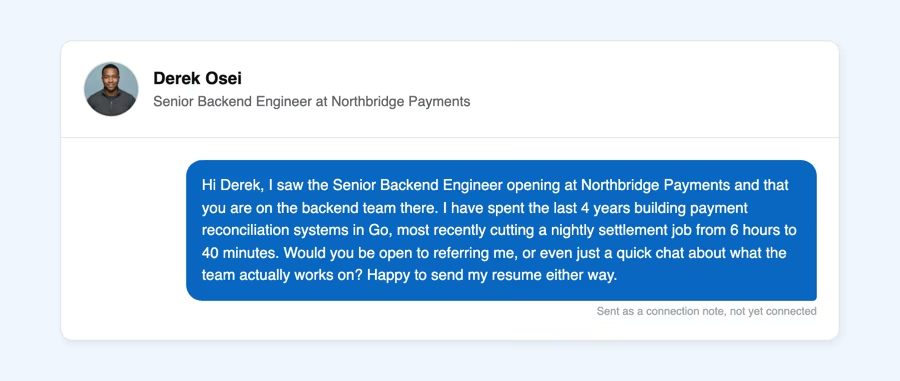
Hi Derek, I saw the Senior Backend Engineer opening at Northbridge Payments and that you are on the backend team there. I have spent the last 4 years building payment reconciliation systems in Go, most recently cutting a nightly settlement job from 6 hours to 40 minutes. Would you be open to referring me, or even just a quick chat about what the team actually works on? Happy to send my resume either way.
Why it works: the one concrete number, 6 hours cut to 40 minutes, does more than any adjective could, and the offer of a quick chat gives a stranger a lower-commitment way to say yes than referring you outright.
2. Ask to a former colleague
With someone who already knows your work, you can skip the credentials and go straight to the ask. Keep the warmth, but still name the role so they are not left guessing what to forward.
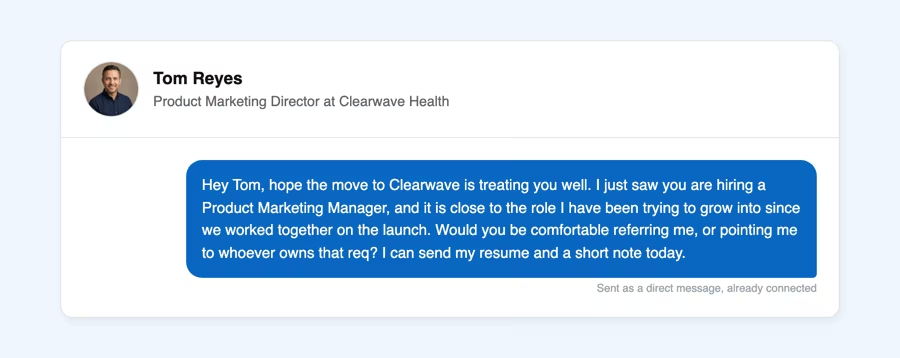
Hey Tom, hope the move to Clearwave is treating you well. I just saw you are hiring a Product Marketing Manager, and it is close to the role I have been trying to grow into since we worked together on the launch. Would you be comfortable referring me, or pointing me to whoever owns that req? I can send my resume and a short note today.
Why it works: one line acknowledges the relationship before asking for anything, and naming a shared project, the launch, reminds them exactly what they can vouch for instead of asking them to take your word for it.
3. Ask to an alumni connection
A shared school, past employer or group is enough common ground to open with, even if you have never spoken. Lead with that connection point, then the role.
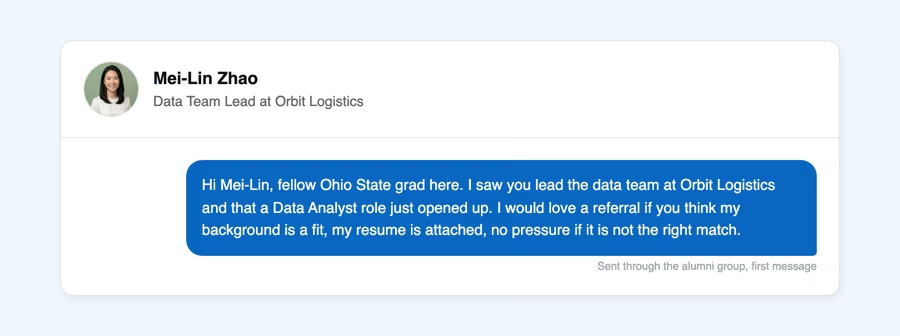
Hi Mei-Lin, fellow Ohio State grad here. I saw you lead the data team at Orbit Logistics and that a Data Analyst role just opened up. I would love a referral if you think my background is a fit, my resume is attached, no pressure if it is not the right match.
Why it works: "no pressure if it is not the right match" does real work here. It signals that you are not expecting an automatic yes because you share a school, which lowers the stakes for the alumna reading it.
4. Follow-up after no reply
Wait 5 to 7 business days before following up, restate the ask in one line, and remove any pressure. One follow-up is normal, a second one is not.
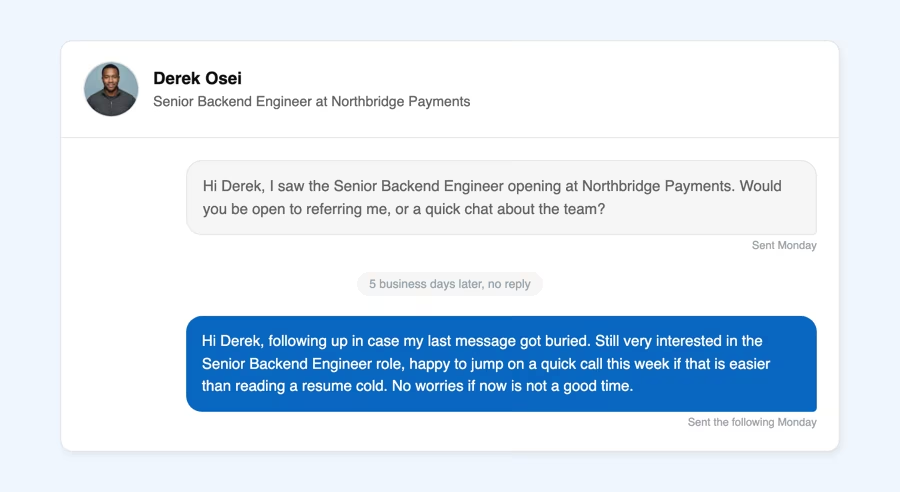
Hi Derek, following up in case my last message got buried. Still very interested in the Senior Backend Engineer role, happy to jump on a quick call this week if that is easier than reading a resume cold. No worries if now is not a good time.
Why it works: "got buried" assumes good faith instead of accusing them of ignoring you, and offering a call swaps the channel instead of just repeating the same request louder.
5. Thank-you after the referral
Send this the same day you hear they submitted you, name what they did, and offer to make their life easier if the recruiter follows up with them.
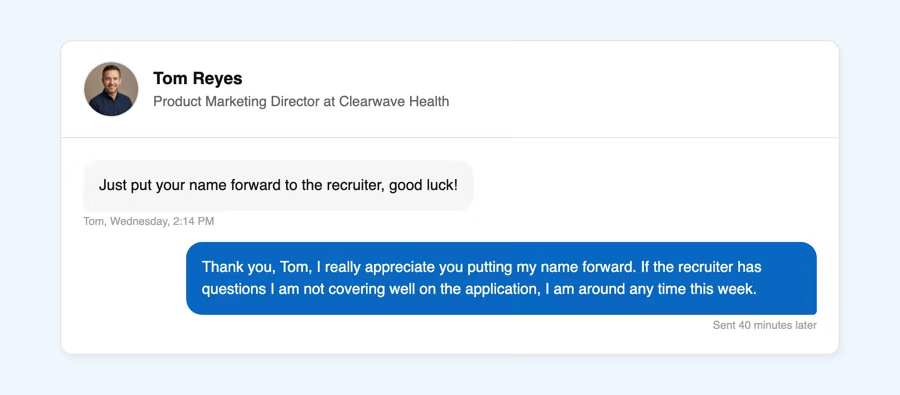
Thank you, Tom, I really appreciate you putting my name forward. If the recruiter has questions I am not covering well on the application, I am around any time this week.
Why it works: it is short, sent the same day, and offers something useful, availability, instead of thanks alone. That keeps the door open for the next time you need a favor from Tom.
6. Make it easy for the referrer
The busier the person, the more this version wins: attach the job link and a two-line summary they can paste straight into the internal referral form without writing anything themselves.
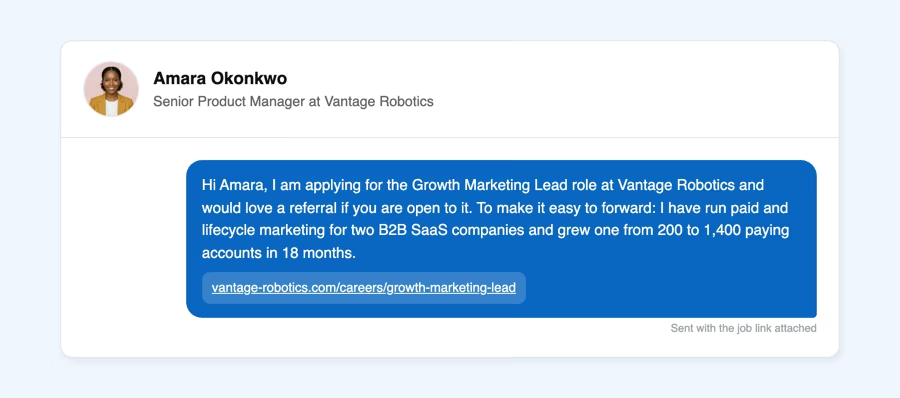
Hi Amara, I am applying for the Growth Marketing Lead role at Vantage Robotics and would love a referral if you are open to it. To make it easy to forward: I have run paid and lifecycle marketing for two B2B SaaS companies and grew one from 200 to 1,400 paying accounts in 18 months.
Why it works: the job link removes any chance of the referrer forwarding the wrong posting, and the two-line summary is written so it can be pasted directly into an internal referral form with no editing required.
How to follow up without seeming pushy
One follow-up, sent 5 to 7 business days after the first message, is normal and expected. A second one with no reply in between reads as pressure rather than persistence.
The follow-up shown in pattern 4 keeps the same structure: restate the ask in one sentence, remove any guilt, and give the person an easy out. If there is still no reply after that single follow-up, treat it as a no and ask someone else.
Timing matters too. A follow-up sent late on a Friday or over a weekend is easy to miss, so send it mid-morning on a weekday.
The one exception is a deadline. If the posting closes within the week, a follow-up after 3 to 4 days is reasonable, as long as you say why you are writing again sooner than usual.
A clear no is rare. Most non-replies come from someone who meant to answer and did not get to it. Treating silence as a soft no after one follow-up keeps the relationship intact for the next time you need to ask.
Referral request mistakes to avoid
Most referral requests fail for the same handful of reasons, all of them fixable before you hit send.
- Asking before you have read the job posting, so the message does not match the role
- Sending the same generic message to a long list of people instead of one tailored ask
- Asking someone who does not work at the company, or has left it, and cannot refer you at all
- Following up more than once when the first message got no reply
- Never sending a thank-you if the person says yes, which makes the next ask harder
- Asking the recruiter for a referral, when a referral has to come from an employee who is not the person hiring for the role
- Leaving your own profile out of date, so the referrer has nothing current to point to when they vouch for you
Any one of these is recoverable. The repeated follow-up does the most damage, because it turns a neutral non-reply into an active reason to say no.
How LinkedIn's Ask for a referral button works on job posts
LinkedIn's own referral flow starts on the job listing itself: an "In Your Network" filter on LinkedIn Jobs, on desktop, surfaces roles where you already know someone at the company, and an "Ask for a referral" button appears at the top of a listing when that is the case. Tapping it lets you pick the connection you want to reach out to.
LinkedIn pre-fills a suggested message, but its own announcement recommends personalizing it around 3 things: how the person knows you, why you fit the role, and why you want that specific company. The 6 messages in this guide follow the same structure.
The button only appears when you already have a connection at that company, so it does not help with cold outreach. Pattern 1 covers that case.
One detail in LinkedIn's own numbers is easy to miss: the 4 times figure applies to people who asked for a referral and then applied. The referral gets your name in front of the team, but it does not replace the application, so submit it through the listing the same day.
Native button or plain message, the mechanism is the same: someone on the inside puts your name and a short note in front of the person hiring, before the general applicant pile.
Before you ask, a quick checklist
Run these 5 checks before you send anything; they catch most of the mistakes above before they happen. A fully optimized LinkedIn profile makes every step below easier, since the referrer can confirm your background at a glance.
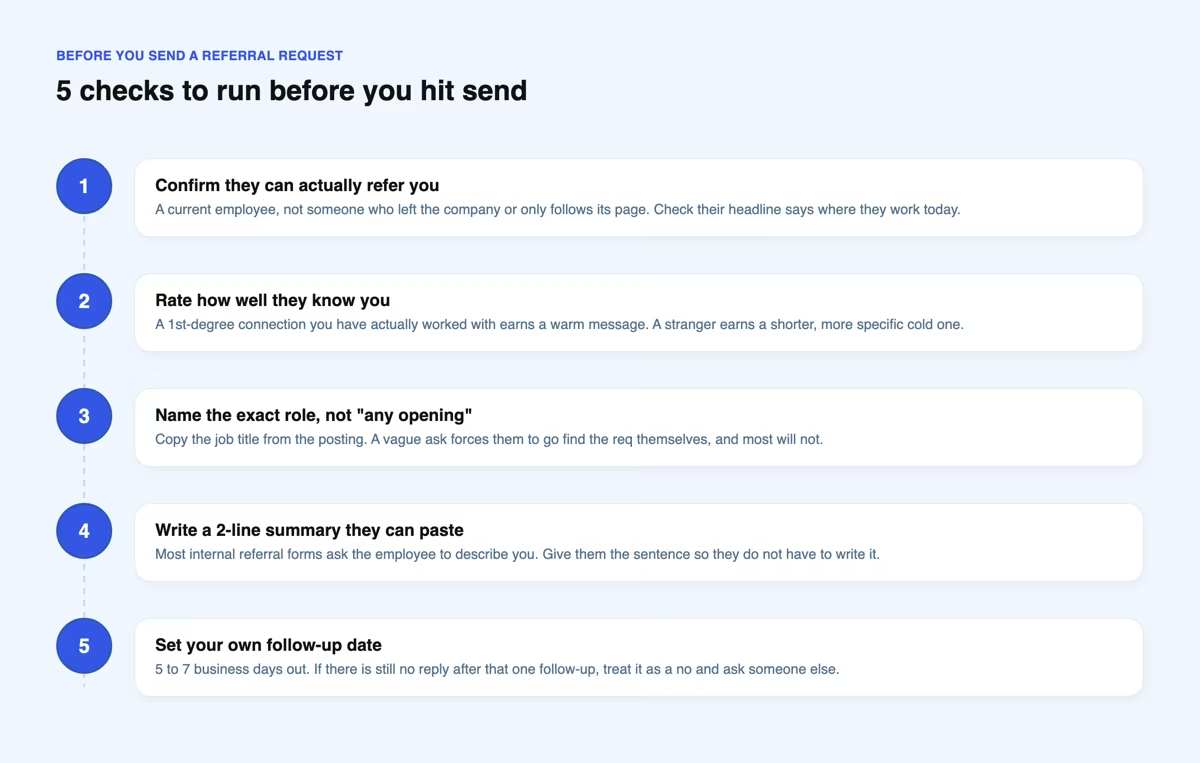
Most of this checklist takes longer to read than to do. Checking a headline and a job title takes seconds; the two-line summary in step 4 is the only part worth real time, since you will reuse it across several asks.
Frequently asked questions
What is a good referral message for a job?
A good referral message for a job names the exact role, states one concrete reason you are a fit, and asks for a specific next step, all in 3 to 5 sentences. It works whether you already know the person or you are reaching out cold, and the 6 patterns earlier in this guide apply it to 6 situations. Keep it short enough to read and act on from a phone.
What is the 3/2/1 rule on LinkedIn?
The 3-2-1 rule is a weekly content mix: 3 educational posts that teach something useful, 2 personal or emotional posts that share a story, and 1 promotional post about what you offer. It is a posting cadence, not a referral tactic; it shows up next to referral searches because both are about turning LinkedIn activity into opportunities.
What is the 4-1-1 rule on LinkedIn?
The 4-1-1 rule sets a similar balance across every 6 posts: 4 entertain or educate your audience, 1 softly mentions what you do, and 1 makes a direct offer. Like the 3-2-1 rule, it governs your regular content, not the one-off message you send to ask for a referral.
What is an example of a good LinkedIn recommendation?
A good LinkedIn recommendation names a specific project or result instead of a generic compliment, and reads like it was written by someone who worked with the person. Here is one that does both:
I managed Priya for two years on the growth team at Lumen. She rebuilt our onboarding emails and lifted activation from 31% to 44% in one quarter, while training two junior marketers along the way. Any team would be lucky to have her.
That format lives on your profile, not in a private message, and the two recommendation guides linked at the top of this article cover it in full.


Keep reading
All articlesRelated Articles

.avif)
Your Linkedin AI coach is waiting for you
Join 12,000+ creators who let their coach turn the blank page into a plan and watch their audience compound.
7-day free trial · 30 day money back · Cancel anytime
AVG. VIEWS
2,979
-1.5%
ENGAGEMENT
3.2%
+0.8%

Free Monthly Report
How does your LinkedIn compare?
Get free monthly benchmarks on reach, engagement, and content format performance.
Get the Benchmark