
Pricing


How to Turn Your Best LinkedIn Post Into 6 New Ones (2026)

August 19, 2026

8
min read

 Open in ChatGPT
 Open in Claude
 Open in Perplexity
Key Takeaways
- Reposting your best content is now a reach penalty, not a shortcut: LinkedIn suppresses distribution on posts it reads as near-duplicates of something already on your profile, even months later. A new hook on old copy is still old copy.
- The unit of reuse is the insight, not the post: the LinkedIn Repurposer skill strips your winner back to the idea that made it work, and the instruction "do not reuse my original wording" is what keeps the six outputs out of duplicate territory.
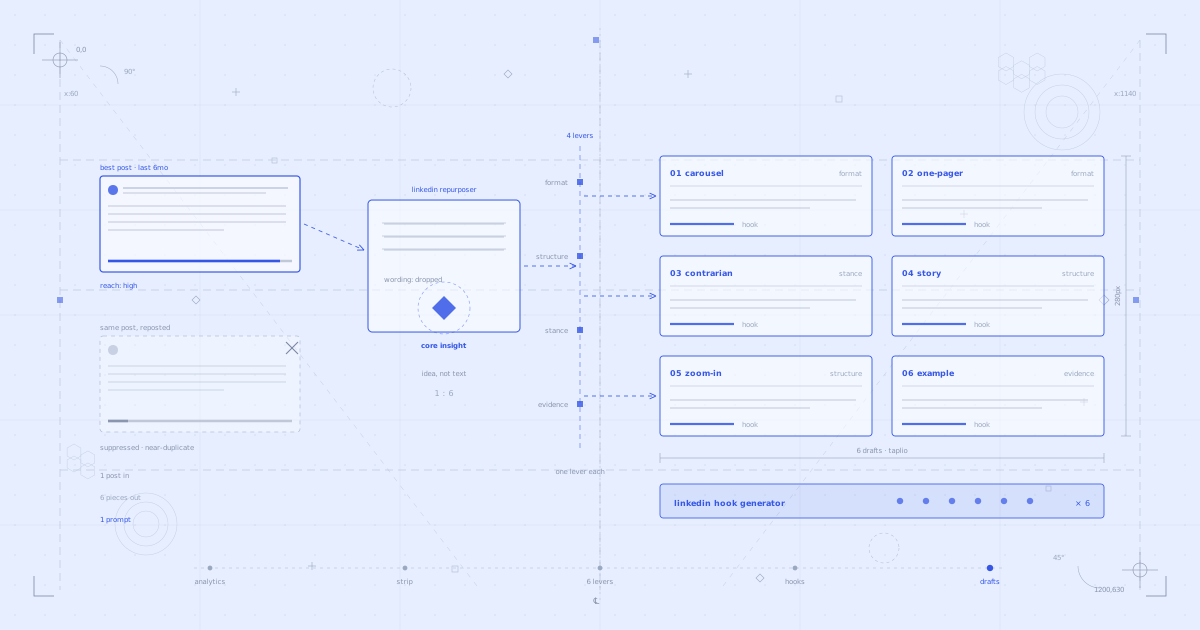
- Four levers are what make six pieces defensible: format, structure, stance and evidence. Each output changes exactly one, which is why a carousel, a one-pager, a contrarian take, a story, a zoom-in and a worked example do not read as reruns of each other.
- It is one prompt, not six sessions:
get_post_analyticspicks the winner from your real numbers, the LinkedIn Hook Generator sharpens each of the six openings, andcreate_draftsaves all six into your Taplio account with visuals attached bypick_mediaorupload_media. - Spread the six across two weeks: the drafts arrive at once, but publishing them in three days reads as a burst even when the pieces are genuinely different. Nothing goes live without your confirmation, so schedule them out with
schedule_draft.
You had a post that worked. Months later, with the calendar looking thin, you tightened the hook, changed a few words and posted it again. It got a fraction of the reach.
That is not bad luck. LinkedIn now suppresses reach on posts that closely repeat something you already published, even months apart. The old advice to recycle your best content quietly stopped working.
This guide shows you the fix: one prompt that takes your best performing post, strips it back to the insight that made it work, and rebuilds it into six genuinely different pieces. Not six rewordings. Six pieces that each change the shape of the idea, which is what keeps them out of duplicate territory.
Why repurposing has to mean something different now
Most repurposing advice is really reposting advice. Take the winner, freshen the hook, ship it again. That worked when the feed had a short memory.
It does not work now. If the body of the post is recognisably the same text, the algorithm reads it as a near-duplicate of something already on your profile and holds back distribution. A new first line on old copy is still old copy.
So the unit of reuse cannot be the post. It has to be the insight underneath the post. Once the insight is separated from the words, you can rebuild it in shapes that share nothing with the original except the idea.
The four levers
There are four things you can change about a piece of content. Every output in this workflow changes exactly one of them, which is what makes six pieces from one insight defensible rather than lazy.
- Format: text becomes slides, or a single visual. Same idea, different container.
- Structure: a framework becomes a story, or you zoom in on one buried line and make it the whole post.
- Stance: you argue the other side of your own conclusion.
- Evidence: the assertion becomes a worked example with real numbers.
Pull a different lever for each piece and nothing you publish reads as a rerun. This is worth internalising even if you never touch the prompt below. It is the whole difference between repurposing and reposting.
What you need
- The Taplio LinkedIn MCP connected to Claude (or ChatGPT). This is what lets your AI read your real post analytics, create drafts, attach images and schedule posts in your Taplio account. 14 tools, two-minute setup.
- Claude Skills for LinkedIn (optional but recommended). Free instruction sets that make Claude better at specific tasks. Three matter here: the LinkedIn Repurposer, the LinkedIn Carousel Builder and the LinkedIn Hook Generator.
- An image tool for two of the six pieces. The carousel and the one-pager need artwork. Options below, and none of them are mandatory to start.
Connect the Taplio LinkedIn MCP (2-minute setup)
Download all 17 Claude Skills for free
You can connect the MCP entirely inside your AI app, no terminal needed. Here is the two-minute setup on Claude or on ChatGPT.
Prefer to watch first? Here is the full workflow, end to end:
The prompt
This is the entire workflow. One prompt, six drafts.
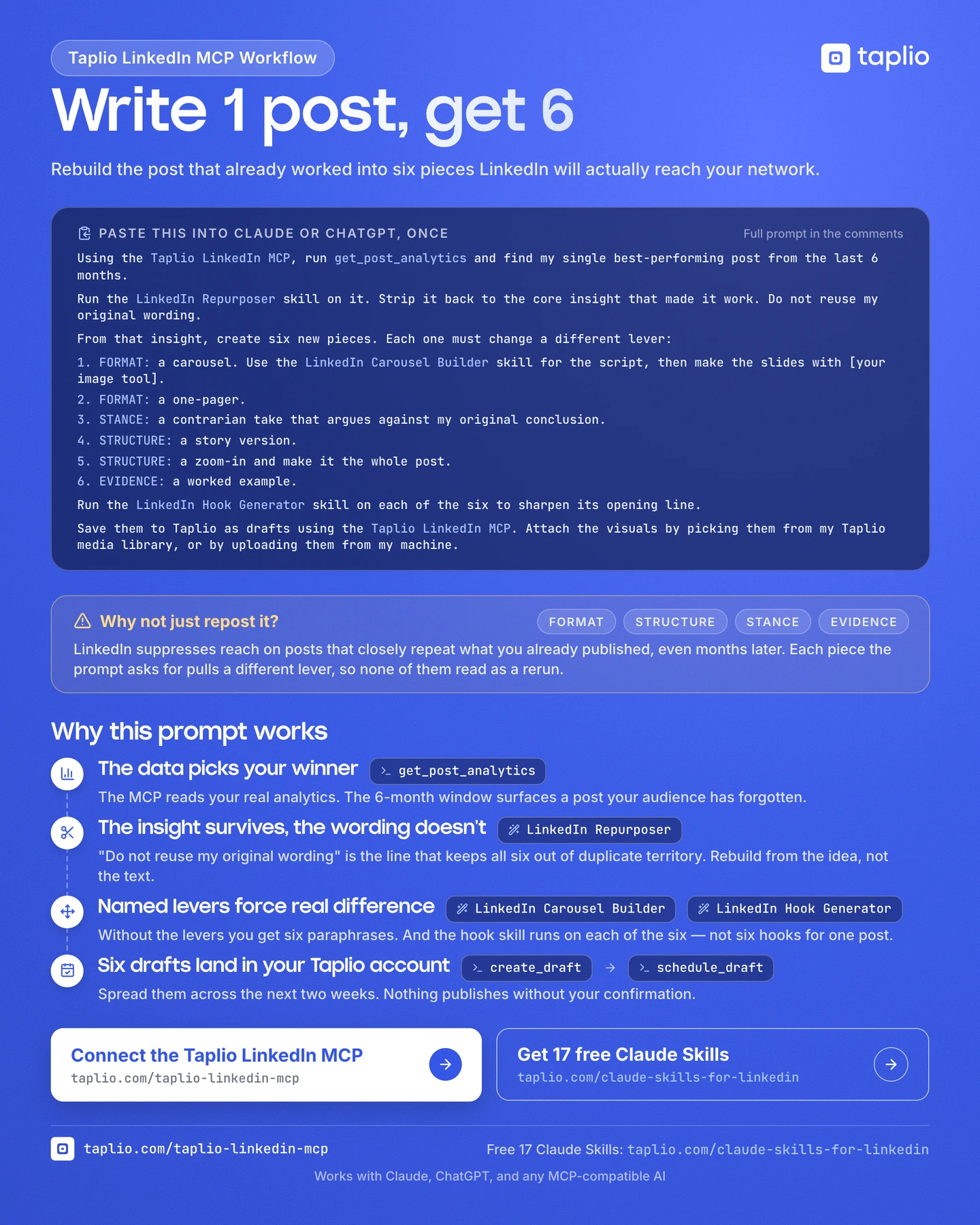
Using the Taplio LinkedIn MCP, run get_post_analytics and find my single best-performing post from the last 6 months.

Run the LinkedIn Repurposer skill on it. Strip it back to the core insight that made it work. Do not reuse my original wording.

From that insight, create six new pieces. Each one must change a different lever:

1. FORMAT: a carousel. Use the LinkedIn Carousel Builder skill for the script, then make the slides with [your image tool].
2. FORMAT: a one-pager.
3. STANCE: a contrarian take that argues against my original conclusion.
4. STRUCTURE: a story version.
5. STRUCTURE: a zoom-in and make it the whole post.
6. EVIDENCE: a worked example.

Run the LinkedIn Hook Generator skill on each of the six to sharpen its opening line.

Save them to Taplio as drafts using the Taplio LinkedIn MCP. Attach the visuals by picking them from my Taplio media library, or by uploading them from my machine.
One line to edit before you run it: [your image tool]. Swap that for whatever you actually use to make images. The prompt is written this way on purpose, so it does not go stale when your tooling changes.
Here is the whole workflow on one page, if you would rather save it than scroll back:
What happens when you run it
Step 1: It finds your actual best post
The first thing the prompt does is read your numbers rather than trust your memory.
What fires under the hood:
- MCP tool:
get_post_analytics. Pulls real engagement data from your Taplio account and ranks your published posts.
This matters more than it sounds. The post you remember as your best is usually the one that got the most comments from people you know. The post that actually travelled is often something you wrote quickly and forgot. Let the data pick.
The six-month window is deliberate too. Long enough that your audience has forgotten the original, recent enough that the insight is still something you believe.
Step 2: It strips the post back to the insight
This is the step that makes the rest of the workflow legitimate, and it is the one people skip.
What fires under the hood:
- Claude Skill (optional): LinkedIn Repurposer. Separates the idea from the execution, so the six outputs get built from the idea rather than edited from the text.
Note the instruction that follows it: do not reuse my original wording. That single line is what keeps you out of near-duplicate territory. Without it, Claude will helpfully preserve your best sentences, and your best sentences are exactly what the algorithm is matching against.
Step 3: It builds six pieces, one lever each
The prompt names the lever before it names the output. That ordering is the point. Ask for six posts and you get six paraphrases. Ask for six pieces that each change a different lever and you get six things that look nothing alike.
- The carousel changes format. Text becomes slides, so the idea has to be broken into beats.
- The one-pager changes format again, in the opposite direction. Everything compresses into a single visual.
- The contrarian take changes stance. It argues against your own conclusion, which is usually the post you would never have written unprompted.
- The story version changes structure. A framework becomes a moment, a tension and a lesson.
- The zoom-in changes structure the other way. It takes the most buried line in the original and makes it the whole post. This one is usually the sleeper.
- The worked example changes evidence. The insight gets proved on one specific case with real numbers instead of asserted.
Step 4: It sharpens all six hooks
What fires under the hood:
- Claude Skill (optional): LinkedIn Hook Generator. Rewrites the opening line of each piece and ranks alternatives by stopping power.
Read that instruction carefully: on each of the six. Not six hook variations for one post. Six different pieces, each getting one sharpened opening. Running the LinkedIn Hook Generator the other way round is exactly the like-for-like pattern that gets throttled.
Step 5: It saves everything to Taplio with the visuals attached
What fires under the hood:
- MCP tool:
create_draft. Creates six real drafts in your Taplio account. - MCP tools:
pick_mediaattaches an image already in your Taplio media library.upload_mediatakes a file off your machine.attach_media_from_urlworks from a public link.
By default the drafts land in your Taplio drafts panel rather than rendering in the chat, so what you get is six real drafts you can open, edit and schedule. If you would rather read them in the conversation, ask Claude to show them as it saves:
Show me each of the six in the chat as you save it to Taplio, so I can read them here before we move on.Claude will print each piece in the chat and still push it, plus any edits you make there, to your Taplio account. The version in the app stays the source of truth either way.
Then space them out:
Using the Taplio LinkedIn MCP, schedule those six drafts across the next two weeks, Tuesdays and Thursdays at 9AM. Confirm the dates back to me before scheduling anything.What fires under the hood:
- MCP tool:
schedule_draft. Locks each post to its slot in your Taplio content calendar.
Connect the Taplio LinkedIn MCP and try this workflow today
Making the visuals
Two of the six pieces need artwork. Three ways to handle it, in rough order of effort:
- The Higgsfield MCP. If you want your AI to generate the images inside the same conversation, this keeps the whole workflow in one place. Nothing to open, nothing to export.
- Claude Design. If you would rather build the slides yourself with real control over layout and type. Available on Claude Pro and above.
- A Claude artifact and a screenshot. Ask Claude to render the carousel as an artifact, then screenshot each slide. Free on any plan, and genuinely good enough.
Whichever you pick, the attaching part is the same. The Taplio LinkedIn MCP puts the image on the draft for you, either from your Taplio media library with pick_media or straight off your machine with upload_media.
What's happening under the hood
Here is a quick reference for the MCP tools and Skills used in this workflow:
Find the winnerget_post_analytics reads your real engagement data and ranks your published posts.
Strip it to the insight
The LinkedIn Repurposer skill separates the idea from the wording.
Build the six
The LinkedIn Carousel Builder skill writes the slide script for the carousel. The four levers do the rest of the work.
Sharpen the openings
The LinkedIn Hook Generator skill rewrites the first line of each of the six.
Save and attachcreate_draft creates the drafts. pick_media, upload_media and attach_media_from_url put the artwork on them.
Scheduleschedule_draft locks each post to a date and time.
The Taplio LinkedIn MCP has 14 tools total. This workflow uses 5-6 of them. Others like search_inspiration and get_analytics_overview power different workflows.
The 17 Claude Skills span five categories: content writing (6 skills), research and inspiration (4), strategy (5), profile optimization (1), and analytics (2). LinkedIn Repurposer, LinkedIn Carousel Builder and LinkedIn Hook Generator are the three that matter here.
Why this works better than reposting
The data picks, not your memory. You are rebuilding from something that demonstrably worked with your actual audience, not something you liked writing.
The insight survives, the words do not. A good insight is worth six pieces of content. The sentences you first wrapped it in are worth exactly one.
Naming the levers forces real difference. Six paraphrases are what you get by default. Six levers are what you get by asking. The constraint is doing the work, not the model.
One prompt, not six sessions. The whole thing runs once. You review six drafts in your Taplio account instead of managing six separate conversations.
5 tips for better results
1. Spread the six across two weeks. Six drafts arrive at once, but publishing them in three days reads as a burst even when the pieces are genuinely different. Two weeks gives each one room.
2. Kill the weakest one. Six outputs does not mean six posts. If the story version feels forced, delete it. Five strong pieces beat six with a passenger.
3. Publish the contrarian take even if it makes you uncomfortable. It is the piece you would never have written on your own, which is usually why it performs. You are arguing with a past version of yourself, which is a real position, not a stunt.
4. Add your audience as context. Telling Claude who you write for changes which insight it pulls out and which lever lands hardest. "My audience is B2B SaaS founders" is a different brief to "my audience is agency owners".
5. Run it monthly, not weekly. One winning post can carry two weeks of content. Give the next one time to actually win before you mine it.
FAQ
Will LinkedIn suppress these six posts too?
Not if each one changes a lever. Suppression triggers on text that closely repeats something already on your profile. A carousel, a contrarian argument and a worked example built from the same insight share an idea, not wording, which is the same thing that happens when two different people write about the same topic. The line in the prompt that says do not reuse my original wording is what keeps this true, so do not remove it.
How far apart should I publish them?
Two weeks for all six is a good default, which works out to three posts a week. If you publish daily, spread them further and fill the gaps with other content. There is no penalty for spacing them out and no advantage to shipping them in a block.
What if I do not have six months of posts?
Shorten the window. Change "the last 6 months" to whatever you have, even if it is six weeks. The workflow needs one post that outperformed the others, not a long archive. If you have published fewer than about ten posts, wait. There is not enough signal yet for get_post_analytics to pick a real winner.
Do I need a design tool for the carousel and the one-pager?
No. Ask Claude to render them as an artifact and screenshot it. That is free on any plan and the output is good enough to publish. The Higgsfield MCP and Claude Design are upgrades, not requirements. You can also skip both visual pieces and run the prompt for the other four.
Can I run this on more than one post?
Yes, but not at the same time. Run it on your best post, publish the six, then run it again on the next one. Running it across two winners in one go produces twelve drafts that start blurring into each other, which defeats the point.
Does the Taplio LinkedIn MCP post without my permission?
No. Scheduling and publishing always require your explicit confirmation. When Claude calls publish_draft, it asks you to confirm before anything goes live. This is built into the tool. It is not optional.
Does it work with ChatGPT?
Yes. The Taplio LinkedIn MCP works with Claude, ChatGPT, and any MCP-compatible AI assistant. The 17 Claude Skills are Claude-specific, but the 14 MCP tools work everywhere. Without the Skills the prompt still runs, it just leans on the model's own judgment for the repurposing and the hooks.
Do I need a paid Taplio plan?
The MCP tools require a Taplio account. The Claude Skills are free for everyone. You do not even need a Taplio account to use them.
Is it safe? Will it get my LinkedIn account banned?
The Taplio LinkedIn MCP runs on your authenticated Taplio account. There is no scraping, no browser automation, and no direct LinkedIn API calls that violate terms of service. It is account-safe by design.
How long does setup take?
About two minutes for the Taplio LinkedIn MCP, and you can do all of it inside Claude or ChatGPT.
- In Claude: add it from your connector settings. Watch the two-minute setup.
- In ChatGPT: same thing from your connector settings. Watch the two-minute setup.
- The URL to paste:
https://stash.mcp.taplio.com - Terminal (Claude Code only):
claude mcp add --transport http taplio https://mcp.taplio.com - Product page: taplio.com/taplio-linkedin-mcp
Start with your best post
You already have the raw material. One post on your profile earned more attention than everything around it, and the idea inside it is still true.
You do not need to write it again. You need to rebuild it six different ways.
- Connect the Taplio LinkedIn MCP: 2-minute setup, 14 tools
- Install the free Claude Skills: 17 skills, free for everyone
- Copy the prompt above, swap in your image tool, and run it
Format, structure, stance, evidence. Four levers, six pieces, one post you already know works.


Keep reading
All articlesRelated Articles
.avif)
Your Linkedin AI coach is waiting for you
Join 12,000+ creators who let their coach turn the blank page into a plan and watch their audience compound.
7-day free trial · 30 day money back · Cancel anytime
AVG. VIEWS
2,979
-1.5%
ENGAGEMENT
3.2%
+0.8%

Free Monthly Report
How does your LinkedIn compare?
Get free monthly benchmarks on reach, engagement, and content format performance.
Get the Benchmark