
Pricing


AI writer

Taplio
MCP V2
New: Engage tools
Taplio MCP V2 now available, try it out
Your AI can now comment and reply for you. It finds the posts worth engaging, drafts in your voice and queues them on your Taplio account. Nothing posts until you confirm.

How to Spy on Your LinkedIn Niche: Turn Viral Patterns into Posts (2026)

July 29, 2026

7
min read

 Open in ChatGPT
 Open in Claude
 Open in Perplexity
Key Takeaways
- Spying on viral LinkedIn posts: The Taplio LinkedIn MCP connected to Claude or ChatGPT searches real posts in a niche with live likes, comments and reposts via its search_inspiration tool, 14 tools and a 2-minute setup, but MCP access needs a paid Taplio account starting at $39/month with a 7-day trial and no free plan.
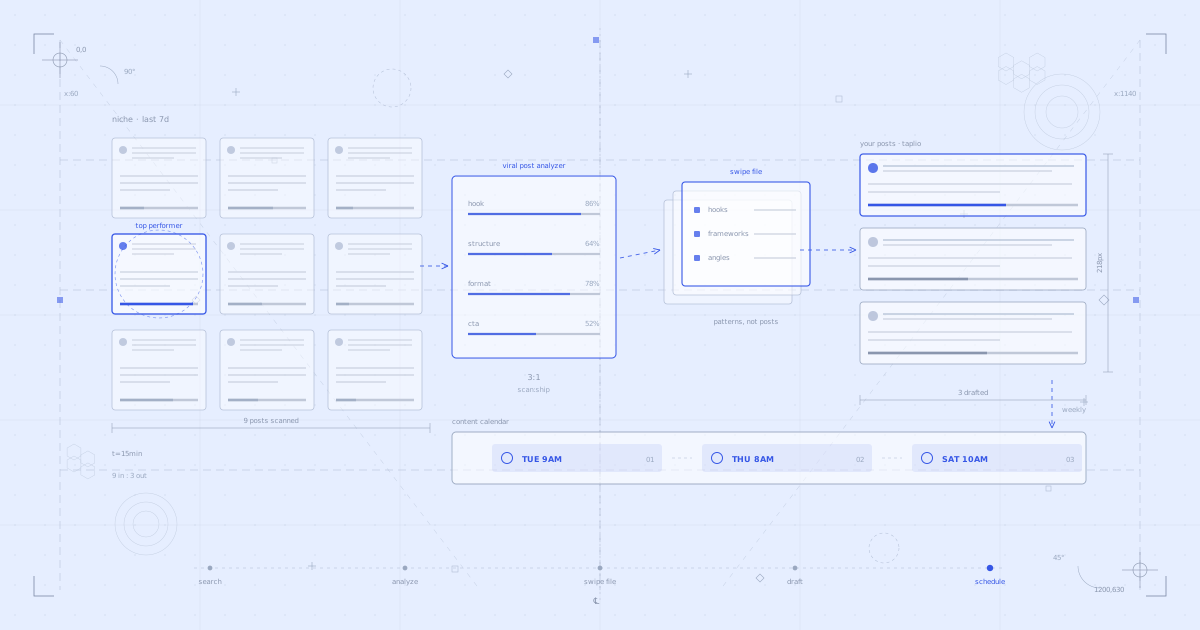
- The four-step workflow: Run search_inspiration for top posts in the niche, apply the LinkedIn Viral Post Analyzer skill to the top 5 to extract hook type, structure, format and CTA, organize findings with the LinkedIn Swipe File Builder, then draft with the LinkedIn Post Writer and save via create_draft plus schedule_draft.
- The number that decides: Fifteen minutes on a Friday afternoon plus a Monday session, two conversations per week total, produces five to six scheduled posts, according to the weekly cadence described by Taplio.
- Check before starting: Confirm the niche search term is narrow ("B2B SaaS content strategy" not "marketing"), that search terms rotate weekly into adjacent niches and competitor names, that patterns rather than posts get saved, and that publish_draft always asks for explicit confirmation before anything goes live.
- Decision rule: Use the free 17 Claude Skills alone if there is no Taplio account, since Skills need none, and add the Taplio LinkedIn MCP at mcp.Taplio.com when drafting and scheduling inside Taplio matters, with the Growth plan at $69/month for AI post writing.
Your niche is showing you exactly what works. Every day, posts in your space are getting thousands of impressions, hundreds of comments, dozens of reposts. The patterns are right there. Most people scroll past them.
This guide shows you how to stop scrolling and start studying. Search for viral posts in your niche with the Taplio LinkedIn MCP, decode what makes them work, build a swipe file of repeatable patterns, and turn those patterns into your own posts, drafted and scheduled. One conversation with Claude. About fifteen minutes.
What is niche spying
Niche spying is the practice of systematically studying what performs in your space. Not copying. Studying. You identify the posts that are getting traction, break down why they work (hook type, structure, format, CTA), and extract the underlying patterns you can adapt to your own voice and topics.
Without tools, this means hours of scrolling, screenshotting, and manual analysis. With the Taplio LinkedIn MCP and Claude Skills, it takes one conversation.
What you need
- The Taplio LinkedIn MCP connected to Claude (or ChatGPT). This is what lets your AI search real LinkedIn posts with engagement data, create drafts, and schedule posts in your Taplio account. 14 tools, two-minute setup.
- Claude Skills for LinkedIn (optional but recommended). Free instruction sets that make Claude better at specific tasks. The LinkedIn Viral Post Analyzer, LinkedIn Swipe File Builder, and LinkedIn Post Writer are the three that matter here.
Connect the Taplio LinkedIn MCP (2-minute setup)
Download all 17 Claude Skills for free
You can connect the MCP entirely inside your AI app, no terminal needed. Here is the two-minute setup on Claude or on ChatGPT.
The niche spying workflow: step by step
Step 1: Search for viral posts in your niche
Open Claude with the Taplio LinkedIn MCP connected and type something like:
Using the Taplio LinkedIn MCP, search for the highest-performing LinkedIn posts about [your niche] this week. Show me what is getting the most engagement.What fires under the hood:
- MCP tool:
search_inspiration. Searches real LinkedIn posts performing right now in your niche, with engagement data (likes, comments, reposts).
You get a list of posts that are actually working, not a guess about what might work. Real posts, real numbers, right now.
Step 2: Analyze what makes them work
Pick the top performers and ask Claude to break them down:
Using the Taplio LinkedIn MCP, run the LinkedIn Viral Post Analyzer skill on these top 5 posts. For each one, tell me the hook type, structure, format, and why it got engagement.What fires under the hood:
- Claude Skill (optional): LinkedIn Viral Post Analyzer. Breaks down each post across multiple dimensions: hook type (question, bold claim, story opener, stat), structure (problem-solution, listicle, narrative arc), format (text, carousel, image), CTA style, and engagement drivers.
This is where the insight lives. You are not just seeing what performed. You are seeing why it performed. The patterns become obvious once they are laid out side by side.
Step 3: Build your swipe file
Tell Claude to organize the patterns into something you can reuse:
Use the LinkedIn Swipe File Builder skill to build a swipe file from those analyses. Organize by hook type, structure, and angle so I can reference it next time I write in Taplio.What fires under the hood:
- Claude Skill (optional): LinkedIn Swipe File Builder. Organizes the patterns into a structured swipe file: hooks you can adapt, frameworks you can follow, angles that are gaining momentum in your space.
Your swipe file is not a collection of posts to copy. It is a toolkit of patterns to apply. "Question hooks outperform bold claims in my niche." "Listicles with 5-7 items get more saves." "Posts that open with a personal failure get 3x the comments." Those are the patterns that change your output.
Step 4: Draft and schedule your own posts
Now turn the best patterns into your own content:
Use the LinkedIn Post Writer skill to write three LinkedIn posts using the top patterns from my swipe file. Apply them to my topics and make them sound like me. Save all three to Taplio as drafts using the Taplio LinkedIn MCP.What fires under the hood:
- MCP tool:
create_draft(called 3 times). Each draft lands directly in your Taplio account. - Claude Skill (optional): LinkedIn Post Writer. Writes variants using the patterns from your swipe file, with hooks ranked by stopping power and structure optimized for readability.
Each draft appears in your Taplio drafts panel. (If you prefer to read them in the chat as they save, you can ask Claude to print them there too. Edits sync either way.) Then schedule them:
Using the Taplio LinkedIn MCP, schedule draft 1 for Tuesday at 9AM, draft 2 for Thursday at 8AM, draft 3 for Saturday at 10AM. Confirm each one back to me before scheduling.- MCP tool:
schedule_draft(called 3 times). Each post locks to its time slot in your Taplio content calendar.
Done. You studied your niche, extracted the patterns, and turned them into a week of scheduled posts.
Connect the Taplio LinkedIn MCP and try this workflow today
What's happening under the hood
Here is a quick reference for the MCP tools and Skills used in this workflow:
Search your nichesearch_inspiration finds high-performing posts with real engagement data.
Analyze what works
The LinkedIn Viral Post Analyzer skill breaks down hook, structure, format, and engagement drivers for each post.
Build the swipe file
The LinkedIn Swipe File Builder skill organizes patterns into a reusable reference: hooks, frameworks, angles.
Draft postscreate_draft creates real drafts in your Taplio account. The LinkedIn Post Writer skill writes variants using the patterns you found.
Scheduleschedule_draft locks posts to a date and time.
The Taplio LinkedIn MCP has 14 tools total. This workflow uses 3 of them. Others like get_analytics_overview, get_post_analytics, and update_draft power different workflows.
The 17 Claude Skills span five categories: content writing (6 skills), research and inspiration (4), strategy (5), profile optimization (1), and analytics (2). LinkedIn Viral Post Analyzer, LinkedIn Swipe File Builder, and LinkedIn Post Writer are the three that matter here.
How to run this weekly
Friday afternoon, 15 minutes. That is the ideal time. You are wrapping up the week, you have context on what performed for you, and you can study what performed for others.
Here is the cadence:
- Friday: Run the niche spying workflow. Search, analyze, build your swipe file, draft 2-3 posts for next week.
- Monday: Run the Monday morning workflow. Scan trends, draft 3 more posts, schedule your full week.
- Midweek: Check your analytics. Ask Claude: "Show me how this week's posts are performing." Adjust.
Two conversations per week. Five to six posts scheduled. No blank pages.
5 tips for better niche spying
1. Be specific about your niche. "LinkedIn posts about marketing" is too broad. "LinkedIn posts about B2B SaaS content strategy" gives you actionable patterns. The more specific your search, the more relevant the results.
2. Look for patterns, not posts to copy. The goal is not to rewrite someone else's post. It is to understand why it worked and apply the same principle to your own topic. "This hook worked because it challenged a common assumption" is more useful than the hook itself.
3. Save your swipe file and build on it. Each week, add new patterns. Over time, you build a library of what works in your niche. That library is what makes your content consistently good, not just occasionally lucky.
4. Compare your posts to the patterns. After a few weeks, ask Claude to analyze your own top posts the same way. "What patterns do my best posts share?" The overlap between your hits and your niche's hits is your sweet spot.
5. Rotate your search terms. Do not search the same keywords every week. Try adjacent niches, competitor names, trending topics. The best inspiration often comes from one step outside your usual space.
FAQ
Does the Taplio LinkedIn MCP post without my permission?
No. Scheduling and publishing always require your explicit confirmation. When Claude calls publish_draft, it asks you to confirm before anything goes live. This is built into the tool. It is not optional.
Is this just copying other people's posts?
No. You are studying patterns, not copying content. The LinkedIn Viral Post Analyzer breaks down why a post worked (hook type, structure, format). The LinkedIn Post Writer then applies those patterns to your own topics in your own voice. The output is original content informed by what is working in your space.
Does it work with ChatGPT?
Yes. The Taplio LinkedIn MCP works with Claude, ChatGPT, and any MCP-compatible AI assistant. The 17 Claude Skills are Claude-specific, but the 14 MCP tools work everywhere.
Do I need a paid Taplio plan?
The MCP tools require a Taplio account. The Claude Skills are free for everyone. You do not even need a Taplio account to use them.
How far back does the search go?
The search_inspiration tool searches posts that are performing right now. The exact time range depends on the search query and what LinkedIn surfaces, but it focuses on recent, high-engagement content.
Is it safe? Will it get my LinkedIn account banned?
The Taplio LinkedIn MCP runs on your authenticated Taplio account. There is no scraping, no browser automation, and no direct LinkedIn API calls that violate terms of service. It is account-safe by design.
How long does setup take?
About two minutes for the Taplio LinkedIn MCP, and you can do all of it inside Claude or ChatGPT.
- In Claude: add it from your connector settings. Watch the two-minute setup.
- In ChatGPT: same thing from your connector settings. Watch the two-minute setup.
- The URL to paste:
https://mcp.taplio.com - Terminal (Claude Code only):
claude mcp add --transport http taplio https://mcp.taplio.com - Product page: taplio.com/taplio-linkedin-mcp
Start spying on your niche
The posts that perform in your niche are not random. They follow patterns. The people who grow fastest on LinkedIn are not more creative. They are more systematic about studying what works.
One conversation with Claude. A swipe file of patterns. Three posts drafted and scheduled.
- Connect the Taplio LinkedIn MCP: 2-minute setup, 14 tools
- Install the free Claude Skills: 17 skills, free for everyone
- Open Claude on Friday afternoon and follow the workflow above
Your niche is already showing you exactly what works. Now you have a system to see it.


Keep reading
All articlesRelated Articles


.avif)
Your Linkedin AI coach is waiting for you
Join 12,000+ creators who let their coach turn the blank page into a plan and watch their audience compound.
7-day free trial · 30 day money back · Cancel anytime
AVG. VIEWS
2,979
-1.5%
ENGAGEMENT
3.2%
+0.8%

Free Monthly Report
How does your LinkedIn compare?
Get free monthly benchmarks on reach, engagement, and content format performance.
Get the Benchmark