
Pricing


AI writer

Taplio
MCP
Taplio MCP connects your AI assistant to your LinkedIn account. It learns what works in your niche, then drafts and schedules posts in your voice.

Supergrow Review 2026: What PostCast Gets Right and Where It Stops

August 24, 2026

12
min read

 Open in ChatGPT
 Open in Claude
 Open in Perplexity

Key Takeaways
- Overall score 3.8 out of 5. Supergrow is a strong writer with a thin measurement layer. It scores 4.5 on PostCast and 2.3 on analytics.
- The real entry price is $39, not $19. Starter ships with no analytics at all, so the cheapest plan lets you publish without knowing what worked.
- PostCast and Content DNA are the reason to buy. A 10 to 15 minute voice interview plus a voice profile built on your own posts produce drafts that sound like you.
- The 4.8 out of 5 rating sits on 13 G2 reviews. That is early signal from happy first users, not a market consensus.
- After the 7 day trial the account pauses. There is no free plan, no surprise charge and no data loss, but you do have to decide within a week.
Supergrow's G2 score is 4.8 out of 5. It sits on 13 reviews. The distance between that number and that sample is the problem with almost everything written about this tool, and this page is not exempt. This review lives on the Taplio blog, and Taplio competes with Supergrow. So here is the deal. Every price, limit and rating below is checkable, and the links point at the source. Prices come from Supergrow's own pricing page, read on 24 August 2026, and each rating is cross checked against three independent reviews. By the end of this page you will know whether Starter at $19, Pro at $39, or neither of them, is the right call for you.
Supergrow scored across seven categories
Verdict first, category by category, each one out of 5.
- Content DNA and voice quality, 4.3. Drafts sound like your old posts, not like a prompt output.
- PostCast, 4.5. A voice interview that turns one sitting into a week of drafts.
- Carousels and infographics, 3.8. The template library covers common formats. The editor still feels young.
- Scheduling, 4.3. Calendar, queue, Kanban and automatic first comment all work without drama.
- Analytics, 2.3. Nothing on Starter, surface metrics on Pro, no post by post depth.
- Teams and approvals, 3.2. Four seats, one approver, one account per LinkedIn profile.
- Value for money, 3.8. Fair at $39. Thin at $19 the moment you want numbers.
3.8 out of 5. Strong writer, thin measurement layer.
The gap between the top score and the bottom one is the whole review. Supergrow is built to get words out of your head. It is not built to tell you which of those words worked.
Supergrow bets everything on making the AI listen first
Most AI writing sounds generic for one reason. The model never listened to you. Supergrow front loads the listening instead.
It reads the posts you already published, builds a voice profile from them, then interviews you out loud to collect raw material. Writing happens last, not first.
Supergrow claims 10,000+ active creators and 40,000+ posts generated. Two buyers show up in how the product is built. The solo creator who owns one feed and posts to win clients. And the marketing team that activates its executives, which is why seats, approvals and a brand kit exist at all.
The thesis deserves to be taken seriously. It also sets the ceiling. A tool organised around your voice is not organised around your numbers.
PostCast turns a 15 minute conversation into a week of posts
PostCast is the reason people pay for Supergrow, so it goes first.
What the interview actually feels like
You pick a topic and an AI interviewer called Alex asks you questions out loud. You talk. It follows up when an answer is thin.
Supergrow advertises 10 to 15 minutes per session. Testers at Kleo report closer to 30 minutes for a full one. Block half an hour the first time, less once you know the format.
What comes out is a set of drafts built from what you said, including the messy specifics you would never have typed. That is the gain. Talking beats staring at an empty editor.
Content DNA is what keeps the drafts sounding like you
Content DNA is the voice profile. Supergrow imports your existing posts and extracts your patterns. Sentence length, hook shapes, formatting habits, recurring themes.
Here is the honest limit. It learns how you write, not what you know. This morning's call transcript, last quarter's deck, the article you published two years ago somewhere else, none of that is in there.
The model also rewards the person who shows up. Sit for the interview and the drafts are yours. Ask it for twelve posts while the coffee brews and the output falls back to template level.
Everything around the writing is younger than the writing
Supergrow ships more than a writer. The rest is competent, and clearly newer.
The carousel maker is Canva lite and that is enough for most posts
You get a template library, a brand kit on team accounts and direct publishing without leaving the tool. For a listicle carousel or a simple infographic it does the job. Several testers still call the editor young, and they have a point. If design is your differentiator, keep your design tool. The same ceiling shows up in our AuthoredUp review.
Scheduling is the part nobody complains about
Calendar, queue, Kanban board, automatic first comment. It works, it is quiet, nothing here breaks. At this price bracket the scheduler is usually the weak brick. In Supergrow it is the most reliable one.
Repurposing and the new MCP are ahead of the price bracket
Feed it a YouTube video, an article or a PDF and it returns LinkedIn drafts in your voice. That part has been solid for a while.
Two August 2026 additions sit on Pro. Engage, which brings commenting and reply drafting into the tool, and a Supergrow MCP that plugs the product into Claude and ChatGPT alongside a public API. Both are listed on the pricing page and neither is documented anywhere else yet. The MCP still carries an early access button, so treat it as shipping rather than shipped, and check both before you buy on their promise.
Caveats aside, few tools at $39 list anything like it. Saying so is what makes the rest of this review worth reading.
Analytics is the wall, and it costs $39 to hit it
Starter has no analytics. None. You write, you schedule, you publish, then you scroll LinkedIn yourself to find out how it went.
Profile analytics and the weekly report start on Pro at $39. What you get there is follower count, connections, impressions and engagement rate. Useful. Shallow.
There is no post by post breakdown you can act on, no comparison against what works in your niche, no way to see which hook format carries your account.
This is not one reviewer holding a grudge. Kleo scores the category 2.5 out of 5. AuthoredUp scores it 2 out of 5. The G2 summary concedes it too. Three parties with different incentives landing on the same point is a fact, not an opinion.
So name the real cost. You are buying a tool to publish more, and on the entry plan you publish blind. If you want to see what deeper LinkedIn reporting looks like before you decide, our LinkedIn benchmark analyses 60k+ posts a month and it is free to browse.
Which means the entry price of Supergrow is not $19. It is $39, unless you do not care about numbers for your first six months.
What $19, $39 and $139 actually buy you
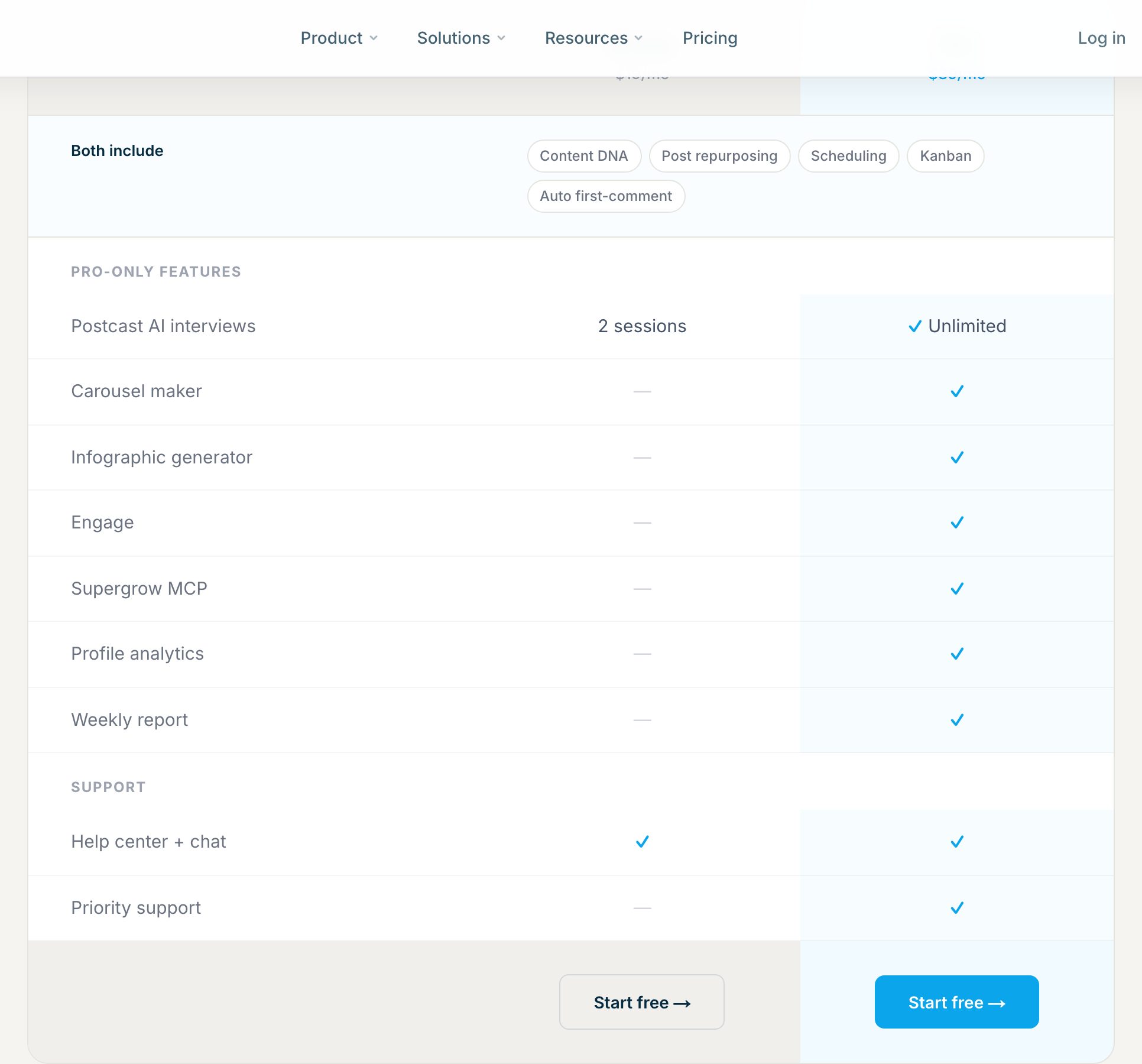
Prices checked on supergrow.ai/pricing on 24 August 2026. Annual billing takes 20% off every plan.
- Starter, $19/mo, $16/mo billed annually. Content DNA, 2 PostCast sessions, repurposing, scheduling, calendar, Kanban board, automatic first comment. No analytics.
- Pro, $39/mo, $31/mo billed annually. Everything in Starter plus unlimited PostCast, carousels, infographics, Engage, the MCP, profile analytics, the weekly report and priority support.
- Teams, $139/mo, $133/mo billed annually. Four accounts, organisation dashboard, approval workflows, team analytics.
- Enterprise, on request. Anything above four accounts.
Watch the annual line. Some reviews quote $12 and $24 for Starter and Pro. The discount is 20%, not 37%, so the correct figures are $16 and $31.
Now the part almost nobody covers. What happens after the 7 day trial. There is no free plan. When the trial ends you pick a plan or your account is paused. No surprise charge, no wiped data, no maze in the cancellation flow.
Those terms are fair, and most of this category does worse. A pause is still a pause though. Try it, go quiet for a month, come back, and you come back to a locked account.
If you want a reference point from another LinkedIn tool, our own plans page is public.
What users praise, and the one thing they keep flagging
The praise is consistent. Voice quality first. People say the drafts sound like them, which is rare enough to be the reason they stay. Then onboarding, which takes minutes. Then support, with live chat responses cited on both G2 and Product Hunt.
The criticism is just as consistent. Analytics depth. Visual tools that still feel early. Approval friction in agencies, where one approver and one account per LinkedIn profile becomes a bottleneck fast.
Now weigh the evidence itself. That 4.8 out of 5 sits on 13 G2 reviews. Count them yourself. Thirteen reviews describe a young product with happy early users, not a market consensus. It is not a bad score. It is a small one, and the two are easy to confuse.
Reddit threads land in the same place, with more scepticism about AI writing in general than about Supergrow in particular. Ratings this thin also move fast, in both directions. Kleo carried a strong one until LinkedIn shut down its Chrome extension, which we covered in our Kleo review.
Supergrow says it publishes through LinkedIn's official API
This matters more than most reviews admit. Tools that drive LinkedIn through the browser put accounts at risk.
Supergrow displays a LinkedIn Verified Partner badge on its home page, and its pricing FAQ states that it publishes through the official API with no automation and no scraping. We found no documented enforcement action against Supergrow users.
One nuance, then we stop. A displayed badge and a vendor statement are not the same thing as a status you can verify yourself. Nothing here points to a problem. It is worth knowing what kind of evidence you are holding. If you run several profiles, read the LinkedIn user agreement once.
Buy Supergrow if you will actually sit for the interview
The tool pays off for a narrow and concrete profile.
- LinkedIn is your main channel. Not one of six you cross post to.
- You think better out loud than at a keyboard. PostCast is built for you, and nothing else on this shelf does it as well.
- You take Pro, not Starter. Two PostCast sessions a month with zero analytics is not a workflow.
- You can live with surface metrics for six months. Early on, volume matters more than measurement.
If those four are true, $39 a month is a fair trade and you will publish more than you did last quarter.
Skip it if measurement is why you are buying a tool
- You run on numbers. Profile level impressions will not tell you what to write next.
- You manage more than four client profiles. Teams caps at four and Enterprise means a sales call.
- You want engagement to turn into pipeline. Supergrow writes. It does not track relationships.
- You want to test without your account pausing. Seven days, then a decision.
There is also a timing point worth naming. For the first six to eight weeks the bottleneck is what to write. After that it becomes what to repeat, and that is a different kind of tool. Taplio was built for the second problem, which is why we wrote the head to head separately, prices checked the same week: Taplio vs Supergrow. If you would rather scan the whole field first, we keep a list of Supergrow alternatives.
Supergrow FAQ
What does Supergrow do?
Supergrow is an AI tool for LinkedIn. It builds a voice profile from your existing posts, interviews you out loud through PostCast, turns your answers into drafts, then schedules and publishes them. It also builds carousels and repurposes videos, articles and PDFs into posts.
How much does Supergrow cost in 2026?
$19/mo for Starter, $39/mo for Pro and $139/mo for Teams. Annual billing takes 20% off, which puts them at $16, $31 and $133 per month. Above four accounts, Enterprise is quote based.
Does Supergrow have a free plan or a free trial?
There is no free plan. Every plan comes with a 7 day trial. When the trial ends you choose a plan or your account is paused. You are not charged by surprise and your data stays in place.
What is the difference between Supergrow Starter and Pro?
Starter gives you 2 PostCast sessions and no analytics. Pro adds unlimited PostCast, carousels, infographics, Engage, the MCP, profile analytics, the weekly report and priority support, for $20 more per month.
Does Supergrow include analytics?
Not on Starter. Pro adds profile analytics and a weekly report covering followers, connections, impressions and engagement rate. There is no post by post breakdown and no benchmark against your niche, which is why we score the category 2.3 out of 5.
Is Supergrow safe for your LinkedIn account?
Supergrow states that it publishes through LinkedIn's official API, with no automation and no scraping, and it displays a LinkedIn Verified Partner badge. No enforcement action against its users is documented. That is a vendor statement, not a status you can check yourself.
Is there a Supergrow lifetime deal?
No. As of 24 August 2026 no lifetime deal is listed on supergrow.ai. Pages ranking for the term are chasing the search, not an active offer. The cheapest real entry point is Starter billed annually at $16/mo.
What do Supergrow users say on G2 and Reddit?
G2 shows 4.8 out of 5 from 13 reviews. Users praise voice quality, fast onboarding and live chat support. They flag shallow analytics, young visual tools and approval friction in agencies. Reddit threads echo the same points.
The bottom line on Supergrow
- PostCast is a good idea that works. Talking your way to a week of drafts beats every blank editor.
- The entry plan is $39, not $19. Starter ships with no analytics at all.
- The 4.8 rating rests on 13 reviews. Treat it as early signal, not consensus.
- Trial terms are honest, and the account still pauses. Seven days, then you decide.
3.8 out of 5. Supergrow is a good writer. If you want the writing, the scheduling and the numbers in one place, start a 7-day Taplio trial with full Pro access. 7-day free trial. 30-day money back. Cancel anytime.
And if you are still shopping, read us with the same suspicion. We keep an honest list of the best Taplio alternatives, and a page for readers who came here looking for the best Supergrow alternative.


Keep reading
All articlesRelated Articles



.avif)
Your Linkedin AI coach is waiting for you
Join 12,000+ creators who let their coach turn the blank page into a plan and watch their audience compound.
7-day free trial · 30 day money back · Cancel anytime
AVG. VIEWS
2,979
-1.5%
ENGAGEMENT
3.2%
+0.8%

Free Monthly Report
How does your LinkedIn compare?
Get free monthly benchmarks on reach, engagement, and content format performance.
Get the Benchmark