
Pricing


AI writer

Taplio
MCP V2
New: Engage tools
Taplio MCP V2 now available, try it out
Your AI can now comment and reply for you. It finds the posts worth engaging, drafts in your voice and queues them on your Taplio account. Nothing posts until you confirm.

Can Grok post on LinkedIn? What works in 2026 (grok.com, X, Grok Bot, Grok Build, API)

November 19, 2026

9
min read

 Open in ChatGPT
 Open in Claude
 Open in Perplexity
Key Takeaways
- Can Grok post on LinkedIn: Not natively, since LinkedIn is not among the 7 built-in connectors or the catalog connectors xAI documents for Grok, so posting works only by adding a LinkedIn MCP server such as Taplio (https://mcp.taplio.com) as a custom connector, with 50 free MCP calls to start and Taplio plans from $39/month after that, and Taplio cannot send LinkedIn DMs or edit your profile.
- Setup path on each Grok surface: on grok.com open grok.com/connectors, click New Connector, then Custom, and paste the server URL; in the Grok Bot desktop app choose Connect apps, Add a custom connector, Remote HTTPS, then Add plugin and Authenticate; in Grok Build run grok mcp add --transport http taplio https://mcp.taplio.com; Grok inside the X app has no documented connectors.
- Dates that decide the route: xAI launched Connectors with Bring Your Own MCP on Grok web, iOS and Android on May 6, 2026, while the xAI API Remote MCP tools added in November 2025 only accept a static token, so the API route needs a developer to run the Taplio OAuth flow.
- Checks before connecting Grok to LinkedIn: whether your Grok plan and account allow custom connectors, whether a Grok Business or Enterprise admin must provision the connector first, whether every post waits for your explicit confirmation, and whether the tool acts through an authorized account rather than browser automation, which LinkedIn bans.
- Decision rule: choose grok.com to draft and schedule posts in a chat, Grok Bot for recurring LinkedIn routines, Grok Build for terminal or scripted runs, and skip the xAI API unless a developer can handle Taplio OAuth tokens.
No, Grok cannot post on LinkedIn by itself. LinkedIn is not one of the built-in or catalog connectors xAI documents for Grok, and Grok inside the X app has no documented connectors at all. What works is a custom MCP connector: you add Taplio's LinkedIn MCP at https://mcp.taplio.com to grok.com, Grok Bot or Grok Build, sign in once, and Grok can draft, schedule and, after you confirm, publish your posts.
The route depends on which Grok you use. Here is each one, what it can do, and where it stops.
Does Grok have a LinkedIn integration?
No, Grok has no native LinkedIn integration. The official Grok connectors documentation lists 7 built-in connectors (Gmail and Google Calendar, Google Drive, OneDrive, Outlook Mail and Calendar, Microsoft Teams, SharePoint, Salesforce) and a catalog of notable ones such as Box, Canva, GitHub, Linear and Notion. LinkedIn is in neither list.
What Grok does have is "Bring Your Own MCP". xAI launched Connectors on May 6, 2026 on Grok web, iOS and Android, including the option to connect any custom Model Context Protocol server. An MCP server is a bridge that gives the AI tools to read data and take actions in another service. Taplio runs one for LinkedIn, so Grok reaches LinkedIn through Taplio rather than through anything xAI built.
Two things this does not mean. Taplio is not listed in Grok's connector catalog, so you add it yourself as a custom connector. And Grok does not hold your LinkedIn password: it acts through your authorized Taplio account.
Which Grok can reach LinkedIn, surface by surface
Three Grok surfaces accept a custom MCP connector today, one does not, and the API needs developer work. The table sums it up.
| Grok surface | Custom MCP connector | How you add Taplio | LinkedIn posting |
|---|---|---|---|
| grok.com and the Grok iOS and Android apps | Yes, documented by xAI | grok.com/connectors, New Connector, Custom, paste the URL | Yes, through Taplio, after your confirmation |
| Grok inside the X app | No connectors documented | Not possible today | No |
| Grok Bot (desktop app) | Yes, documented by xAI | Connect apps, Add a custom connector, Remote HTTPS | Yes, through Taplio, after your confirmation |
| Grok Build (CLI) | Yes, documented by xAI | One grok mcp add command | Yes, through Taplio, after your confirmation |
| xAI API (Remote MCP) | Yes, static token only | A developer must run the Taplio OAuth flow | Only with custom code |
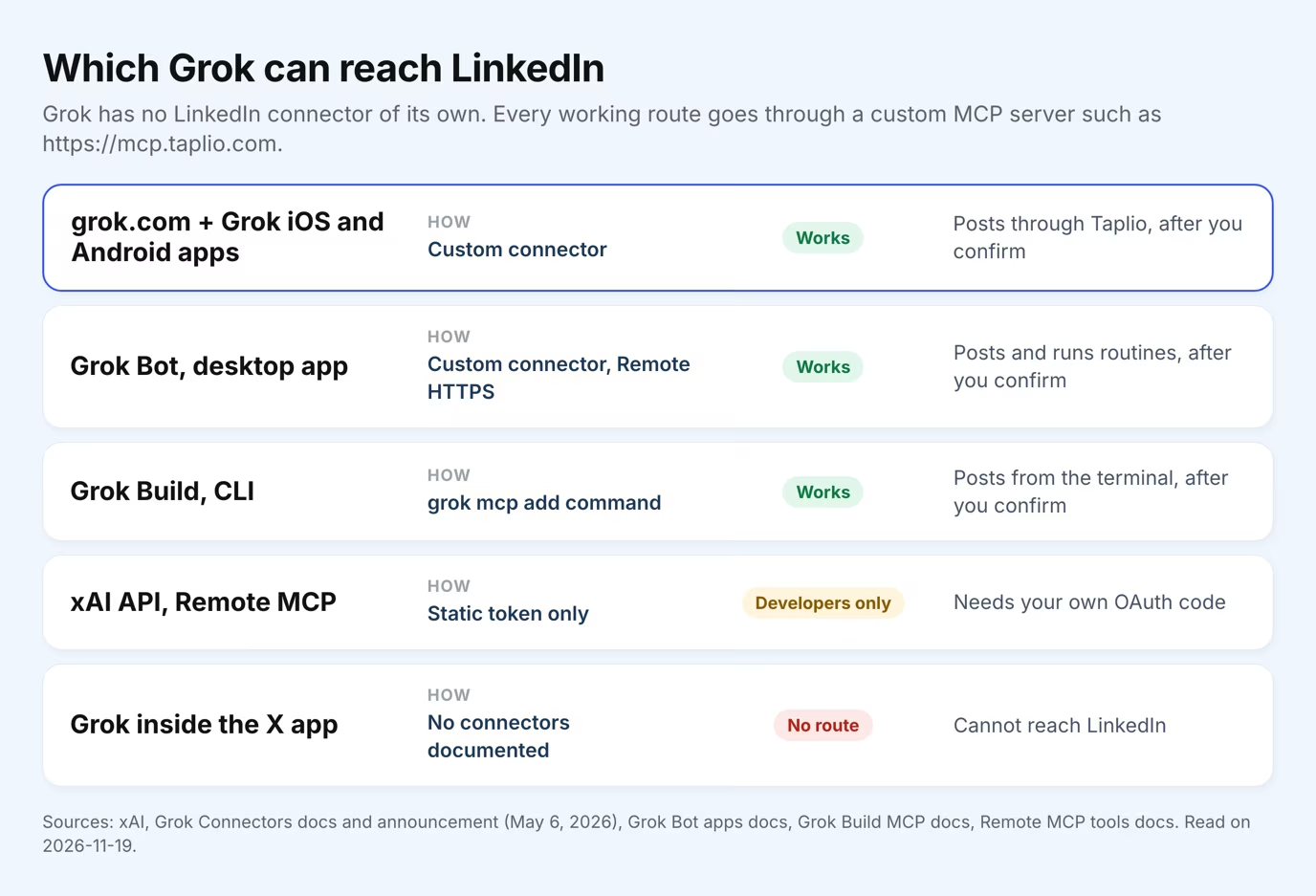
The X app is the trap. Grok is built into X, so it is easy to assume it can post elsewhere too. It cannot: xAI's Connectors announcement names Grok web, iOS and Android, not the X app.
How to connect Grok to LinkedIn: three setup paths
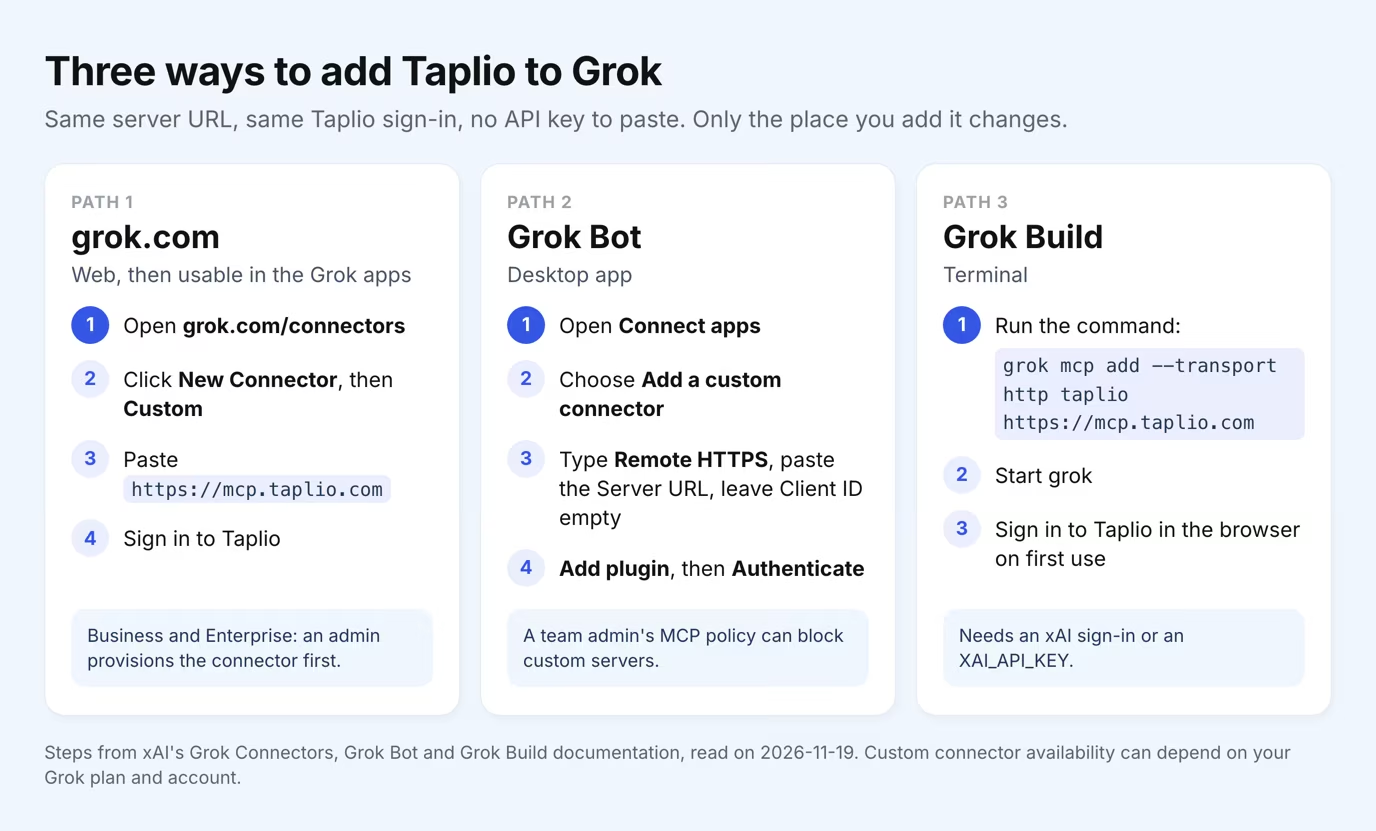
Each path takes the same server URL, https://mcp.taplio.com, and the same Taplio sign-in, with no API key to paste. Only the place where you add it changes.
On grok.com and the Grok apps
- Open Connectors. Go to grok.com/connectors and click New Connector, then Custom.
- Paste the server URL. Enter
https://mcp.taplio.comand complete the authentication step by signing in to your Taplio account. - Ask in plain words. Start a chat and ask Grok for a LinkedIn task, for instance "write 3 posts from my last newsletter and save them as drafts".
xAI's documentation says Connectors are available to all Grok users, while some third-party guides say custom connectors need a paid plan. Availability can depend on your plan and account, so check your own Connectors page. On Grok Business and Enterprise, a team admin must first provision the connector in the cloud console. The full walkthrough lives on the Grok + LinkedIn setup page.
In Grok Bot
- Add a custom connector. In the Grok Bot desktop app, open Connect apps and choose Add a custom connector at the bottom.
- Fill the fields. Name it Taplio, pick the type Remote HTTPS, paste
https://mcp.taplio.comas the Server URL and leave the Client ID empty. - Save and sign in. Choose Add plugin, then Authenticate, and finish the Taplio sign-in in your browser.
According to the Grok Bot apps documentation, a Bot can also add an MCP server by URL from the chat, and a team admin's MCP policy can block a custom server. Grok Bot is the surface for recurring work, such as planning three posts every Monday. Details on the Grok Bot + LinkedIn page.
In Grok Build
Grok Build, xAI's command-line tool, takes one command:
grok mcp add --transport http taplio https://mcp.taplio.com
xAI documents that remote servers needing OAuth open a browser sign-in on first use, so you sign in to Taplio the first time Grok calls a tool. Grok Build itself needs an xAI sign-in or an XAI_API_KEY. More on the Grok Build + LinkedIn page.
Can you use the Grok API to post on LinkedIn?
Not directly. The xAI API gained Remote MCP tools in November 2025, but the Remote MCP documentation only describes a static token passed in an authorization parameter. xAI does not run an OAuth flow for you.
Taplio has no API key: its MCP signs you in with OAuth. So a developer would have to run the Taplio OAuth flow themselves, pass the access token to the API and refresh it when it expires. That is custom engineering, not a supported setup. If you want Grok writing LinkedIn posts without code, use grok.com, Grok Bot or Grok Build.
What Grok can do on LinkedIn once Taplio is connected
Once connected, Grok works with your LinkedIn through 35 Taplio MCP tools, and nothing is published or sent without your confirmation. These are the jobs it covers:
| LinkedIn job | What you ask Grok | Taplio tools behind it |
|---|---|---|
| Write posts | "Draft 3 posts on hiring in my voice" | get_me, create_draft |
| Schedule and publish | "Schedule these for Tuesday morning" | schedule_draft, publish_draft |
| Find inspiration | "Find posts on pricing that got the most comments" | search_inspiration |
| Comment and reply | "Draft replies to the comments on my last post" | find_comments_to_reply, create_comment_draft |
| Likes and connection requests | "Like the comments on my last post" | like_post, send_connection_request |
| Analytics | "Which of my posts worked last month?" | get_analytics_overview, get_post_analytics |
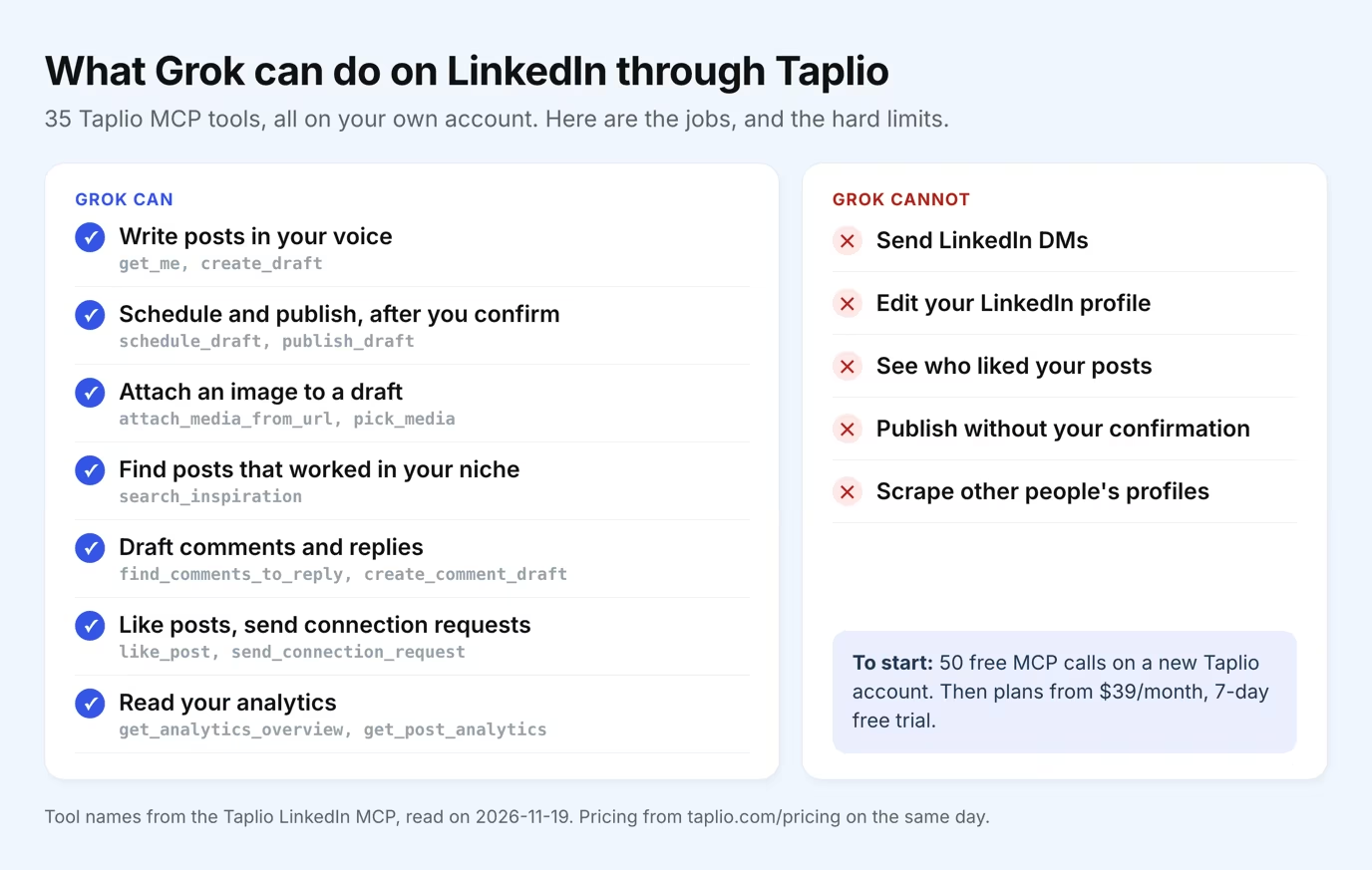
The limits are just as clear. Grok cannot send LinkedIn DMs through Taplio, cannot edit your LinkedIn profile, and cannot see who liked your posts. It works on your own account, not on a scraped copy of the LinkedIn network.
A new Taplio account gets 50 free MCP calls to start, with no subscription. After that you need a Taplio plan, from $39/month for Starter, with a 7-day free trial on every plan.
Is it safe to let Grok post on LinkedIn?
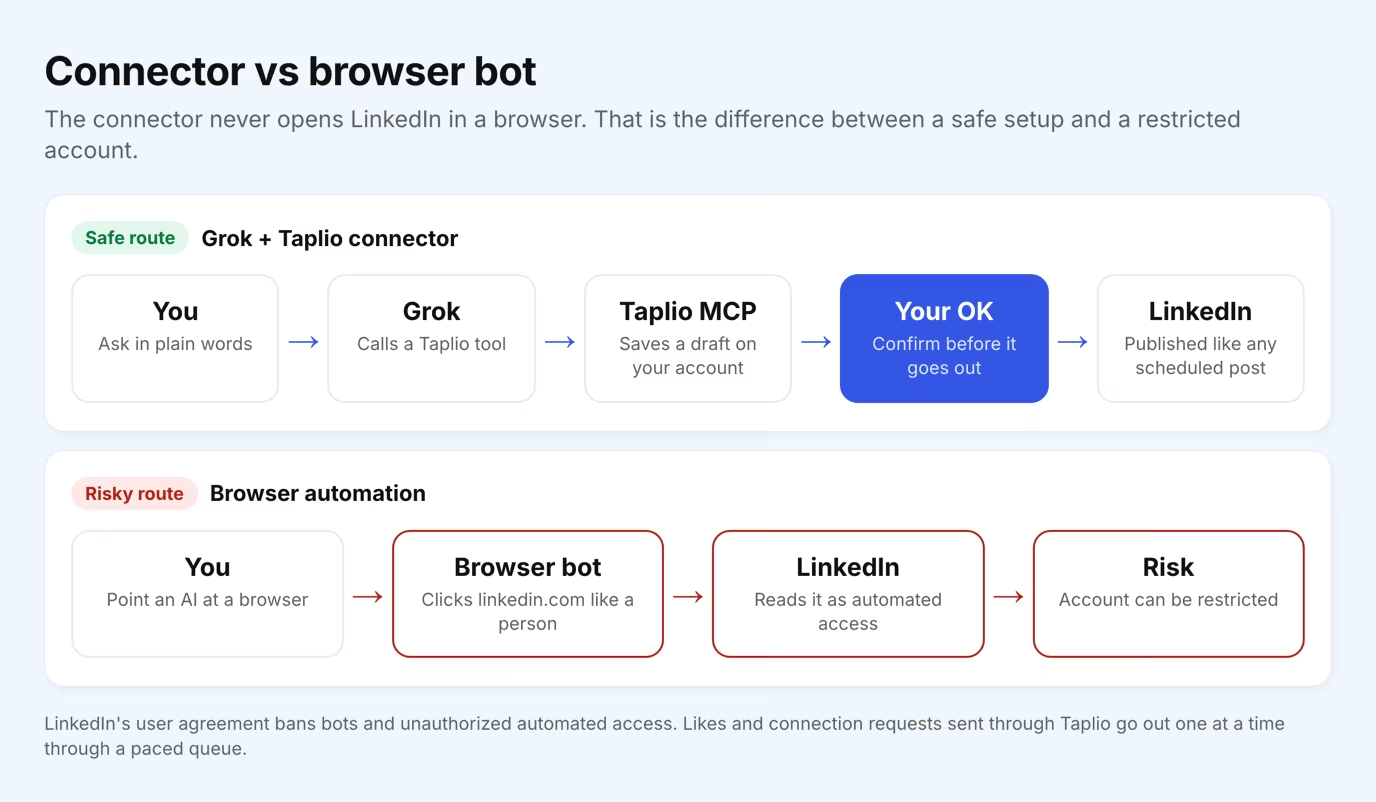
Yes, if it goes through a connector rather than a browser bot. LinkedIn's user agreement bans bots and other unauthorized automated access, and tools that make an AI click through linkedin.com like a person are what get accounts restricted.
The connector route never opens LinkedIn in a browser. Grok calls a Taplio tool, and Taplio acts through your authorized account, the same way the Taplio app schedules a post. Two safeguards sit on top:
- A confirmation gate. Grok saves drafts and asks before anything is published, scheduled or sent.
- A paced queue. Likes and connection requests go out one at a time, so your account keeps a natural rhythm and nobody gets the same invite twice.
Grok vs Claude vs ChatGPT for LinkedIn
All three reach LinkedIn through the same Taplio server, and the difference is how you add it. In Claude, Taplio is an official connector in the directory. In ChatGPT and Grok, you add it yourself with the server URL.
| Assistant | How Taplio is added | Where you do it |
|---|---|---|
| Claude | Official connector, one click on Connect to Claude | Claude connectors directory |
| ChatGPT | Custom connector with https://mcp.taplio.com | ChatGPT settings, on the web |
| Grok | Custom connector, or one CLI command in Grok Build | grok.com/connectors, Grok Bot desktop app, terminal |
If you already use Claude, read how Claude connects to LinkedIn. To compare every option, including servers other than Taplio, go through the best LinkedIn MCP server guide.
Which Grok route should you pick?
Pick the surface that matches how you work, since the LinkedIn tools are the same everywhere.
| If you want to | Use |
|---|---|
| Draft and schedule posts in a chat | grok.com or the Grok apps |
| Run a weekly LinkedIn routine on its own | Grok Bot |
| Script LinkedIn tasks from the terminal | Grok Build |
| Build your own product on Grok | xAI API, with your own OAuth handling |
| Post from inside the X app | Not possible today |
Frequently asked questions
Can Grok post on LinkedIn?
Not by itself. Grok has no LinkedIn connector, but you can add Taplio's LinkedIn MCP as a custom connector on grok.com, Grok Bot or Grok Build. Grok then drafts and schedules posts, and publishes only after you confirm.
Can Grok Bot post to LinkedIn?
Yes, with a connector. In the Grok Bot desktop app, add Taplio under Connect apps as a Remote HTTPS custom connector, then authenticate. The Bot can then run LinkedIn routines, and it still waits for your approval before posting.
Does Grok support MCP?
Yes. grok.com and the Grok apps accept custom MCP connectors since May 6, 2026, Grok Bot and Grok Build add MCP servers by URL or command, and the xAI API has Remote MCP tools that take a static token.
Can Grok in the X app post to LinkedIn?
No. xAI documents Connectors on Grok web, iOS and Android only, and no connector option is documented for the Grok built into X. Use grok.com or the Grok app instead.
Is Taplio in the Grok connector catalog?
No. Taplio is added as a custom connector with the URL https://mcp.taplio.com. xAI's documentation describes no submission process for vendors who want to join the catalog.
Can Grok add images to a LinkedIn post?
Yes, through Taplio. Grok can attach an image from a link or from your Taplio media library to a draft before you schedule it.
Can Grok send LinkedIn messages?
No. The Taplio MCP does not send DMs and does not edit your profile. It covers posts, comments, replies, likes, connection requests and analytics.


Keep reading
All articlesRelated Articles



Your Linkedin AI coach is waiting for you
Join 12,000+ creators who let their coach turn the blank page into a plan and watch their audience compound.
7-day free trial · Cancel anytime