
Pricing


AI writer

Taplio
MCP V2
New: Engage tools
Taplio MCP V2 now available, try it out
Your AI can now comment and reply for you. It finds the posts worth engaging, drafts in your voice and queues them on your Taplio account. Nothing posts until you confirm.

LinkedIn video ads examples: 4 patterns and the specs

November 19, 2026

7
min read

 Open in ChatGPT
 Open in Claude
 Open in Perplexity
Key Takeaways
- LinkedIn video ad examples: the four patterns worth copying are a 4:5 customer testimonial, a 16:9 product demo of about 15 seconds, a 9:16 founder talking head and a 1:1 data hook.
- How to build one: open on a single idea in the first frame as text, burn captions into the picture, upload an optional SRT file, and end on one ask that matches the CTA button.
- The spec that decides: LinkedIn recommends 4:5 at 720 x 900 pixels and 15 to 30 seconds, and its Help Center caps the file at 500 MB in MP4.
- What to check first: the ratio, the length, the caption file, the 150-character intro text and the 70-character headline all need to fit before upload.
- Decision rule: post the video organically first, then sponsor the version that beats the median for your follower bracket, and use a member's profile when trust matters more than polish.
Four LinkedIn video ad patterns are worth copying: a customer testimonial in 4:5, a 15-second product demo in 16:9, a founder talking to camera in 9:16, and a data hook in 1:1. Each one puts a single idea in the first frame and burns the captions in, because LinkedIn video ads autoplay with the sound muted by default.
The patterns in this guide use invented advertisers to show the structure. For real campaigns, browse LinkedIn's public Ad Library.
Four LinkedIn video ad examples, one pattern each
Each storyboard below shows three or four key frames, the on-screen caption, the timecode and the ad text that sits around the video. The advertisers, people and numbers are invented. What carries over is the structure.
Pattern 1: the customer testimonial
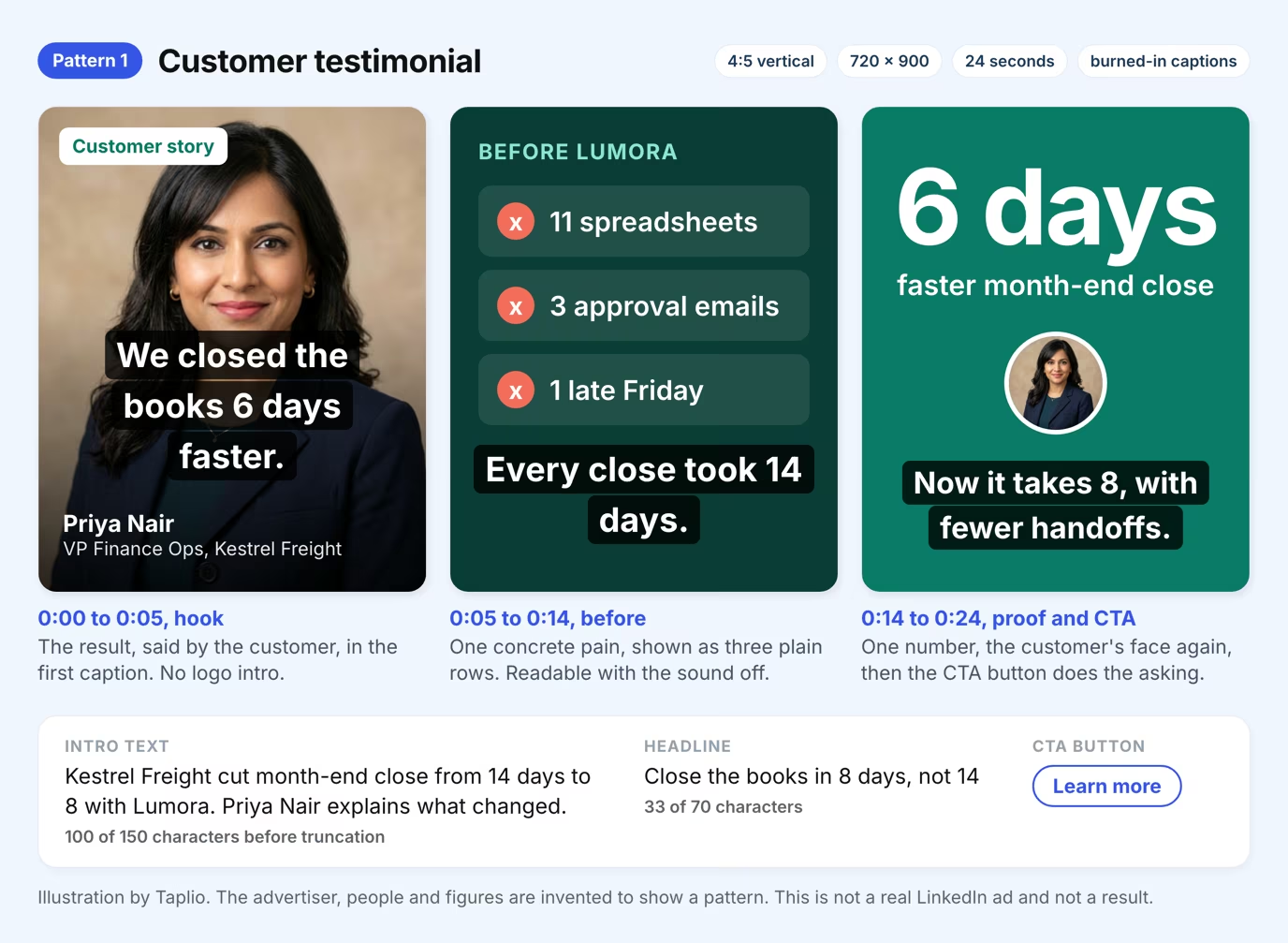
Open on the customer's result, spoken or captioned, in the first second. Then show the before state, one number and the call to action.
Pattern 2: the 15-second product demo
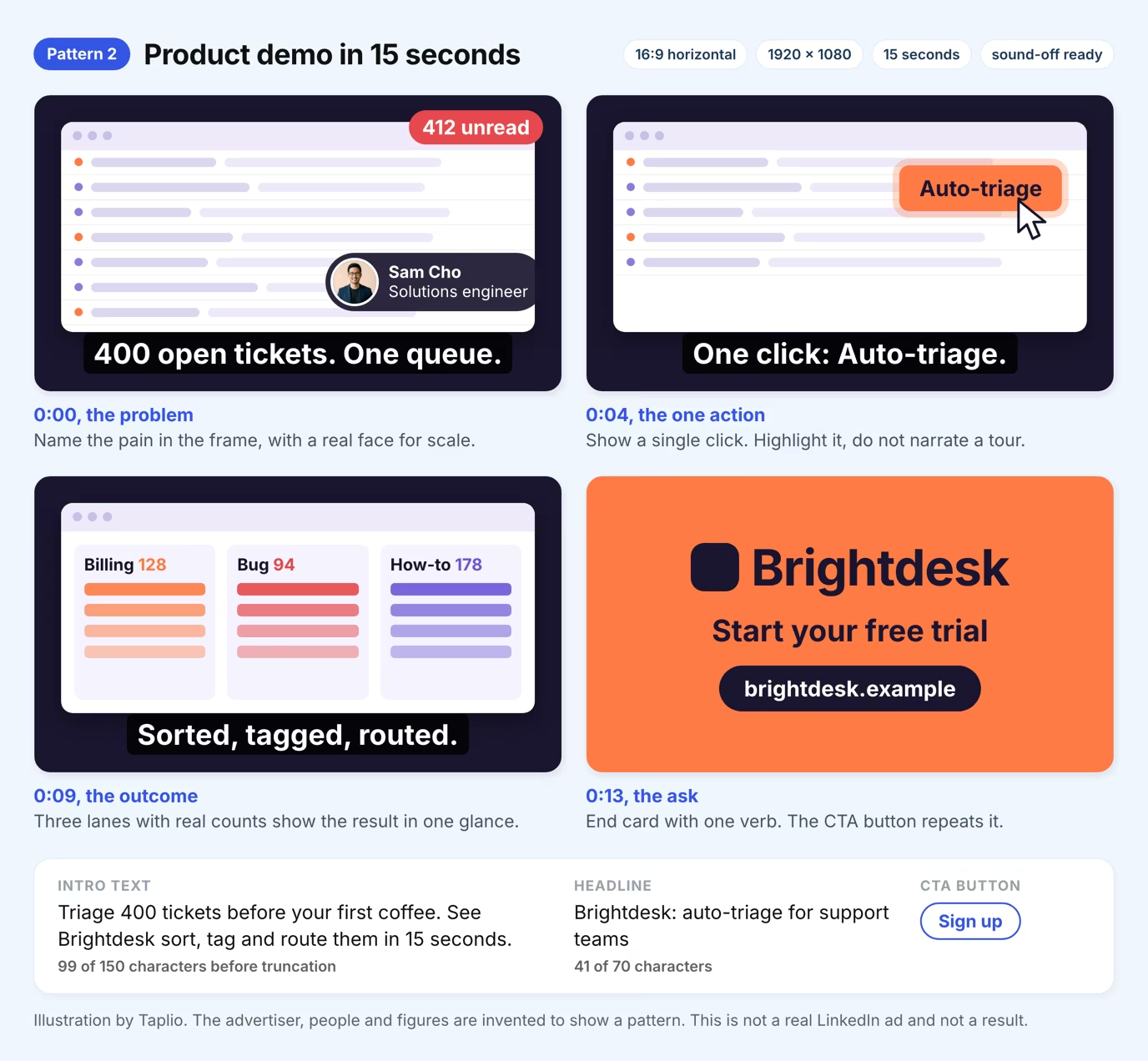
Show one problem, one click and one outcome. A long feature tour loses the muted scroller, so name the pain in the frame and highlight the single action.
Pattern 3: the member-led talking head
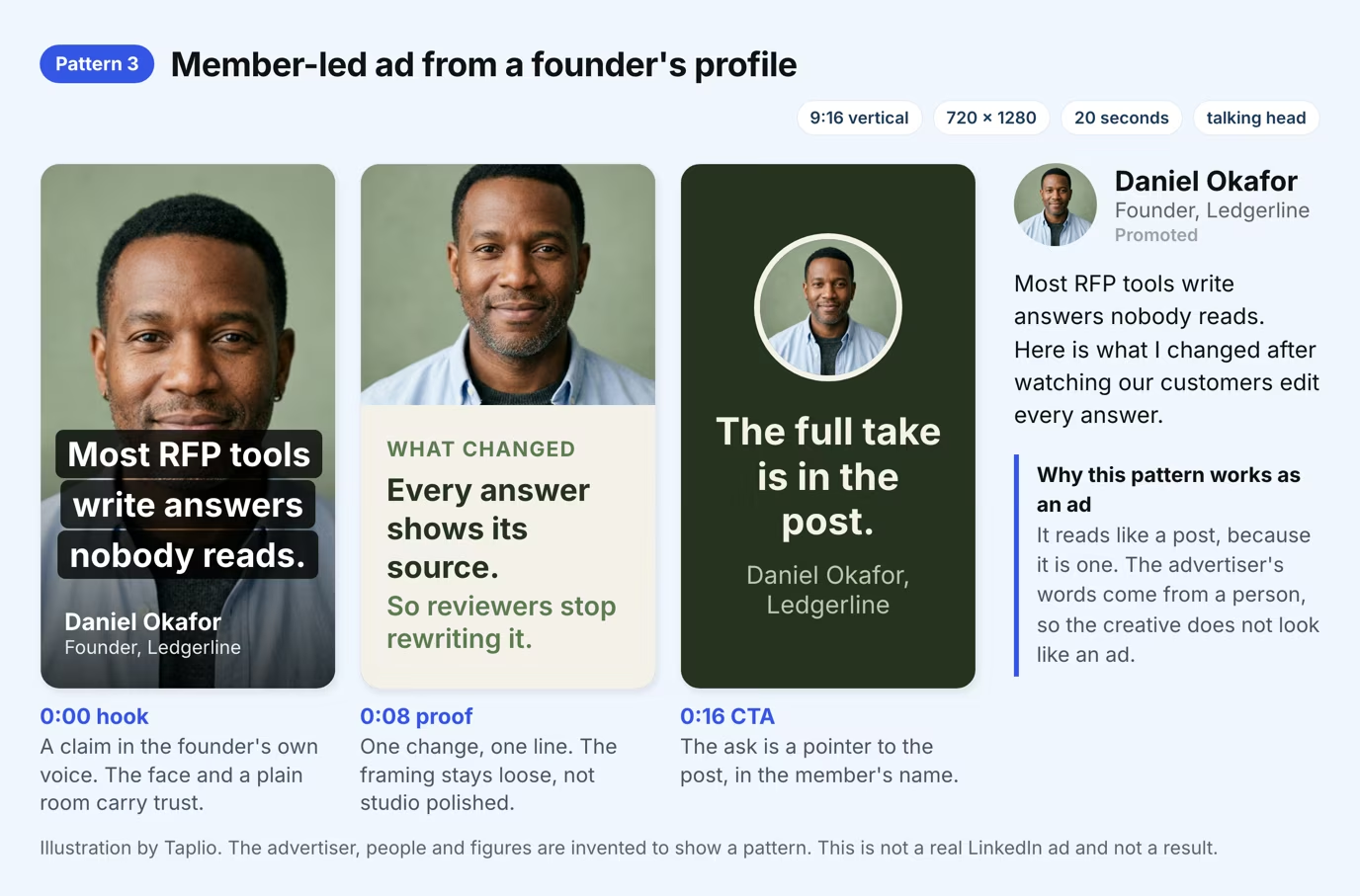
A founder or expert speaks to camera in plain light, and the ad runs from their profile as a thought leader ad. It reads like a post because it started as one. Taplio's guide to LinkedIn thought leader ads covers the setup rules.
Pattern 4: the data hook
Make the statistic the whole first frame, name its source on screen, then turn it into a cost the viewer owns. No face and no voice are needed, so it is the cheapest pattern to produce.
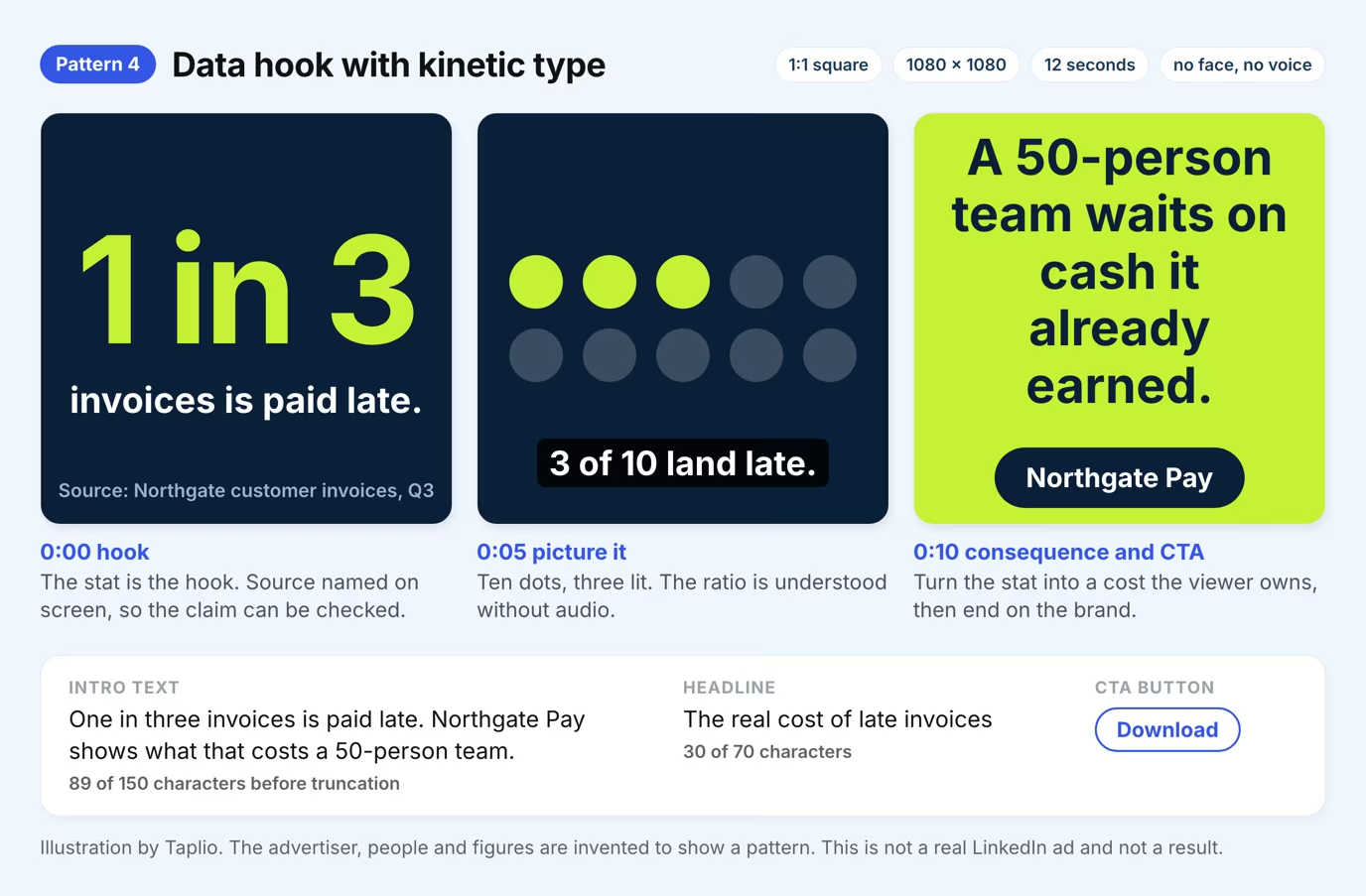
Pick the pattern from the proof you already have. A customer quote calls for pattern 1, a working product for pattern 2, a strong point of view for pattern 3 and a defensible statistic for pattern 4.
| Pattern | Ratio | First-frame hook | Use it when |
|---|---|---|---|
| Customer testimonial | 4:5 | The customer's result as a caption | You have a named customer and a number |
| Product demo | 16:9 | The pain, named on screen | The product solves one visible problem fast |
| Member-led talking head | 9:16 | A claim in the speaker's own words | A founder or expert has a clear opinion |
| Data hook | 1:1 | The statistic itself | You can cite the source on screen |
LinkedIn video ad specs from LinkedIn's own pages
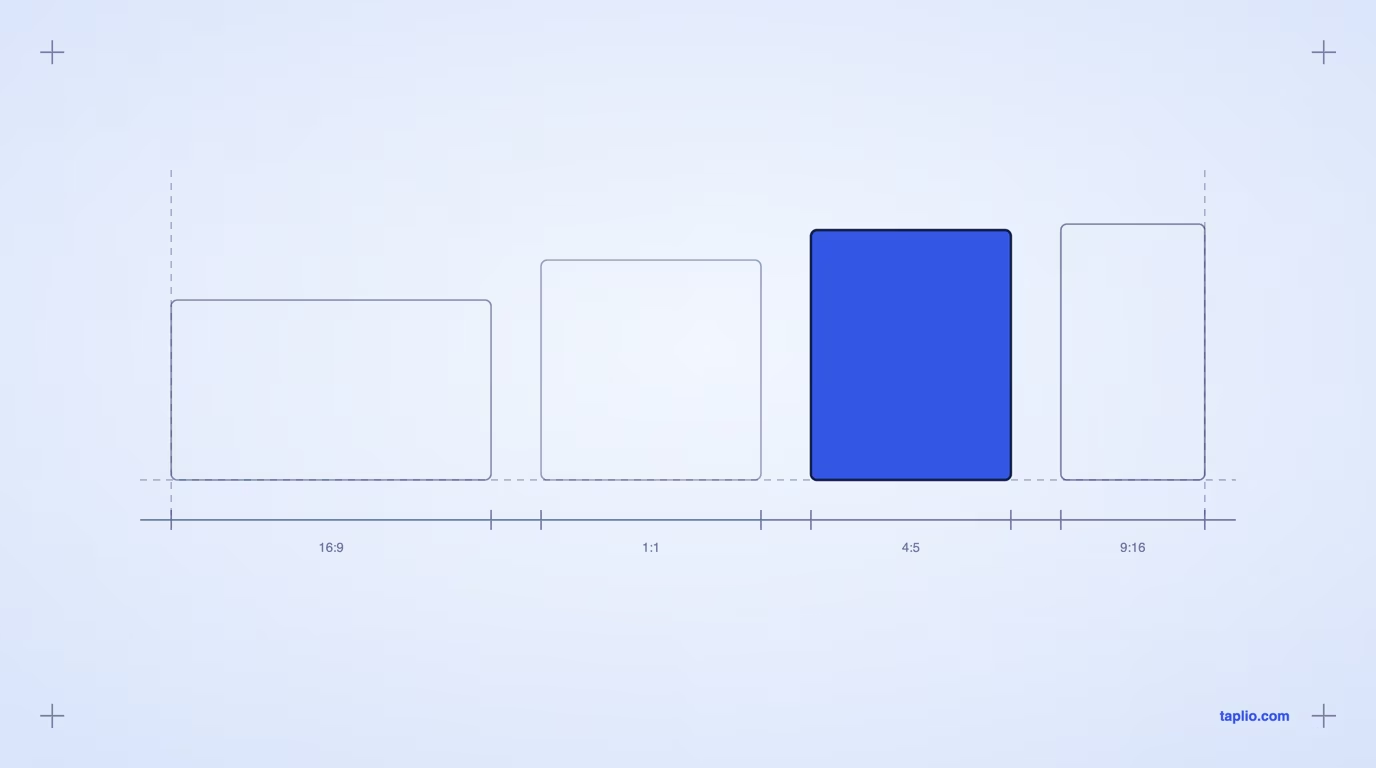
LinkedIn accepts four aspect ratios, MP4 files from 75 KB to 500 MB, and lengths from 3 seconds to 30 minutes. The diagram lists every range, read from LinkedIn's video ads specifications on 2026-11-19.
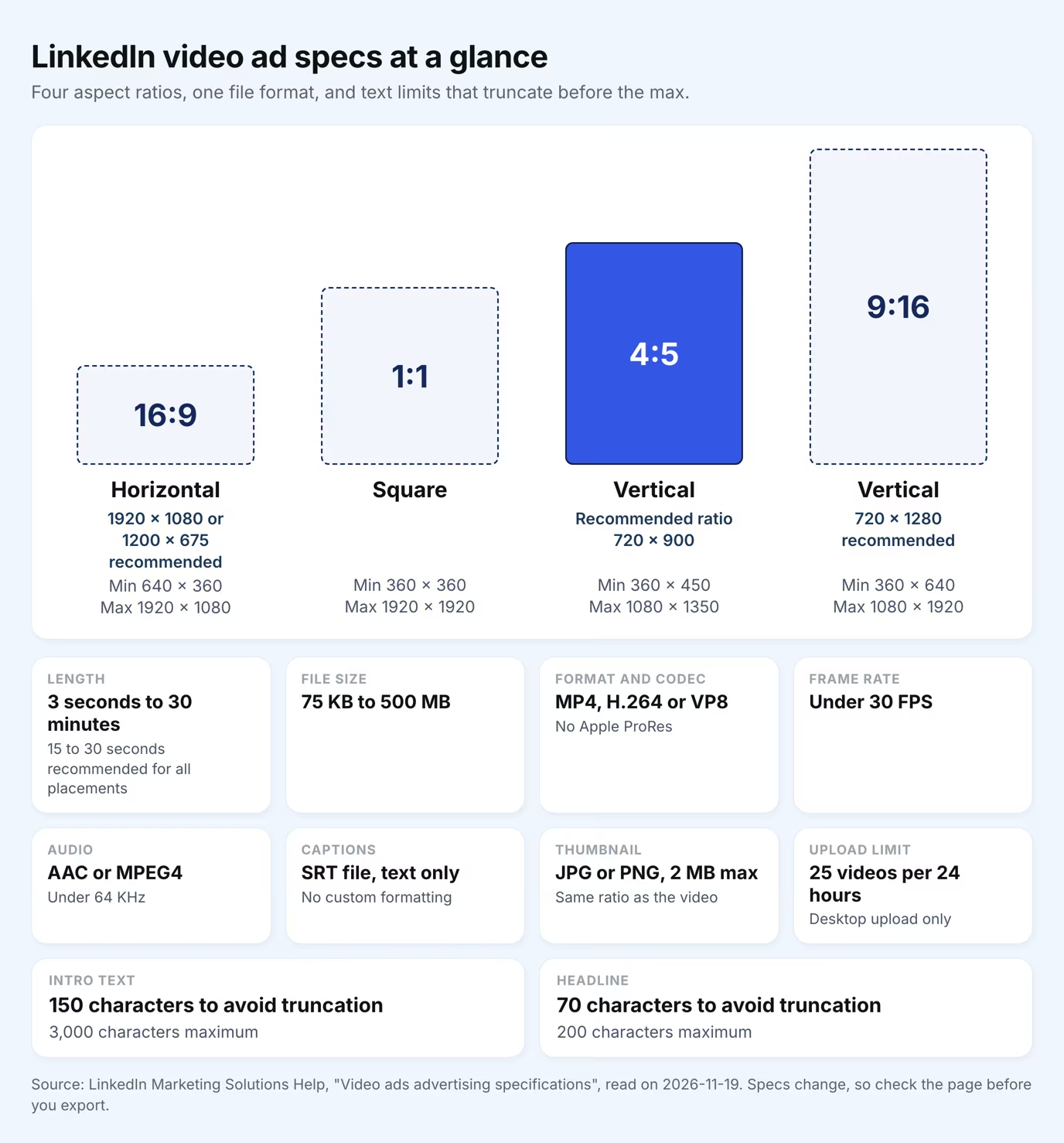
Three details trip people up. For 16:9, LinkedIn lists two recommended sizes, 1920 x 1080 and 1200 x 675 pixels, while 1:1 has a range but no recommended size. The intro text can hold 3,000 characters, but LinkedIn advises 150 to avoid truncation. LinkedIn may also reject an ad that contains more than four emojis, symbols or repeated characters.
How to write a video ad for muted autoplay
Write for the viewer who never turns the sound on, because LinkedIn video ads autoplay with the sound muted. LinkedIn's own video ads page strongly recommends captions for that reason.
Four habits follow from it. Put the hook in the first frame as text. Burn captions into the picture, and also upload an SRT file, which must contain text only. Keep one idea per frame. End on a single ask that matches the CTA button.
Length matters less than it seems. LinkedIn recommends 15 to 30 seconds, and a video under 30 seconds loops until it reaches at least 30 seconds of playback. In LinkedIn's own case, a 10-second video loops three times, so design the last frame of a short ad to flow back into the first.
Before you upload, watch the finished video on a phone with the sound off. If you cannot follow the story from the captions and the picture alone, a viewer in the feed will not follow it either. Fix the script, not the volume.
Test the video organically before you pay for it
Post the idea as normal video content first, then sponsor the version that earns attention. LinkedIn lets you sponsor an existing organic video post as an ad, so the test costs only the time to publish.
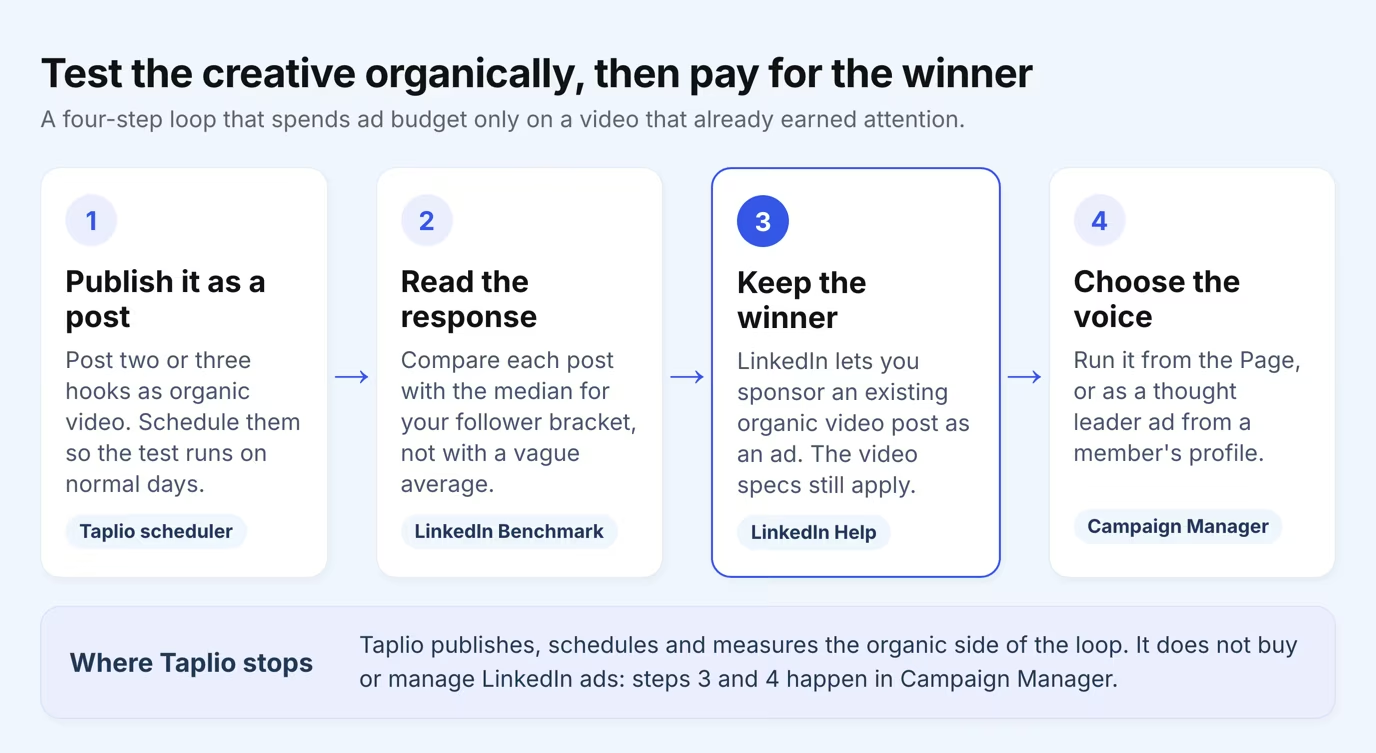
Use Taplio's post scheduler to publish two or three hooks on comparable days. Then compare each post with the median for your follower bracket in the LinkedIn Benchmark, which ranks image, video, document and text posts on reach and engagement. It does not say which format wins, so judge your own posts against your own bracket.
If you need the MP4 of one of your own posts for an upload, Taplio's LinkedIn video downloader saves it as a file. Taplio does not run ads, so budgets and targeting stay in Campaign Manager.
When a member's voice should carry the ad
Run the video from a person when trust matters more than brand polish. A thought leader ad sponsors a member's public post, so the creative keeps the member's name and voice. The member has to approve the request, and LinkedIn's thought leader ads guide limits them to ad sets with the brand awareness, engagement or video views objective.
That objective list decides the use. A member-led video builds reach and views, and it does not replace a conversion campaign. Pair it with a lead capture step when the goal is pipeline, as Taplio's guide to LinkedIn form ads for lead gen explains.
Run it from the company Page when the message is about the product, the offer or a customer. Patterns 1, 2 and 4 suit the Page, and pattern 3 suits a profile.
Mistakes that waste a LinkedIn video ad budget
The costly mistakes are basics that LinkedIn already documents in its specs. Check these six before you upload.
- A logo intro before the hook. A muted viewer scrolls past a branded opening, so put the idea in frame one and the logo in the end card.
- A link instead of a file. A YouTube or Vimeo link does not qualify, so export an MP4 and upload it directly.
- A ratio outside the range. LinkedIn's own sample, a 1920 x 360 file, is too wide at 16:3 because the widest allowed shape is 16:9.
- A mismatched thumbnail. The optional JPG or PNG thumbnail, up to 2 MB, should share the video's ratio and resolution.
- Audio-dependent storytelling. If the point lives only in the voice-over, the muted viewer never gets it. Say it in text as well.
- Emoji and symbol clutter in the intro text. More than four emojis, symbols or repeated characters can get the ad rejected.
None of these needs a bigger budget. They need a checklist and one pass through the spec sheet before export.
Frequently asked questions
How long should a LinkedIn video ad be?
LinkedIn accepts videos from 3 seconds to 30 minutes. It recommends 15 to 30 seconds so the ad can qualify for every placement across the feed and the Audience Network. A video under 30 seconds loops until it reaches at least 30 seconds of playback.
What size should a LinkedIn video ad be?
Use 4:5 at 720 x 900 pixels if you want LinkedIn's recommended ratio. The platform also accepts 16:9 (1920 x 1080 or 1200 x 675 recommended), 1:1 and 9:16 (720 x 1280 recommended), each with its own minimum and maximum pixel size. The spec sheet in the specs section lists every range.
Do LinkedIn video ads play with sound?
No, they autoplay muted by default, and the viewer chooses to turn the sound on. LinkedIn strongly recommends captions for that reason. Burn the key line into the frame so the message survives without audio.
Can I turn an organic LinkedIn video post into an ad?
Yes. LinkedIn's specifications cover sponsoring an existing organic video post as an ad, and the same video rules apply. Choose a post that already earned attention, then confirm the file meets the ratio, length and caption requirements.
Can I use a YouTube link as a LinkedIn video ad?
No. A video ad must be a file uploaded directly to LinkedIn, not a link to YouTube or Vimeo. Uploads are limited to 25 videos per 24 hours in Campaign Manager and must come from a desktop.


Keep reading
All articlesRelated Articles

Your Linkedin AI coach is waiting for you
Join 12,000+ creators who let their coach turn the blank page into a plan and watch their audience compound.
7-day free trial · Cancel anytime