
Pricing


AI writer

Taplio
MCP V2
New: Engage tools
Taplio MCP V2 now available, try it out
Your AI can now comment and reply for you. It finds the posts worth engaging, drafts in your voice and queues them on your Taplio account. Nothing posts until you confirm.

The post alarm: a Claude task that watches your LinkedIn post for 48 hours

October 19, 2026

6
min read

 Open in ChatGPT
 Open in Claude
 Open in Perplexity

Key Takeaways
- Reach is decided in the first 48 hours: a post's distribution is set while LinkedIn tests it on the people most likely to react, and answering comments inside that window is the lever most people never pull because the checking is a chore.
- The alarm compares you with you, not with a platform average: it pulls your last 90 days of posts through the Taplio LinkedIn MCP, computes your median impressions, likes and comments, and calls a post breaking out above that median (or above 3x median impressions) and flopping under half of it a day in.
- Three outcomes, one prompt: breaking out drafts a reply to every unanswered comment in your voice, flopping gives two lines on what missed plus one way to bring the idea back, and quiet is a single line, so the task only costs attention when there is something to do.
- It runs without you but never posts without you: a Claude scheduled task (paid plans) runs the prompt every morning at 9:00 in the cloud, and a reply is scheduled through the Taplio LinkedIn MCP only after you approve it in the run.
- Fresh posts can show zero impressions: analytics take time to sync, so the prompt tells Claude to judge a new post on likes and comments first and say so.
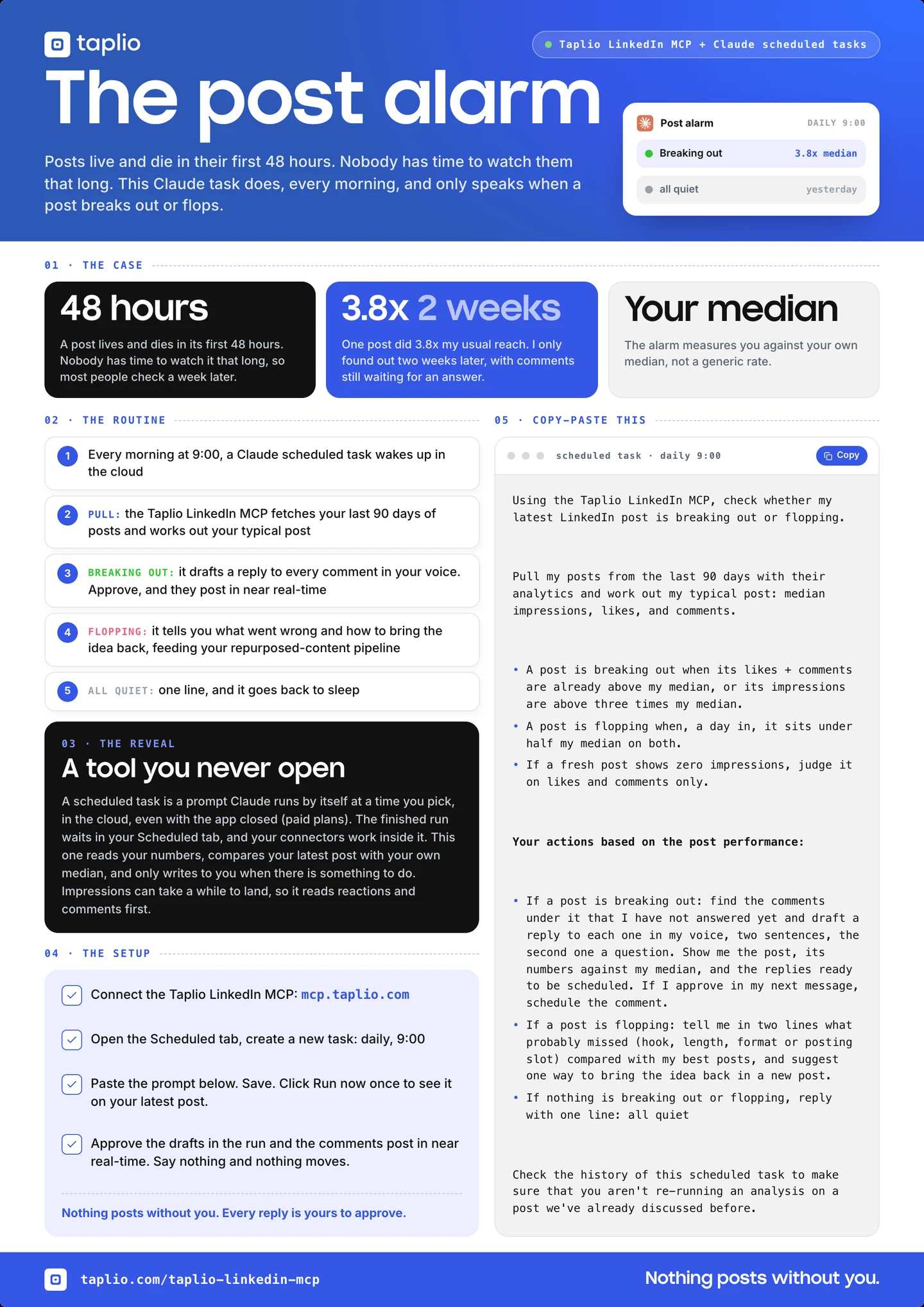
Nobody has the time to check their LinkedIn post performance for forty eight hours. But they should: LinkedIn posts live and die in their first 48 hours, and the lever that decides how far they travel, answering the comments while the post is still moving, is the one nobody has time to pull.
This guide shows you the fix: the post alarm. A Claude scheduled task that reads your latest post every morning through the Taplio LinkedIn MCP, checks it against your own median, and only speaks when the post is breaking out or flopping. Breaking out, it drafts a reply to every comment and schedules the ones you approve. Flopping, it tells you what went wrong and how to bring the idea back. Quiet, one line.
Why the first 48 hours decide everything
A post's reach is not spread evenly over its life. Most of it is decided early, while LinkedIn is still testing the post on the people most likely to react. Every comment answered in that window is a signal that the conversation is alive, and the post keeps travelling. Every comment left waiting is a signal that it is not.
Here is the receipt from Annika's account. A post in September did 4,671 impressions, 3.8 times her median of 1,217. Two of the comments under it were still waiting for an answer weeks later. A breakout nobody answered.
The problem is not that you do not care. It is that the checking is a chore: open LinkedIn, find the post, read the numbers, decide whether they are good, then go through the comments. Twice a day, for two days, for every post. So the alarm does the checking, and you only do the part that needs you.
What you need
- The Taplio LinkedIn MCP connected to Claude. This is what lets Claude read your posts with their real numbers, pull the comments still waiting under them, and save a reply as a comment draft.
- A paid Claude plan. The prompt runs anywhere, but the automatic morning version uses Claude scheduled tasks, which are included on Pro, Max, Team and Enterprise plans.
Connect the Taplio LinkedIn MCP (about a minute)
Prefer to watch first? Here is the routine in under a minute:
The Claude feature this runs on
A scheduled task is a prompt Claude runs by itself at a time you pick: daily, weekly, whenever. It runs in the cloud, which means it keeps going even when your laptop is closed and the app is shut. When you open Claude, the finished run is waiting in the Scheduled tab. Scheduled tasks can use your connected tools, which is why the Taplio LinkedIn MCP works inside one, and they are included on every paid Claude plan.
That is the whole trick. The checking you never have time for becomes a task that runs before you wake up, against numbers that are yours.
How the alarm decides
The alarm does not compare your post with a platform average. It compares it with you. Every morning it pulls your posts from the last 90 days, works out your typical post (median impressions, likes and comments), then looks at your latest one.
- Breaking out: likes plus comments are already above your median, or impressions are above three times your median. Claude finds the comments you have not answered and drafts a reply to each one in your voice, two sentences, the second one a question. You read them in the run, approve, and Claude schedules them through the Taplio LinkedIn MCP.
- Flopping: a day in, the post sits under half your median on both counts. Claude tells you in two lines what probably missed (hook, length, format or posting slot) compared with your best posts, and suggests one way to bring the idea back in a new post. Those notes become your pipeline for repurposed content.
- All quiet: one line, and the task goes back to sleep.
One thing to know: impressions on a fresh post can take a while to land in your analytics, so the alarm judges a post on likes and comments first when impressions still read zero. The prompt says so.
The prompt
This is the entire routine. Nothing to edit, it runs on your own data. Paste it as is.
Using the Taplio LinkedIn MCP, check whether my latest LinkedIn post is breaking out or flopping.

Pull my posts from the last 90 days with their analytics and work out my typical post: median impressions, likes, and comments.
- A post is breaking out when its likes + comments are already above my median, or its impressions are above three times my median.
- A post is flopping when, a day in, it sits under half my median on both.
- If a fresh post shows zero impressions, judge it on likes and comments only.

Your actions based on the post performance:
- If a post is breaking out: find the comments under it that I have not answered yet and draft a reply to each one in my voice, two sentences, the second one a question. Show me the post, its numbers against my median, and the replies ready to be scheduled. If I approve in my next message, schedule the comment.
- If a post is flopping: tell me in two lines what probably missed (hook, length, format or posting slot) compared with my best posts, and suggest one way to bring the idea back in a new post.
- If nothing is breaking out or flopping, reply with one line: all quiet
- Check the history of this scheduled task to make sure that you aren't re-running an analysis on a post we've already discussed before.
Set it up once
- Connect the Taplio LinkedIn MCP to Claude at taplio.com/taplio-linkedin-mcp. About a minute, no code.
- In Claude, open the Scheduled tab in the sidebar and create a new task: daily, 9:00.
- Paste the prompt above and save.
- Click Run now once to see it work on your latest post. Most days it will say "all quiet". That is the point.
- When a post breaks out, read the drafted replies in the run and reply "approve". Claude schedules them through the Taplio LinkedIn MCP. Say nothing and nothing moves.
Nothing posts without you
The alarm reads your numbers and drafts replies. The only thing that can send a comment is your approval inside the run, and even then the reply is scheduled through Taplio rather than fired instantly, so it goes out minutes later, spaced like a human would. You can read, edit or skip every draft before it goes anywhere.
FAQ
Does this post anything to LinkedIn on its own?
No. Breaking out or not, the run ends with drafts. A comment is scheduled only after you approve it in your reply to the run. If you never answer, nothing is sent.
Do I need a paid Claude plan?
For the automatic morning version, yes: scheduled tasks are included on paid Claude plans (Pro, Max, Team, Enterprise). On a free plan you can paste the same prompt into a chat each morning and get the same verdict, it just will not run itself.
Why my own median and not a benchmark?
Because a 300-impression post is a breakout for one account and a flop for another. Your median comes from the same call that reads your posts, so the prompt needs nothing filled in. If you want to know where your median sits against creators your size, the Taplio LinkedIn benchmark shows you by follower bracket.
What if my newest post shows zero impressions?
Impressions can take a while to sync for a fresh post. The prompt tells Claude to judge on likes and comments in that case, which land faster, and to say so in the run.
Will it analyse the same post twice?
The prompt asks Claude to check the history of the scheduled task first, so a post that was already discussed is not reported again. If a post stays quiet for two days, you will simply see "all quiet" until the next one goes live.


Keep reading
All articlesRelated Articles

.avif)
Your Linkedin AI coach is waiting for you
Join 12,000+ creators who let their coach turn the blank page into a plan and watch their audience compound.
7-day free trial · 30 day money back · Cancel anytime