
Pricing


AI writer

Taplio
MCP V2
New: Engage tools
Taplio MCP V2 now available, try it out
Your AI can now comment and reply for you. It finds the posts worth engaging, drafts in your voice and queues them on your Taplio account. Nothing posts until you confirm.

Taplio Is Now an Official Claude Connector: Connect It in 3 Steps

October 12, 2026

7
min read

 Open in ChatGPT
 Open in Claude
 Open in Perplexity

Key Takeaways
- Taplio Claude connector: Taplio is now an official Claude connector, listed in Claude's directory and connected in 3 steps (search taplio, click Connect to Claude, then Allow access) with no URL to paste. It runs on a Taplio account, which can be created during sign-in.
- Other AI tools: the same server at mcp.taplio.com works as a custom connector in ChatGPT, a remote MCP server in Cursor, a native plugin in Manus and a one-line command in Claude Code.
- 30 tools in 6 groups: analytics (5), drafts (8), scheduling and publishing (3), inspiration across 5M+ viral posts (1), engagement (11) and networking (2).
- Safety controls: sign-in runs through Taplio, Claude never sees the LinkedIn password, publishing needs confirmation, and comments, likes and invitations leave through a paced send queue.
- Decision rule: connect from the directory when starting fresh, keep either the custom connector or the official one but not both, and revoke access anytime in Taplio settings.
Taplio is now an official Claude connector, listed in Claude's connectors directory with a verified badge. Connecting it no longer means adding a custom connector or pasting a server URL. You search "taplio", click Connect to Claude, sign in to Taplio and allow access. A minute later, Claude can draft, schedule and analyze your LinkedIn content from a plain conversation.
Open the Taplio connector in Claude
We have been building toward this since the first version of the Taplio LinkedIn MCP. Seeing Taplio listed next to the tools people already use with Claude every day makes the whole team proud. Here is what changed, how to connect it, and what you can ask Claude to do once it is on.
The official listing removes the custom connector step
Until now, connecting Taplio to Claude worked, but it asked for a small leap of faith. You opened Settings, chose "Add custom connector", pasted https://mcp.taplio.com and hoped you typed it right. Our earlier guide on how to connect a LinkedIn MCP to Claude walked through that route.
The official listing replaces it with a one-click flow:
- It is easy to find. Taplio shows up in Claude's directory, in the same Claude marketplace of connectors as the other verified tools.
- There is no URL to paste. Claude already knows where the server lives. You only sign in.
- You see every permission before you agree. The Taplio consent screen lists what the connection can do, group by group, with the number of tools in each.
- It runs on your own Taplio account. Claude acts through the same account you already use to schedule posts. No browser automation, and Claude never sees your LinkedIn password.
If you want the broader picture of why this route is safer than scrapers and browser extensions, read our guide to the LinkedIn connector for Claude.
How to connect Taplio to Claude in 3 steps
You need a Claude account and a few seconds to sign in to Taplio. If you do not have a Taplio account yet, you create one during step 2.
Step 1. Find Taplio in Claude's connectors directory
In Claude, open Customize, then Connectors, then the Discover tab. Type "taplio" in the search bar. Taplio appears with the verified badge and the description "Run your LinkedIn by talking to Claude". Click the + button or open the listing.
You can also skip the search and go straight to the Taplio connector page in Claude.

Step 2. Click Connect to Claude and sign in to Taplio
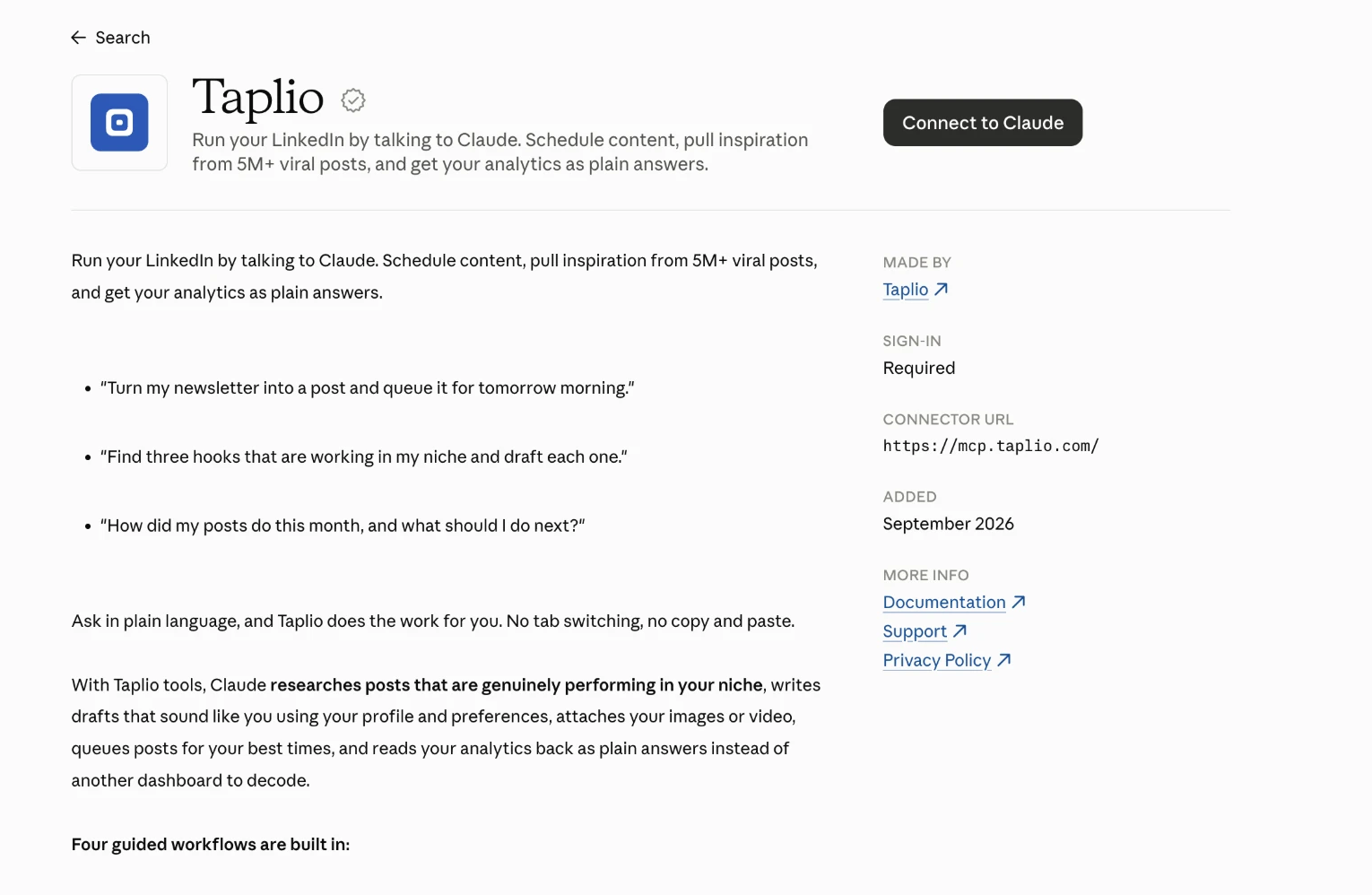
The listing shows who made the connector, that sign-in is required, the connector URL (https://mcp.taplio.com/) and the date it was added. Click Connect to Claude.
Claude sends you to Taplio to sign in. Log in with the account you use for LinkedIn. New to Taplio? You can create your account in the same window and come back to the flow.
Step 3. Review the permissions and click Allow access
Taplio shows a consent screen titled "Claude is requesting access to your Taplio account". It lists six groups of capabilities and the LinkedIn account they apply to. Read it, then click Allow access. You land back in Claude with Taplio connected.

To check that it works, paste one of the prompts from the listing into a new chat:
- "Turn my newsletter into a post and queue it for tomorrow morning."
- "Find three hooks that are working in my niche and draft each one."
- "How did my posts do this month, and what should I do next?"
What you can ask Claude to do once Taplio is connected
The consent screen groups the 30 tools into six jobs. Here is what each one means in practice.
| Permission group | Tools | What you can ask |
|---|---|---|
| Read your account & analytics | 5 | "Which of my posts got the most comments in September?" |
| Create, edit & delete drafts | 8 | "Rewrite this draft with a sharper hook and attach my last image." |
| Schedule & publish | 3 | "Queue these three drafts for Tuesday, Wednesday and Thursday at 9am." |
| Find inspiration | 1 | "Show me viral posts about pricing pages from creators under 20k followers." |
| Find posts to engage with | 11 | "Find five posts in my niche worth commenting on and draft a comment for each." |
| Grow your network | 2 | "Send a connection request to the three founders who commented on my last post." |
Inspiration search covers more than 5 million viral LinkedIn posts. Drafts use your Taplio profile and preferences, so Claude writes in your voice instead of a generic one.
New in the connector: likes and connection requests
Two jobs that used to need the Taplio app now work from Claude.
- Likes. Claude can like a post or a comment you choose. The like joins a send queue that paces likes and follows office hours, so it goes out minutes later or the next morning, never in a burst. Asking twice does not like twice.
- Connection requests. Claude can queue a connection request by LinkedIn username, and check which requests are pending, sent or failed so nobody gets invited twice. Invitations go out without a note, because LinkedIn caps noted invitations far lower than plain ones.
They pair with the commenting tools we shipped in Taplio LinkedIn MCP 2.0: find a post, comment on it, like the best replies, then connect with the people who engaged.
Nothing posts on LinkedIn without your go-ahead
Connecting Taplio does not hand your profile to an autopilot. The controls are built into the tools:
- Publishing waits for you. Publishing a draft goes live at once and cannot be undone, so Claude asks you to confirm first. Scheduling keeps a post editable until its time slot.
- Comments, likes and invitations are queued. They leave through a paced send queue rather than all at once, which keeps your activity close to a human rhythm.
- You decide what runs without asking. Claude's connector settings let you choose which Taplio tools it can use freely and which need your approval each time.
- You can revoke access anytime. Disconnect from Taplio settings, or remove the connector in Claude.
The same Taplio connector works in ChatGPT, Manus, Cursor and Claude Code
The directory listing is the easiest path in Claude, but the server behind it speaks the open Model Context Protocol, so other AI tools can use it too:
- ChatGPT: add a custom connector with the URL
https://mcp.taplio.com. - Cursor: add the same URL as a remote MCP server in your MCP settings.
- Manus: Taplio is available as a native plugin, no URL needed.
- Claude Code: run
claude mcp add --transport http taplio https://mcp.taplio.comin your terminal.
For a side-by-side view of every option, see our comparison of LinkedIn MCP servers. And if you are still wondering whether Claude can reach LinkedIn at all, this explainer answers it.
To go further, add the 26 free Claude Skills for LinkedIn. The connector gives Claude the hands, the Skills give it the playbook: post writing, hook testing, comment routines, analytics reviews. The install guide takes five minutes.
Taplio Claude connector FAQ
Is the Taplio connector for Claude free?
Adding the connector is free. It runs on your Taplio account, and Taplio plans start at $39 per month with a 7-day free trial. If your plan does not include a tool, Claude tells you.
I already added Taplio as a custom connector. Do I need to change anything?
No, the custom connector keeps working. If you prefer the official listing, remove the custom one first and connect from the directory, so you do not end up with two Taplio connectors in the same chat.
Does Claude get my LinkedIn password?
No. You sign in to Taplio, not to LinkedIn, and Claude receives an access token limited to the Taplio MCP scope. You can revoke it anytime in Taplio settings.
Can Claude post on LinkedIn without asking me?
Claude confirms with you before it publishes a post. Comments, likes and connection requests go through a paced queue, and Claude's connector settings let you require approval for any tool.
Which Claude apps does the connector work in?
Once connected, the connector is tied to your Claude account, so you can use it on claude.ai and in the Claude desktop and mobile apps.
What is the difference between the Taplio connector and the Claude Skills?
The connector lets Claude act on your Taplio account: read analytics, write drafts, schedule posts, comment and connect. The Skills are reusable instructions that tell Claude how to do a LinkedIn task well. They work best together.
Connect Taplio to Claude today
If you remember one thing: Taplio is now one search away inside Claude. No URL, no custom setup, three steps and you are writing, scheduling and engaging on LinkedIn from a conversation.


Keep reading
All articlesRelated Articles

.avif)
Your Linkedin AI coach is waiting for you
Join 12,000+ creators who let their coach turn the blank page into a plan and watch their audience compound.
7-day free trial · 30 day money back · Cancel anytime