
Pricing


AI writer

Taplio
MCP V2
New: Engage tools
Taplio MCP V2 now available, try it out
Your AI can now comment and reply for you. It finds the posts worth engaging, drafts in your voice and queues them on your Taplio account. Nothing posts until you confirm.

Can ChatGPT post on LinkedIn? The honest 2026 answer (apps, plans, limits)


8
min read

 Open in ChatGPT
 Open in Claude
 Open in Perplexity
Key Takeaways
- Can ChatGPT post on LinkedIn: not natively, since ChatGPT has no built-in LinkedIn publishing and the official LinkedIn plugin only looks up professionals, but adding Taplio as a custom MCP server at https://mcp.taplio.com lets ChatGPT draft, schedule and publish posts after your confirmation, with 50 free MCP calls to start and write access limited by OpenAI to some plans.
- Exact setup path: on ChatGPT web open Plugins, click +, choose Add custom MCP server, name it Taplio, paste https://mcp.taplio.com, sign in with Taplio, click Create as a plugin, then type @ in a chat to call it, with no Developer Mode needed.
- Plan that decides it: OpenAI's help article (updated around October 28, 2026) gives full custom MCP support to ChatGPT Business and Enterprise or Edu on the web, read and fetch only to Pro, and does not mention Plus, which Taplio has not yet verified.
- Check before connecting: confirm the route is a connector rather than a browser extension that LinkedIn prohibits, that every write action waits for your OK, and that the 3 known limits suit you: no DMs, no profile editing, no list of who liked a post.
- Decision rule: choose the Taplio connector on ChatGPT Business or Enterprise, test a single draft first on Plus or Pro, use Codex with codex mcp add taplio if you work in a terminal, and copy and paste by hand if your plan blocks write actions.
No, ChatGPT cannot post on LinkedIn on its own. There is no built-in publishing feature, and the official LinkedIn plugin in ChatGPT only looks people up. To get ChatGPT to draft, schedule and publish posts on your profile, you add a connector such as the ChatGPT + LinkedIn setup from Taplio, and you confirm every action before it goes out.
The catch is your ChatGPT plan. OpenAI only grants full read and write access to custom connectors on some plans, so the honest answer depends on which one you pay for. Here is the full picture: what exists, how to set it up, and where it stops.
Can ChatGPT post on LinkedIn natively
No. ChatGPT has no LinkedIn account toggle and no publish button. On a plain ChatGPT account, the only way to get a post onto LinkedIn is to copy the text, open LinkedIn and paste it yourself.
That is why Google's AI Overview says there is no native integration. It is right about posting, but it misses two things. LinkedIn does ship an official plugin inside ChatGPT, and ChatGPT supports custom MCP servers, which is the door a posting tool comes through.
So the precise answer is: ChatGPT cannot post by default, it can post through a connector you add, and your plan decides whether that connector may write.
What the official LinkedIn plugin in ChatGPT does
The official LinkedIn plugin finds people, it does not publish. OpenAI's LinkedIn plugin page lists LinkedIn as the developer and describes it as a way to "look up any professional on LinkedIn without leaving ChatGPT".
The plugin returns a person's title, company, location and follower count, with a link to their full profile. The use cases OpenAI shows are attendee briefs, profile checks and speaker background reviews. None of them writes a post, a comment or a connection request.
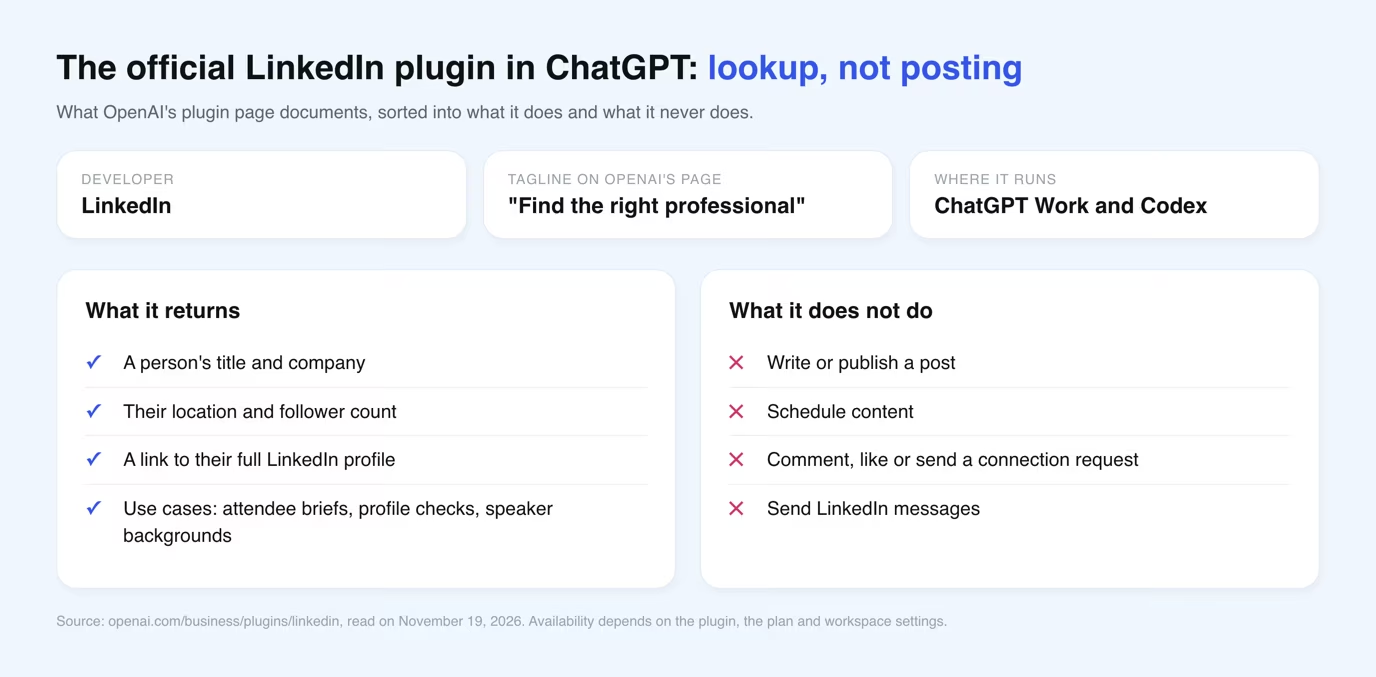
OpenAI also notes that availability "depends on the plugin, your plan, and workspace settings". Use it for research on people, not for content.
Four ways to get ChatGPT content onto LinkedIn
There are four routes, and only one lets ChatGPT post for you without touching LinkedIn's website as a robot.
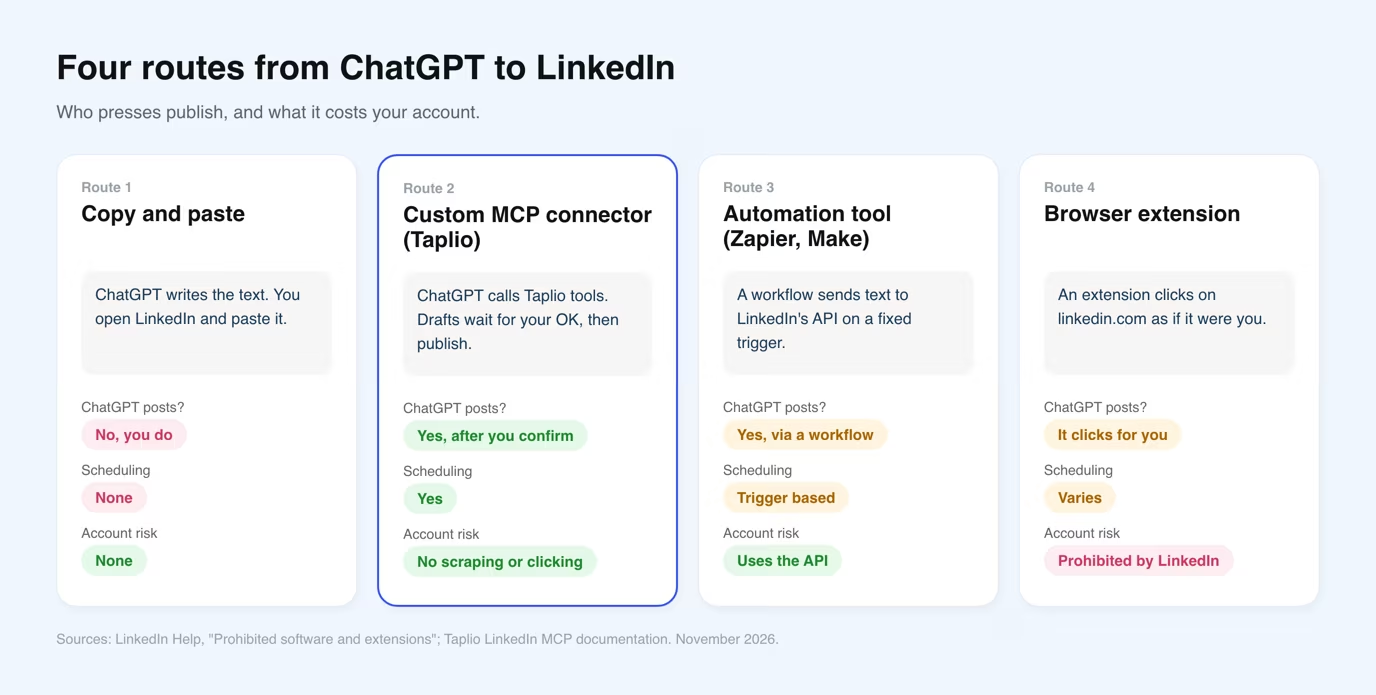
| Route | Does ChatGPT post? | Setup | Main limit |
|---|---|---|---|
| Copy and paste | No, you do | None | Manual every time, no scheduling |
| Custom MCP connector (Taplio) | Yes, after your confirmation | About two minutes on ChatGPT web | Write access depends on your ChatGPT plan |
| Automation tool (Zapier, Make) | Yes, through LinkedIn's API | Build a workflow | Fixed triggers, not a conversation |
| Browser extension | It clicks for you on linkedin.com | Install an extension | Banned by LinkedIn's rules, account risk |
For a weekly content routine, the connector is the route that fits. You keep talking to ChatGPT, and the posting happens through an account that already has proper LinkedIn access.
How to connect ChatGPT to LinkedIn with Taplio
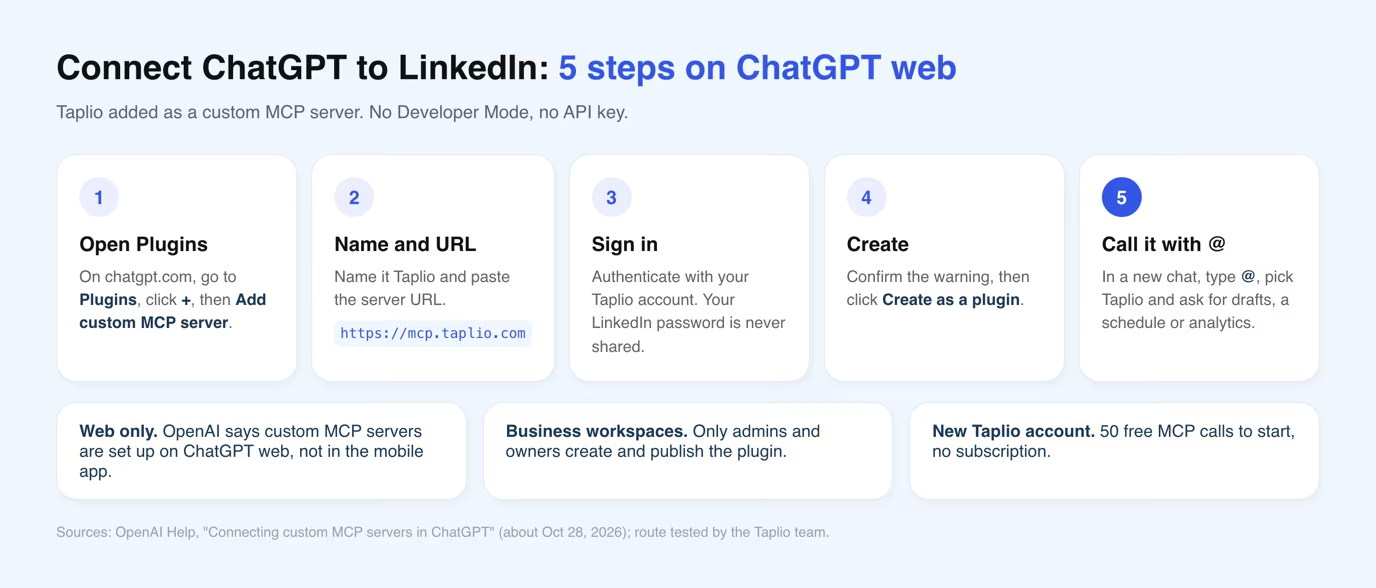
You add Taplio as a custom MCP server on ChatGPT web, sign in with Taplio, then call it with @ in a chat. You do not need to turn on Developer Mode first.
- Open Plugins on chatgpt.com. Click +, then Add custom MCP server. In the older interface, the same option sits under chatgpt.com/apps#settings/Connectors.
- Name it and paste the URL. Call it Taplio and use
https://mcp.taplio.comas the connection. - Authenticate. ChatGPT sends you to Taplio to sign in. No API key to paste, and ChatGPT never sees your LinkedIn password.
- Create it. Confirm the warning, then click Create as a plugin.
- Use it. In a new chat, type @, pick Taplio and ask, for instance, "Write 3 posts from my last newsletter and schedule them for next week."
No Taplio account yet? You can create one during sign-in. A new account gets 50 free MCP calls to start, no subscription needed. The LinkedIn MCP page lists every tool it exposes.
Which ChatGPT plans can post to LinkedIn
According to OpenAI, full custom MCP support, including write actions such as publishing, is for Business and Enterprise or Edu on ChatGPT web. That is stated in OpenAI's help article on connecting custom MCP servers in ChatGPT, updated around October 28, 2026.
| ChatGPT plan | What OpenAI says about custom MCP servers | What it means for LinkedIn posting |
|---|---|---|
| Business | Full MCP support on the web. Only admins and owners create and publish | Drafts, scheduling and publishing, once an admin adds Taplio |
| Enterprise and Edu | Full MCP support on the web | Drafts, scheduling and publishing |
| Pro | "Read/fetch permissions" only | Expect reading, not writing. Not yet verified by Taplio |
| Plus | Not mentioned | Unknown. Not yet verified by Taplio |
| Free | Not mentioned | Do not count on it |
OpenAI also says setup is web only, not in the mobile app. If you are on Plus or Pro, connect Taplio and ask for a draft before you build a routine around it.
What ChatGPT can and cannot do on LinkedIn through Taplio
Once connected, ChatGPT can run most of a LinkedIn content routine, and nothing goes out until you confirm it. Taplio's MCP exposes 35 tools, and ChatGPT asks for your OK before any write action.
- Create: write posts in your voice, attach images, save them as drafts.
- Schedule and publish: queue drafts at your best times, or publish once you confirm.
- Research: search high-performing posts in your niche for hooks.
- Engage: draft comments and replies, like posts, send connection requests through a paced queue.
- Analyze: read your post analytics and turn them into next week's plan.
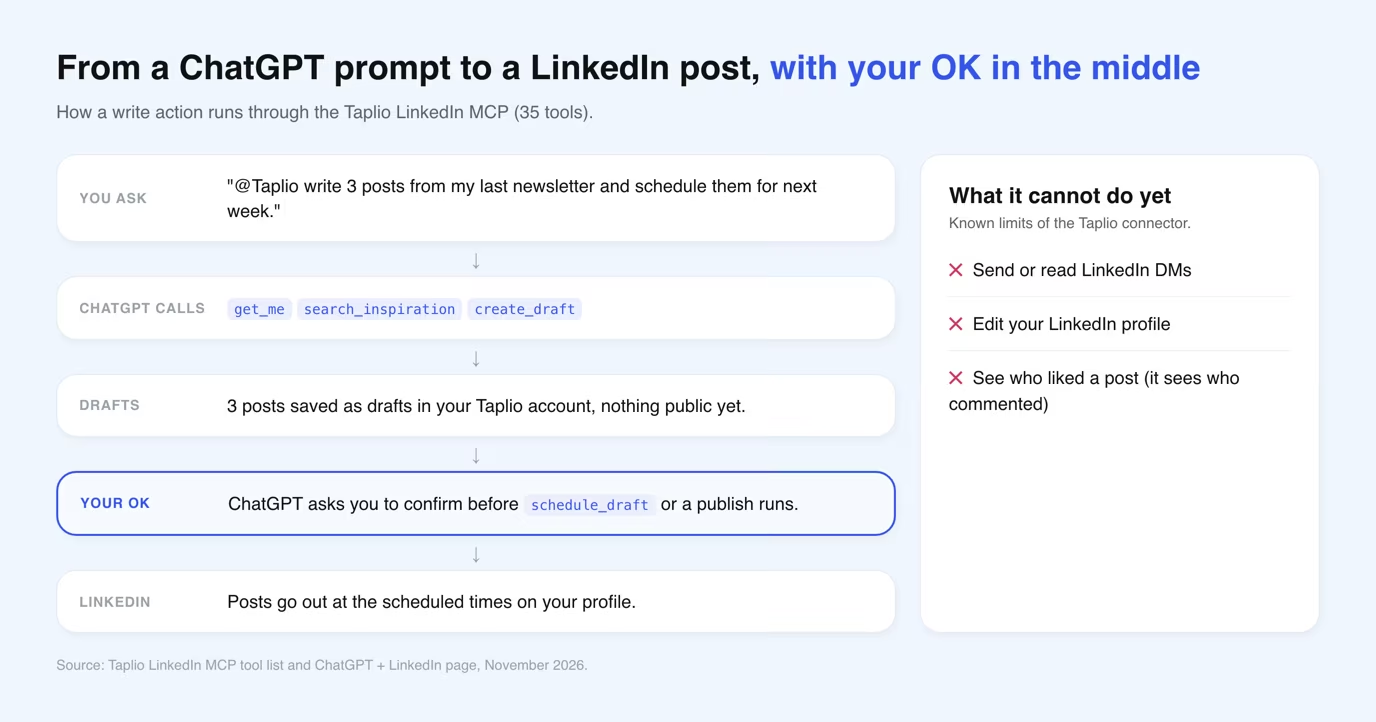
The limits are clear. It cannot send or read LinkedIn DMs, it cannot edit your profile, and it sees who commented on your posts but not who liked them.
Cost: after the 50 free calls, any Taplio plan works. Starter is $39 a month ($32 billed yearly), Growth $69 ($49 yearly) and Pro $199 ($149 yearly), each with a 7-day free trial.
Prefer the terminal? Use Codex
OpenAI's coding agent Codex reaches LinkedIn the same way, through the Taplio MCP server, in two commands.
Run codex mcp add taplio --url https://mcp.taplio.com, then codex mcp login taplio and finish the sign-in in your browser. The Codex + LinkedIn page covers remote machines and how to check the connection.
Is posting from ChatGPT safe for your LinkedIn account
Through a connector, yes. Through a browser extension, no. LinkedIn's help page on prohibited software and extensions bans bots and plug-ins that "automate activity on LinkedIn's website", including tools that create, comment on or like posts.
A connector does not log into LinkedIn as you or click on the website. Taplio keeps posts and comments as drafts until you confirm, and paces likes and invites. You can remove the plugin from ChatGPT settings at any time.
The same logic applies to other assistants. Claude has an official connector, covered in can Claude connect to LinkedIn, and the best LinkedIn MCP servers comparison puts the options side by side.
Frequently asked questions
Can ChatGPT post on LinkedIn for free?
Not reliably. OpenAI does not mention the Free plan for custom MCP servers with write access, which it reserves for Business and Enterprise or Edu. On the Taplio side, a new account gets 50 free MCP calls before a paid plan is needed.
Does ChatGPT have access to LinkedIn profiles?
Only through a plugin. The official LinkedIn plugin can look up a professional's title, company, location and follower count. Through Taplio, ChatGPT reads your own profile and account context, not other people's private data.
Is Taplio an official app in the ChatGPT directory?
No. Taplio is not listed in ChatGPT's directory. You add it yourself as a custom MCP server with the URL https://mcp.taplio.com, which uses the MCP support built into ChatGPT.
Can ChatGPT send LinkedIn messages?
No. Neither the LinkedIn plugin nor the Taplio connector sends or reads LinkedIn DMs. Through Taplio, ChatGPT can draft comments, reply to comments on your posts and send connection requests.
Can I set it up in the ChatGPT mobile app?
No. OpenAI says custom MCP servers are set up on ChatGPT web only. Add Taplio on chatgpt.com from a computer.
How to use AI for LinkedIn?
Use it for the work around the post: finding angles that already performed in your niche, drafting in your voice, scheduling, and reading your analytics. Keep a human check before anything is published, which a connector like Taplio enforces by asking for confirmation.
Does LinkedIn have a chat feature?
Yes, LinkedIn has its own messaging inbox for direct messages between members. It is separate from ChatGPT, and no ChatGPT connector covered here can read or send those messages.


Keep reading
All articlesRelated Articles



Your Linkedin AI coach is waiting for you
Join 12,000+ creators who let their coach turn the blank page into a plan and watch their audience compound.
7-day free trial · Cancel anytime