
Pricing


AI writer

Taplio
MCP V2
New: Engage tools
Taplio MCP V2 now available, try it out
Your AI can now comment and reply for you. It finds the posts worth engaging, drafts in your voice and queues them on your Taplio account. Nothing posts until you confirm.

LinkedIn profile as a CV: template and structure


8
min read

 Open in ChatGPT
 Open in Claude
 Open in Perplexity
Key Takeaways
- LinkedIn profile CV template: map each CV section to one profile section, job title to the 220 character headline, summary to the 2,600 character About, bullets to Experience, references to Recommendations.
- How to build the template: fill the headline and About first, then rewrite each role as situation, action and result, then add skills, education and a recommendation.
- The number that decides the photo: LinkedIn Help states that members with a profile photo receive up to 2X more profile views.
- What to check before publishing: a job title with two or three keywords in the headline, a hook and one proof point in About, a number in every role, and skills tied to the target job.
- Decision rule: use the profile as your main CV and export it with Save to PDF, limited to 200 downloads per month on desktop, when an employer asks for a file.
A LinkedIn profile works as a CV when each CV section sits in its matching profile section: job title in the headline, summary in About, bullets in Experience. The difference is that the profile is public, searchable and backed by other people, so it needs results and keywords rather than a list of duties.
This guide gives you a copyable template, section by section, with a filled profile you can compare against your own. If your goal is the upload feature itself, read how to add a resume to LinkedIn instead.
How to structure a LinkedIn profile like a CV
Keep the CV order and rename each block to its LinkedIn field. LinkedIn describes the profile as a professional landing page for managing your personal brand, which is a different job from a one page PDF sent to one employer.
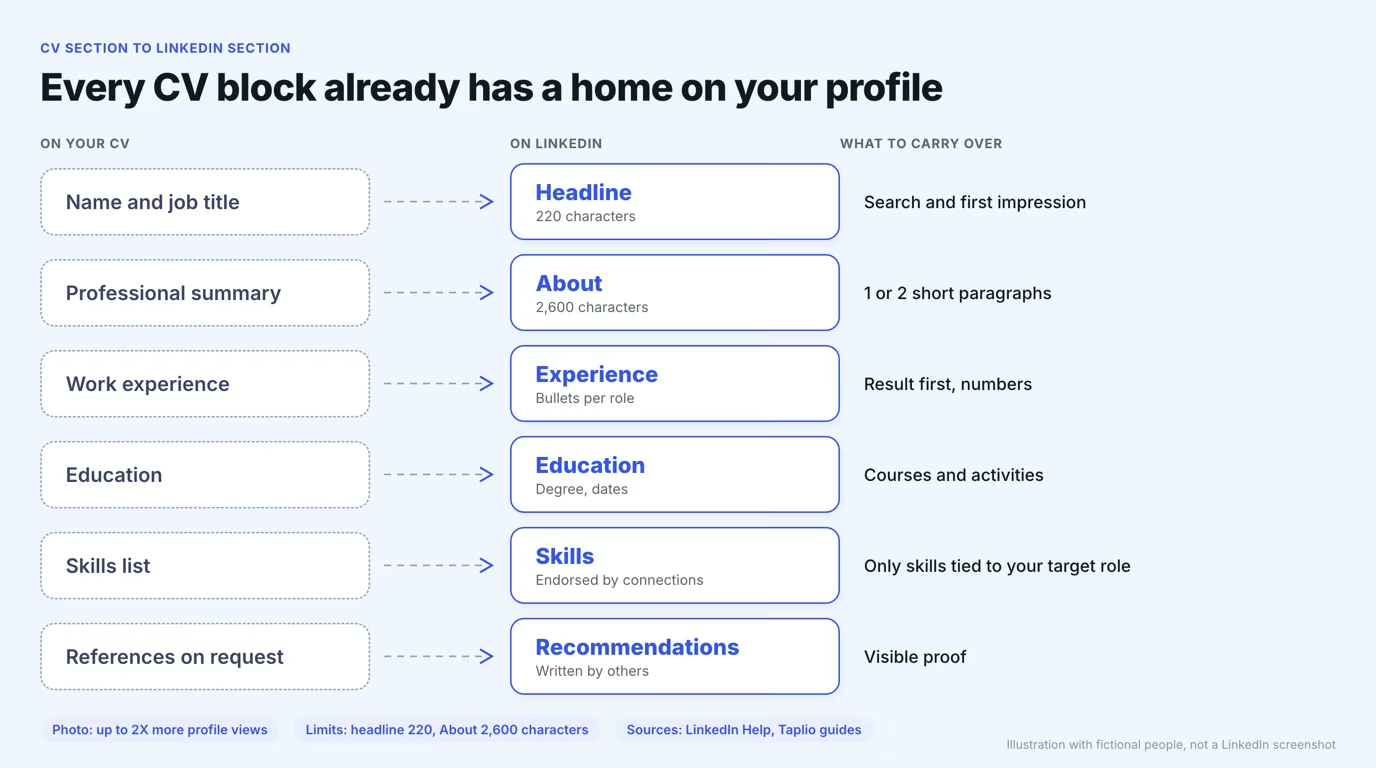
| CV section | LinkedIn section | What changes |
|---|---|---|
| Name and job title | Headline | Add keywords and who you help, up to 220 characters |
| Professional summary | About | Open with a hook, keep it to one or two paragraphs |
| Work experience | Experience | Result first, with numbers and tagged skills |
| Education | Education | Add courses and activities only if they support your target role |
| Skills list | Skills | Keep skills tied to your target role so connections can endorse them |
| References on request | Recommendations | Visible proof written by others, with no cap on requests |
Fill the sections in that order. The headline and About are the first lines a visitor reads, so spend your first hour there.
Headline: the CV title line
Your headline is the CV title line with keywords added, and it can run up to 220 characters, the limit career writer Brenda Bernstein reported when LinkedIn raised it from 120 in 2020. By default LinkedIn builds it from your current position, but you can rewrite it to promote an expertise or let your personality show, according to LinkedIn Help.
Three patterns cover most job seekers. Each profile card below uses one, with its character count and what it costs you.
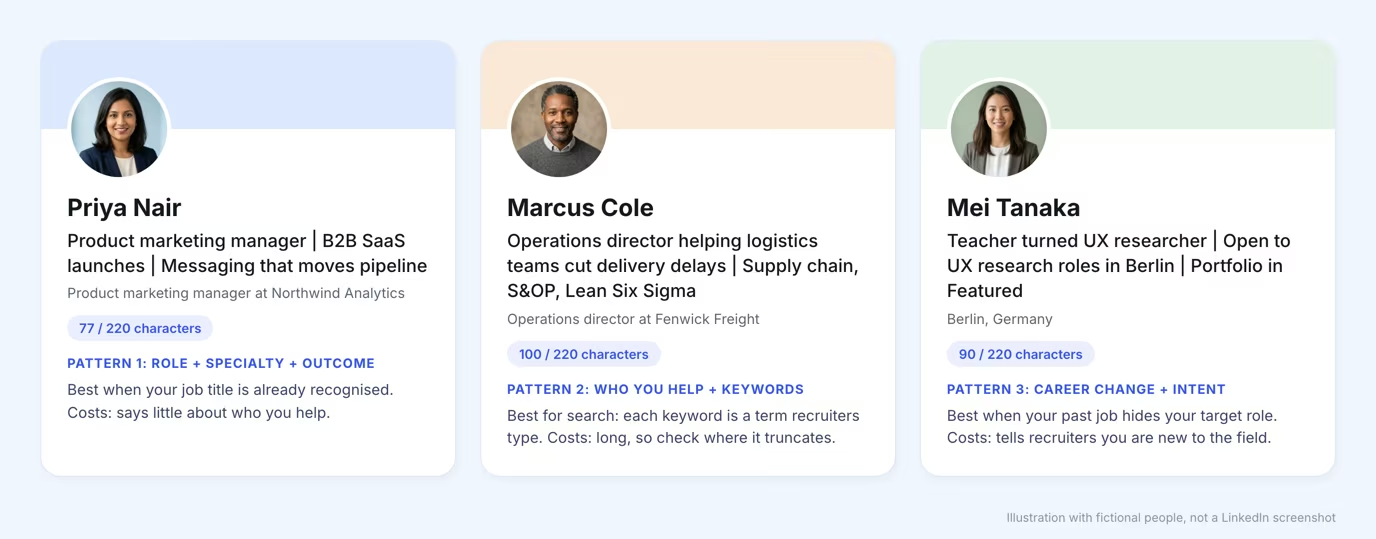
- Use pattern 1 when your title is already recognised in your field.
- Use pattern 2 when you want to be found by search terms.
- Use pattern 3 when your last job title hides the role you want next.
For more wording ideas, browse these LinkedIn headline examples, or draft options with the LinkedIn headline generator.
About: the CV summary
The About section replaces your CV summary, and it needs a hook, not a list of adjectives. LinkedIn suggests one or two paragraphs, or bullet points if you prefer, and the field accepts up to 2,600 characters.
A CV summary such as "results-driven professional with a proven track record" fits a document an employer asked for. On a profile it is skipped, because nothing in it is specific. Rewrite it in five short parts.
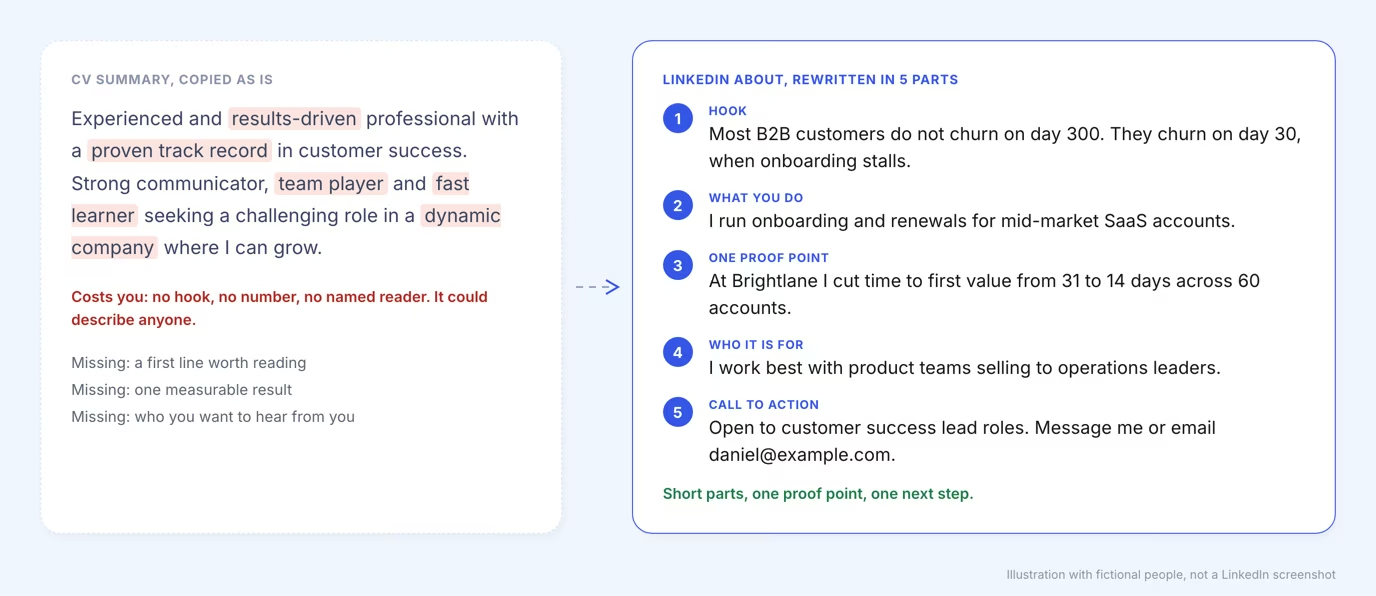
The full method, with role-based versions, is in the guide on how to write a LinkedIn summary.
Experience: the CV bullets
Experience is where a CV bullet becomes proof. Write each bullet in the STAR format that university career centers teach: the situation or task, the action you took, and the result, with numbers where you can, as the SFSU career center puts it.
A duty tells a reader what you were assigned. A result tells them what you changed. Compare the two versions of the same role.
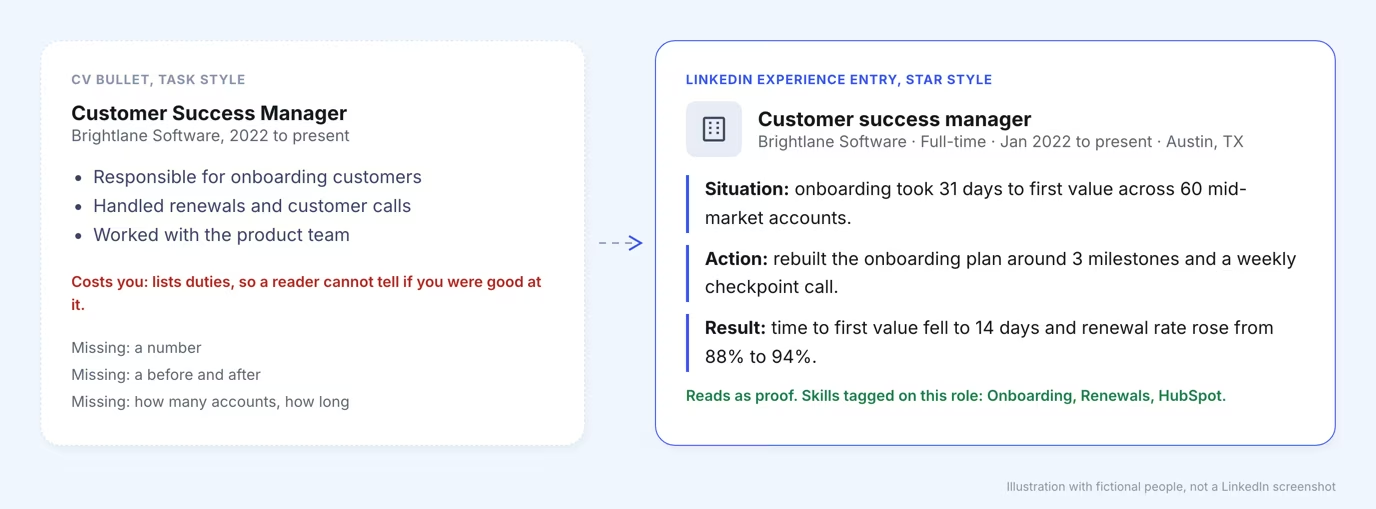
Use two or three bullets per role, most recent first. Tag the skills you used in each role so the Skills section is backed by evidence.
Education, skills and recommendations
These three sections replace the short blocks at the bottom of a CV, and they do more work online. Education stays brief, skills get endorsements, and recommendations replace the line "references on request".
- Education: degree, school and dates. Add courses or projects only when they match the role you want.
- Skills: list the skills your target job posts ask for. LinkedIn Help notes that endorsed skills increase your chance of being discovered for related opportunities.
- Recommendations: ask two people who saw your work. There is no limit on how many you can request, and you can hide any that do not suit your goals.
Add a clear, friendly photo as well. LinkedIn Help states that members with a profile photo receive up to 2X more profile views.
A filled LinkedIn profile template
Here is the whole structure filled in for one fictional customer success manager. Copy the order and the level of detail, then replace the content with your own.
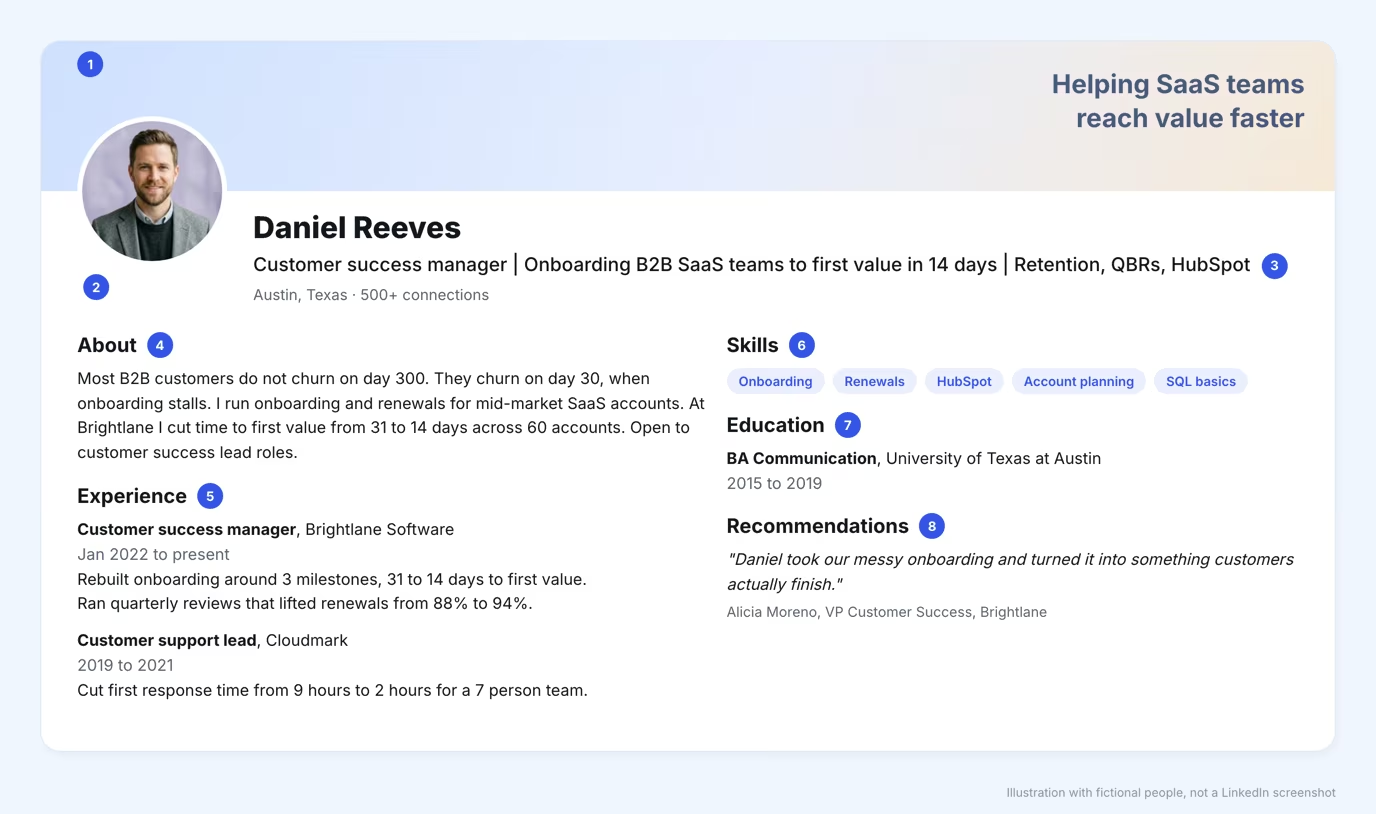
- Banner: one line saying who you help.
- Photo: face centered, plain background.
- Headline: job title, outcome and two or three keywords.
- About: hook, what you do, one proof point, call to action.
- Experience: two or three result-first bullets per role.
- Skills: five or so, all tied to the target job.
- Education: degree, school, dates.
- Recommendations: one quote from a manager or client.
For a guided pass over your own profile, the LinkedIn profile optimization page covers the same sections.
What LinkedIn adds that a CV cannot
A profile does four things a PDF cannot: it gets found by search, it shows proof from other people, it stays current, and it lets you be seen before you apply. A CV is a snapshot sent to one reader, while a profile is a standing page that recruiters can open at any time.
| Feature | CV | LinkedIn profile |
|---|---|---|
| Audience | One employer | Anyone searching or visiting |
| Proof | Written by you | Recommendations and endorsements from others |
| Updates | New file each time | Edited in place, always current |
| Length | One or two pages | Sections you can expand and collapse |
| Extras | None | Media samples, activity, personal URL |
Use that difference. Put the strongest result in your headline and About, and let recommendations carry the claims you would otherwise have to argue yourself.
How to turn your profile into a PDF CV
Once the profile is complete you can export it as a CV in a few clicks, so you maintain one source instead of two. On desktop, open your profile, click More or Resources in the introduction section, then choose Save to PDF.
The LinkedIn Help page on saving a profile as a PDF lists the limits: the feature is not available on the mobile app, it needs English as the profile language, and you can download 200 PDFs per month.
The export mirrors your sections, so trim it before you send it. Keep the roles that fit the job, move your headline keywords to match the posting, and check that dates and punctuation are consistent. Career centers also advise matching job-description keywords, because applicant tracking systems filter on them.
Mistakes to fix when you copy a CV into LinkedIn
The most common mistake is pasting the CV unchanged, which keeps its limits and loses the profile's strengths. Check your page against these four problems.
- A job title only in the headline: add the outcome and two or three keywords a recruiter would type.
- A summary of adjectives: replace "team player" with one result and the reader you want.
- Duties instead of results: every role needs at least one number.
- No proof from others: request recommendations from two people who managed or hired you.
Frequently asked questions
What is the best format for a CV on LinkedIn?
Use the profile sections LinkedIn already gives you, in the order a CV uses: headline, About, Experience, Education, Skills, Recommendations. Keep the headline to one line of keywords, the About to one or two paragraphs, and every role to two or three result-first bullets. If a recruiter asks for a file, export the profile as a PDF and trim it to the roles that match the job.
How do I create a CV for LinkedIn?
Start from your existing CV and move each block into its matching profile section: job title to headline, summary to About, bullets to Experience. Then rewrite the bullets as situation, action and result, add a photo, and ask two former colleagues for recommendations. LinkedIn Help notes that members with a profile photo receive up to 2X more profile views.
What is the 7 second rule in resume?
The 7 second rule is a recruiting rule of thumb: a reader decides in the first few seconds of a skim whether a resume deserves a full read. The exact figure comes from no LinkedIn source, so treat it as a reminder to lead with your strongest line. On a profile, that skim covers the photo, headline and first lines of About, so put your proof there.
How do I write my LinkedIn CV?
Write for one target role. Pick the job title you want, put it in the headline with two or three keywords, open the About with a problem or a result, and turn each role into numbers. Then check that every section answers one question: what do you do, for whom, and how do you know it works.


Keep reading
All articlesRelated Articles


Your Linkedin AI coach is waiting for you
Join 12,000+ creators who let their coach turn the blank page into a plan and watch their audience compound.
7-day free trial · Cancel anytime