
Pricing


AI writer

Taplio
MCP V2
New: Engage tools
Taplio MCP V2 now available, try it out
Your AI can now comment and reply for you. It finds the posts worth engaging, drafts in your voice and queues them on your Taplio account. Nothing posts until you confirm.

Boosted and promoted LinkedIn posts: are they worth it?


11
min read

 Open in ChatGPT
 Open in Claude
 Open in Perplexity

Key Takeaways
- Promoted posts on LinkedIn: a boosted post is an organic post that LinkedIn turns into an ad, with Page boosts budgeted above $25 per day, and it is worth the spend only when the post already beat your normal engagement.
- Boost button versus Campaign Manager: the Boost button promotes one post from a profile or Page with a light setup, while Campaign Manager adds full objective, audience, bid and budget controls.
- The number that decides: at $25 per day, a 7-day boost is $175 and a 31-day boost is $775, and a profile boost has a locked budget that cannot be changed after launch.
- Criteria before boosting: a post above your average, a boostable type (not a poll, document or event on a profile), one goal, a funded schedule and an audience between 50,000 and 500,000.
- Decision rule: boost one proven post as a fixed-budget test, and otherwise keep posting on a schedule, because a boost ends with its budget and a queue does not.
A boosted LinkedIn post is an organic post you pay to turn into an ad. Boosting is worth it for a post that already beat your normal engagement, with one clear goal and a budget above $25 a day. It is rarely worth it as a growth habit, because the reach stops when the spend does. This guide covers how promoted posts work, what they cost, a five-check test before you spend, and why a consistent organic rhythm usually wins.
What is a boosted or promoted post on LinkedIn?
A boosted post is a post you already published that you pay LinkedIn to show to a wider audience. LinkedIn Help is direct about the mechanism: boosting a post turns the post into an ad. The word "promoted" is the label that goes with that paid delivery, since LinkedIn's marketing guidance says sponsored posts must be clearly marked as promoted or paid.
Boosting works on content you have already built. You do not write a new ad. You press Boost on a post, choose an audience and a budget, and LinkedIn runs the same post as a campaign.
What happens after you press Boost
The ad is reviewed before it can be shown to members in your target audience, usually within 24 hours. Delivery then runs until the budget is spent or the end date arrives, whichever comes first. Both old and new posts can be boosted.
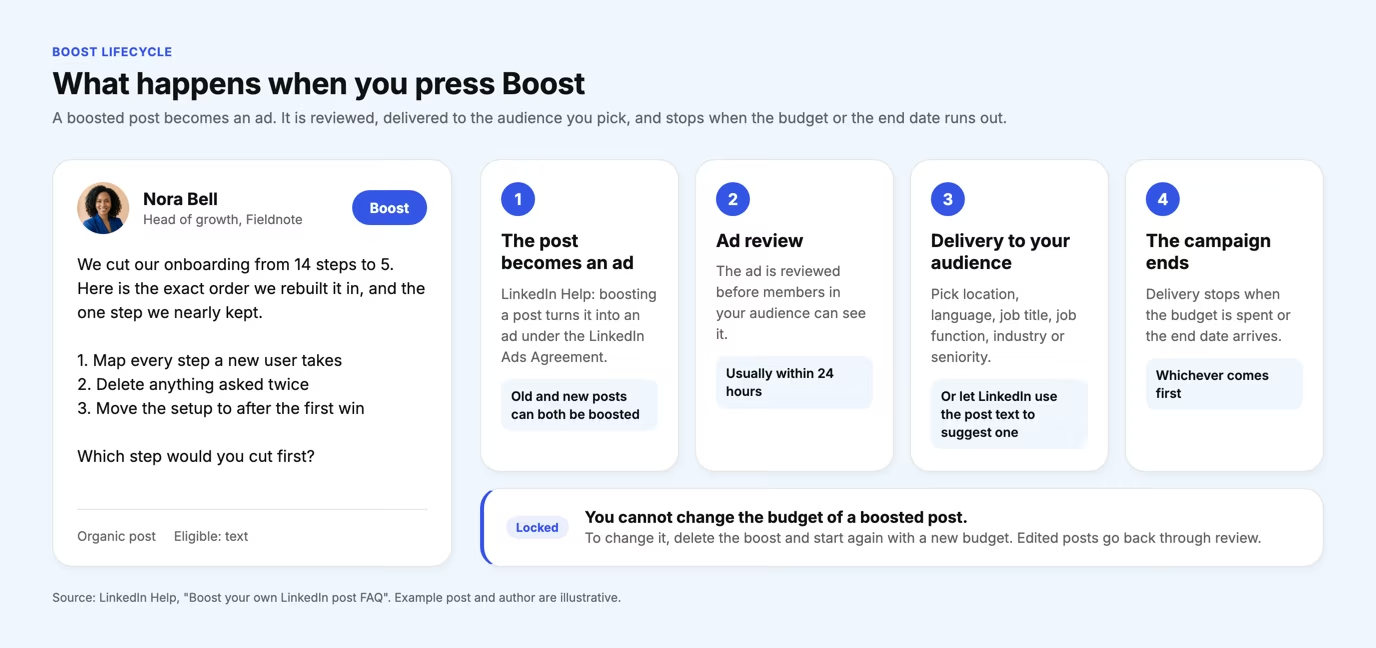
One rule catches people out. You cannot change the budget of a boosted profile post. To change it, you delete the boost and boost the post again with a new budget. If you edit the post itself, the edited version goes back through review before your audience sees it.
Boost button or Campaign Manager: which one promotes your post?
The Boost button promotes a single post with a light setup, while Campaign Manager gives you the full advertising controls. LinkedIn says boosting from a Page offers a lighter creation experience but limits the options for objectives, audience criteria, bid and budget. For the complete set, you build the campaign in Campaign Manager.
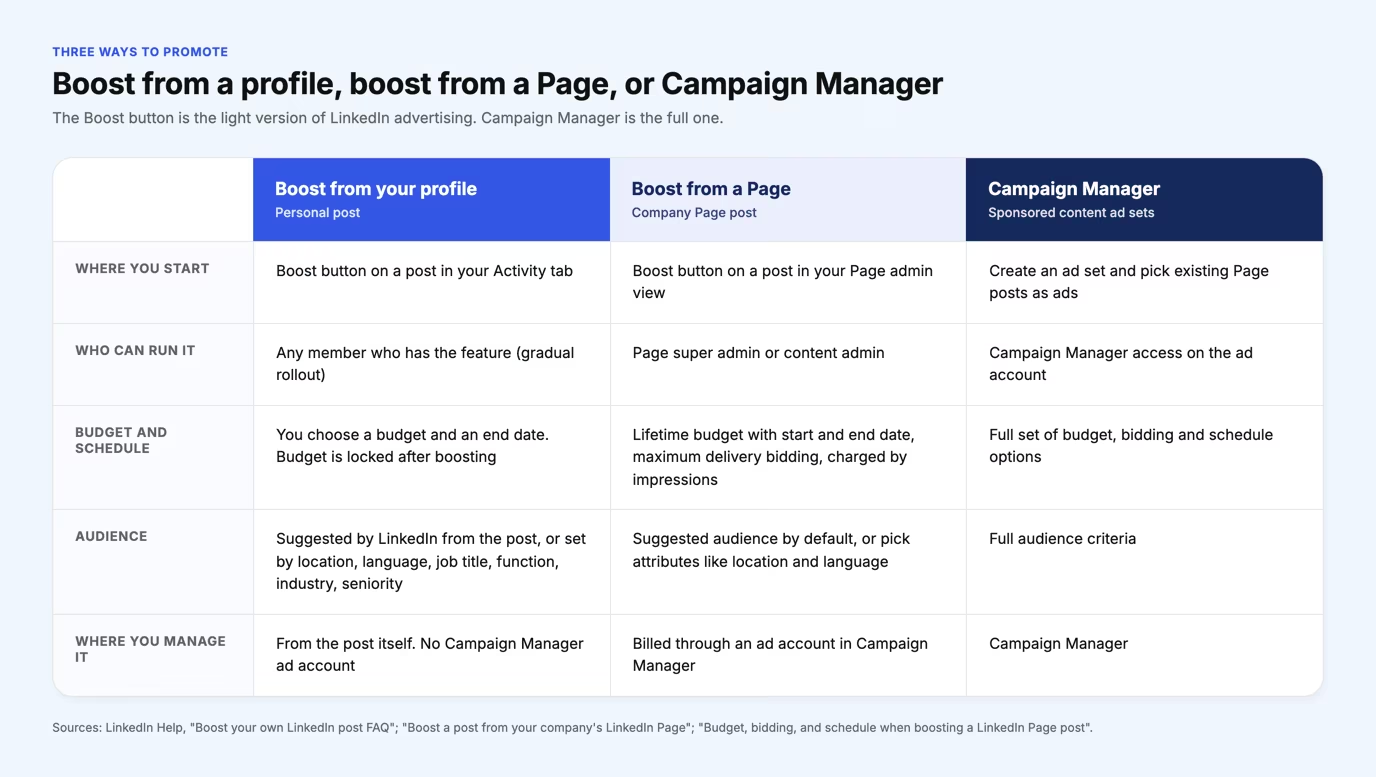
Boosting from a profile and boosting from a Page are different features with different rules. A profile boost lets individual members promote their own posts. Thought Leader Ads are a separate product, where company Pages sponsor posts from members affiliated with them.
A Page boost is charged by impressions, with maximum delivery bidding and a lifetime budget between a start and end date. A Page boost offers four objectives: brand awareness, engagement, video views and website visits. It is billed through an ad account in Campaign Manager, and you can only start it from desktop.
This article is about the native Boost button. If you need the full ad formats and the Campaign Manager workflow, the guide to LinkedIn sponsored updates covers them in detail.
Which posts can you boost?
You can boost text, image, video, article and newsletter posts from a profile, while polls, documents, events, group posts and connections-only posts are excluded. Page posts follow a slightly different list. The table sets the two side by side, based on LinkedIn Help.
| Post type | Boost from a profile | Boost from a Page |
|---|---|---|
| Text post | Yes | Yes |
| Image post | Yes, single or multi-image | Yes, single image |
| Video | Yes | Yes |
| Article or newsletter | Yes | Yes, authored by the Page |
| Document | No | Yes |
| Event | No | Yes, you must be an organizer |
| Poll | No | No |
| Group post or connections-only post | No | Not listed by LinkedIn |
A Page post that was boosted before cannot be boosted again. Plan on one boost per post, and choose carefully.
How much does it cost to boost a LinkedIn post?
LinkedIn does not publish a flat price for a boost. It publishes a floor and a method. The floor is a budget above $25 per day for Page boosts, and LinkedIn notes that the minimum varies with your schedule. The method is an auction: maximum delivery bidding bids for you, and a Page boost is charged by impressions, the number of times the ad is shown.
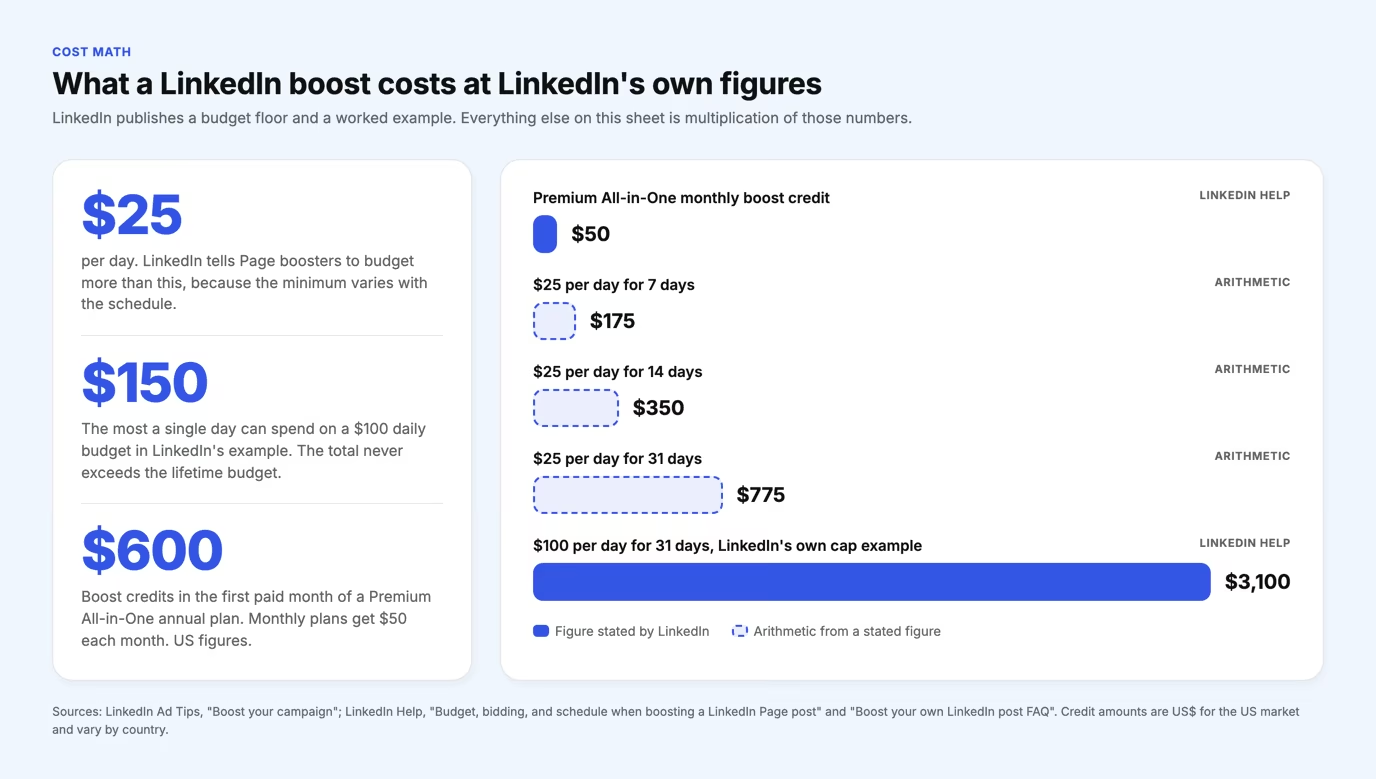
The arithmetic is simple. At $25 a day, seven days is $175, fourteen days is $350 and 31 days is $775. LinkedIn's own worked case uses $100 a day for 31 days, a $3,100 ceiling. Daily spend moves with impression opportunities, so a single day can run to $150 on a $100 daily budget while the total never exceeds the lifetime budget.
Premium All-in-One includes boost credits for personal posts: $100 during the free trial, $600 in the first paid month of an annual plan and $50 each month on a monthly plan. LinkedIn lists these in US dollars for the US market and localizes them by country. The credits cannot be used to boost posts from a Page.
On mobile, a profile boost needs prepaid ad credits, and LinkedIn describes mobile boosting as in testing. Receipts live in the Ads module of the single post analytics page.
When does boosting a post make sense?
Boosting makes sense when five conditions hold at once: the post beat your normal engagement, the type is boostable, you have one goal, the budget is funded and the audience is defined. LinkedIn's own guidance tells you to pick a post with higher than average engagement in likes, shares and comments. The flow below turns that advice into five checks.
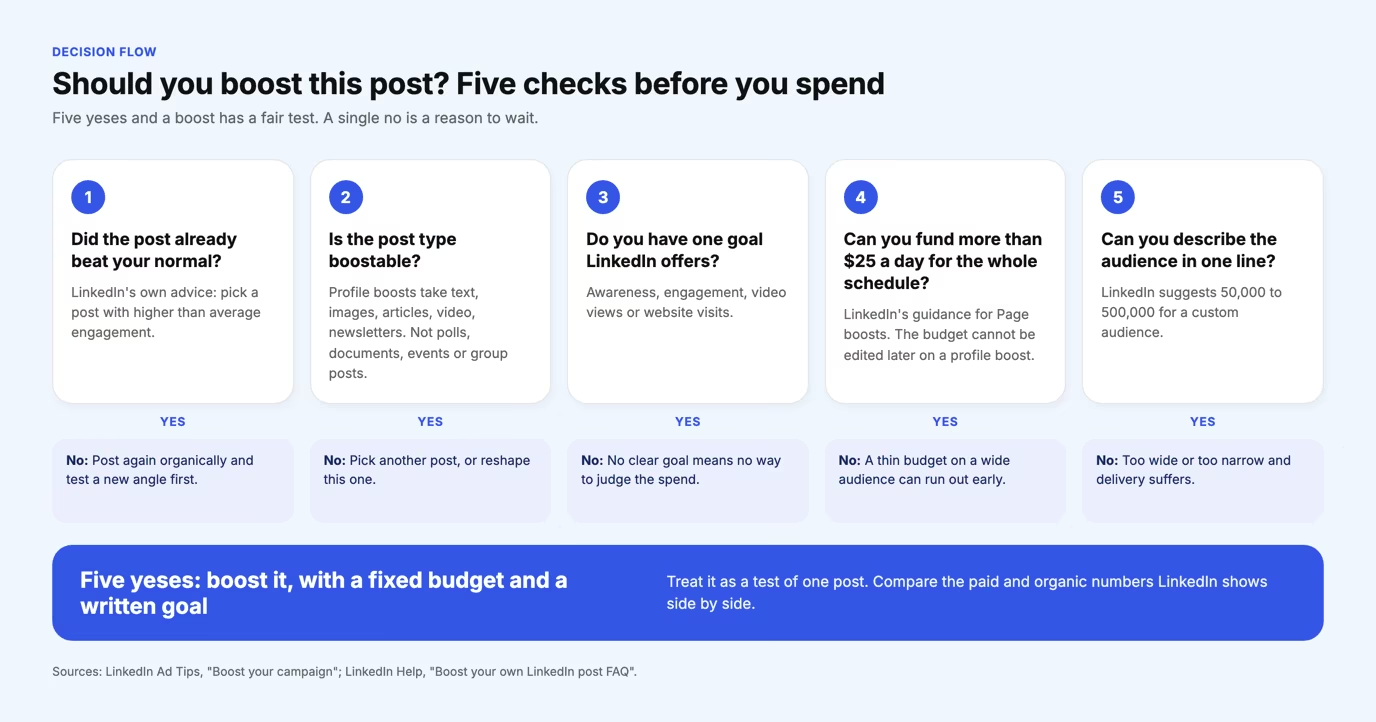
Check 1: the post already worked
Boosting extends a result, it does not create one. A post with weak engagement organically gives the ad auction nothing to build on. To decide what "above average" means for you, compare the post with the median for your follower bracket in the LinkedIn Benchmark, which measures 54,000+ posts a month and reports medians and percentiles instead of one average. The benchmark defines engagement rate as reactions plus comments divided by impressions.
Checks 2 to 5: type, goal, budget and audience
Choose a goal LinkedIn offers, such as awareness or website visits. Fund the full schedule, because a budget that runs out early wastes the test. LinkedIn recommends keeping a custom audience between 50,000 and 500,000, and adding some text to the post, since its AI uses text to choose a suggested audience. A video or image with no text can burn a small budget fast on a wide audience.
LinkedIn also claims that members who boosted personal posts grew followers up to 2x faster. That is the vendor's own number, so use it as a reason to run one controlled test rather than as a forecast.
When is boosting not worth it?
Boosting is not worth it when the post is unproven, the goal is vague or the budget is too thin to finish. It is also a poor fit when you are trying to build a habit. A boost covers one post for one window. It leaves nothing behind once delivery stops.
- The post is average. You pay to show a weak post to more people.
- You have no baseline. Without a posting history, you cannot tell whether a post beat your normal.
- The goal is "more reach". Awareness, engagement, video views and website visits are different goals with different results.
- The budget cannot be topped up. A profile boost has a locked budget, so a small one stops early.
- The post is not eligible. Polls, documents and events cannot be boosted from a profile.
The second point matters most. The first check in the decision flow requires a baseline, and a baseline requires a run of posts. Boosting depends on the thing it is often used to replace.
Why does organic consistency usually beat boosting?
Organic consistency usually wins because it compounds and a boost does not. A boost rents one post a delivery window that ends on a set date. A steady posting rhythm produces the posts, the history and the data that tell you which post deserves a boost in the first place.
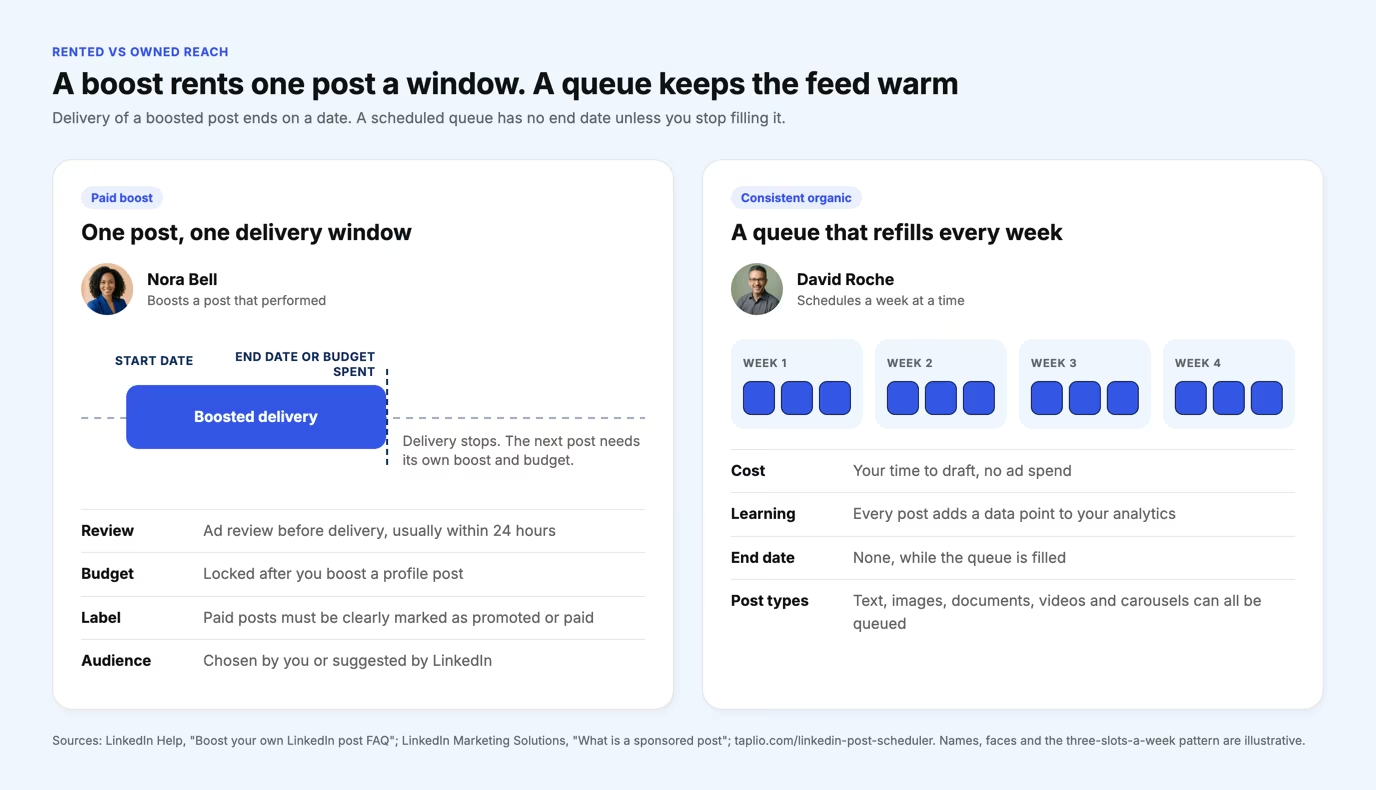
That is an argument from mechanism, not a measured claim, because no public dataset compares the two on equal terms. What LinkedIn documents supports the logic: a boost ends at its end date or when the budget is spent, and a profile boost has a locked budget and a review delay. A post you scheduled last week is still in your history today.
Build the rhythm first
Consistency is mostly logistics. The LinkedIn post scheduler lets you draft a week in one sitting, queue it at suggested best times and publish without opening the app. Taplio does not run paid campaigns. It covers the organic side, and boosting happens on LinkedIn itself.
Before you queue a post, run the draft through the free LinkedIn post booster. You paste your post, and Taplio's AI formats it for readability and improves the copy. A stronger organic post is also a better candidate for a boost later. Taplio plans start at $39 a month with a 7-day free trial and a 30-day money-back guarantee.
How do you judge whether a boost paid off?
You judge a boost against the organic result of the same post, on the goal you set before spending. LinkedIn gives each boosted profile post its own analytics view, with organic performance and paid performance shown separately. Write the goal and the budget down first, then compare.
Keep the comparison fair. Look at the same metric you chose as the goal, such as clicks for website visits or reactions and comments for engagement. Then check the next organic posts, because a one-off spike that fades is a rented result.
For the organic side of that comparison, a LinkedIn analytics tool keeps your post history in one place. That history is the baseline the first check in the decision flow asks for.
Frequently asked questions
Is boosting a post on LinkedIn worth it?
It is worth it when a post has already beaten your normal engagement, you have one goal and you can fund more than $25 a day for the full schedule. It is rarely worth it as a habit. The reach ends with the budget, and you cannot judge a post as above average without a posting history behind it.
Will people know if I boost a post on LinkedIn?
Yes. LinkedIn Help states that boosting turns the post into an ad, and LinkedIn's marketing guidance says sponsored posts must be clearly marked as promoted or paid. Your audience can tell the difference between a post that spread on its own and one you paid to deliver.
How much does it cost to boost a post on LinkedIn?
LinkedIn does not publish a flat price. Its guidance for Page boosts is a budget above $25 per day, and the minimum varies with the schedule. At that floor, seven days comes to $175 and 31 days to $775, before any single day runs above average.
Can you boost a LinkedIn post from a personal account?
Yes, if the feature has reached your account. You boost from the Activity tab on desktop or mobile, and LinkedIn describes the rollout as gradual. You manage the boost from the post itself, not from a Campaign Manager ad account.
Why can't I boost my LinkedIn post?
The usual causes are the rollout, the post type or the role. LinkedIn says personal boosting is released gradually, polls, documents, events, group posts and connections-only posts cannot be boosted from a profile, and Page boosts need a super admin or content admin role. A Page post that was boosted before cannot be boosted again.
How effective is boosting a post on LinkedIn?
LinkedIn claims that members who boosted personal posts grew followers up to 2x faster. That is LinkedIn's own figure, and it does not say what the posts were or what they cost. Run your own test on one post with a fixed budget and compare the paid and organic numbers LinkedIn shows.
Can you boost an old LinkedIn post?
Yes. LinkedIn Help says both old and new posts can be boosted. Pick an old post only if it was above your normal engagement when it ran, since the boost extends a result you already have.


Keep reading
All articlesRelated Articles


.avif)
Your Linkedin AI coach is waiting for you
Join 12,000+ creators who let their coach turn the blank page into a plan and watch their audience compound.
7-day free trial · 30 day money back · Cancel anytime