
Pricing


AI writer

Taplio
MCP V2
New: Engage tools
Taplio MCP V2 now available, try it out
Your AI can now comment and reply for you. It finds the posts worth engaging, drafts in your voice and queues them on your Taplio account. Nothing posts until you confirm.

LinkedIn thought leader ads explained: setup, rules and specs


14
min read

 Open in ChatGPT
 Open in Claude
 Open in Perplexity

Key Takeaways
- What LinkedIn thought leader ads are: LinkedIn thought leader ads are company-sponsored versions of a member's public post, set up in Campaign Manager once the author approves, with 3 available objectives (Brand awareness, Engagement and Video views) and posts open from employees and 1st, 2nd or 3rd-degree+ connections.
- How to set them up in Campaign Manager: Create an ad set with one of those objectives, click Browse existing content, choose LinkedIn members, search the Posts tab, click Request approval, then sponsor the post once the author approves.
- The number that decides which post to promote: LinkedIn's ad type guide advises sponsoring posts less than 30 days old, and LinkedIn's Help Center rules out documents, polls, celebrations, multi-image posts and reposts.
- What to check before requesting a post: The post is public, the author's profile shows their full name, the type is text, single image, video, article, newsletter or event, it already earns replies organically, the company relationship is disclosed, and its organic baseline is saved.
- When to run them: Run thought leader ads when a named employee's post already earns replies from buyers, and build the organic pipeline first if none does; Taplio, from $39 per month with a 7-day free trial and no free plan, drafts, schedules and measures those posts but does not create or manage ads.
LinkedIn thought leader ads are ads built from a member's own public post, which a company promotes through Campaign Manager once the author approves. The post keeps the author's name, photo and words, and LinkedIn labels it as promoted. They run with the Brand awareness, Engagement or Video views objective, and the author can revoke permission at any time.
What LinkedIn thought leader ads are
A thought leader ad is a LinkedIn ad that sponsors a post written by a person, not a brand. LinkedIn's Thought Leader Ads help page describes the format as a way to promote content from LinkedIn members, creators or employees of your company, using authentic member experiences.
LinkedIn's product page for the format names three aims: build credibility through a trusted voice, position your company as an authority, and grow a community around your thought leaders. The ads can appear in the LinkedIn feed and on the LinkedIn Audience Network.
Thought leader ads are a paid distribution step, not a content strategy. If you are still deciding what your experts should say, start with our guide to thought leadership on LinkedIn, then come back once posts are earning replies.
Thought leader ads vs sponsored content vs boosted posts
A thought leader ad sponsors a member's post and needs that member's approval. A boosted post amplifies a post on your own company Page, and a single image ad, the standard Sponsored Content format, is a creative you build from scratch in Campaign Manager.
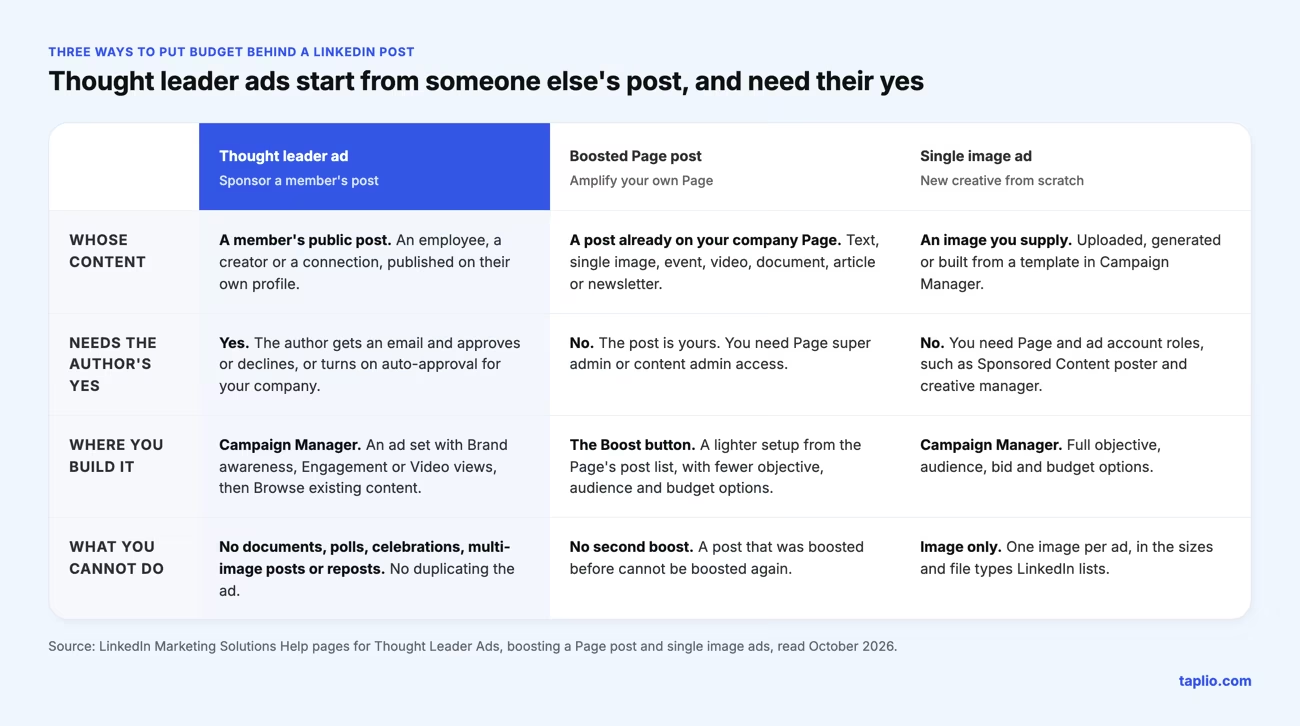
The difference that matters most is ownership. With a boost, the post is yours. With a thought leader ad, the post belongs to a person, so the author decides whether it runs and can end it at any time.
Boosting a post from your own profile is a separate feature again, covered in our guide to LinkedIn promoted posts. For brand-built creative, see LinkedIn sponsored updates.
Who can run thought leader ads and what permissions you need
To set up an ad set with thought leader ads, you need super admin, content admin or Sponsored Content poster permissions on the company Page tied to the ad account. You also need creative manager access or higher on the ad account itself.
If the ad account is tied to a Showcase Page, the permissions are required on the parent company Page. The ad is always tied to the parent Page.
The author has a separate set of requirements, because the post is theirs to give.
| Side | What is required | What it controls |
|---|---|---|
| Advertiser | Super admin, content admin or Sponsored Content poster on the Page, plus creative manager or higher on the ad account | Objective, audience, budget and which approved post becomes the ad |
| Author | A public post and a profile that displays their full name, plus a disclosed relationship with the company | Approving, declining, auto-approval and revoking permission |
Which posts can be promoted as thought leader ads
Public text, single image, video, article and newsletter posts can be promoted, along with eligible collaborative posts and posts from attendees of your Page's LinkedIn Live Event. The post must be public, and the author's profile must display their full name.
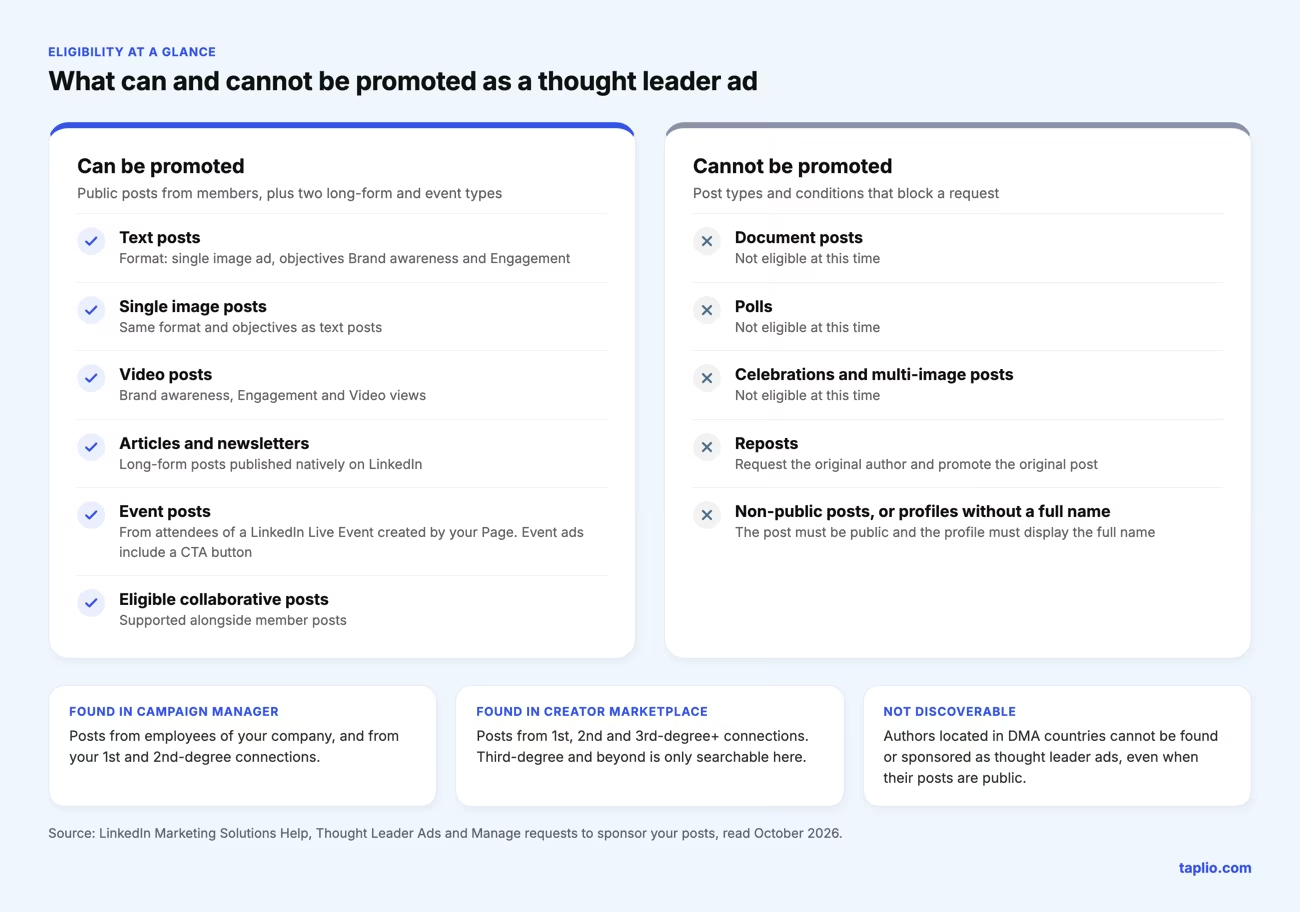
LinkedIn lists several types it does not accept at this time: celebrations, documents, polls and multi-image posts. Reposted content is not eligible either, so you request the original author and promote the original post.
Discoverability depends on the connection. In Campaign Manager you can search posts from employees of your company and from your 1st and 2nd-degree connections. Posts from 3rd-degree and beyond can only be found in Creator Marketplace.
Authors in DMA countries are not discoverable and cannot be sponsored as thought leader ads. There is no limit to the number of requests you can send to each thought leader, and you cannot duplicate a thought leader ad once it exists.
How to set up thought leader ads step by step
Setup comes down to five moves: check your roles, create the ad set, request the post, wait for the author's approval, then sponsor the approved post. The seven clicks listed after the flow follow LinkedIn's guide to creating thought leader ads in Campaign Manager.
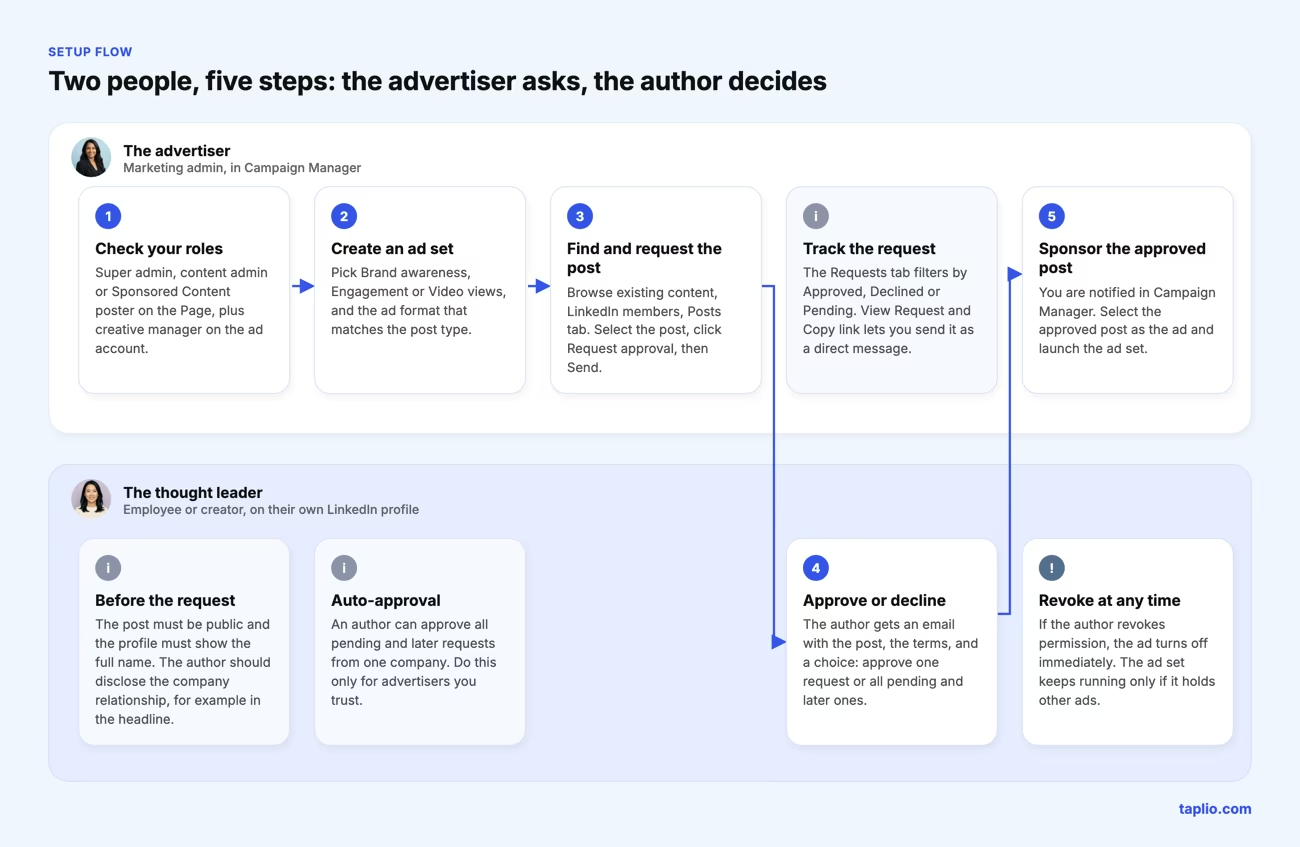
- Confirm your roles. You need Page permission as a super admin, content admin or Sponsored Content poster, and creative manager or higher on the ad account.
- Create or edit an ad set. Choose Brand awareness, Engagement or Video views as the objective, and an ad format that matches the post type. A text or image post uses the single image format, a video post uses the video format.
- Open the Content Library. On the Ads in this ad set page, click Browse existing content, then choose LinkedIn members.
- Find the post. In the Posts tab, search by member name or post URL. Results cover employees of your company and 1st or 2nd-degree connections. Posts from 3rd-degree+ connections are only searchable in Creator Marketplace.
- Request approval. Select the post, click Request approval, then Send in the dialog. You can also use View Request and Copy link to send the request as a direct message.
- Track the answer. The Requests tab filters by Approved, Declined or Pending. The author gets an email notification.
- Sponsor the approved post. Once the author approves, you are notified in Campaign Manager and can select the post as your ad.
Members can approve a single request or all pending and later ones, and can revoke permission afterwards. When that happens you are notified and the ad turns off immediately. The ad set keeps delivering only if it contains other ads.
Thought leader ad examples by post pattern
Three post patterns suit thought leader ads: a leader's text story, an employee's working artifact, and an expert's short video. Each is shown below as it would look in the feed, with a fictional company and author, and each fits a format LinkedIn accepts.
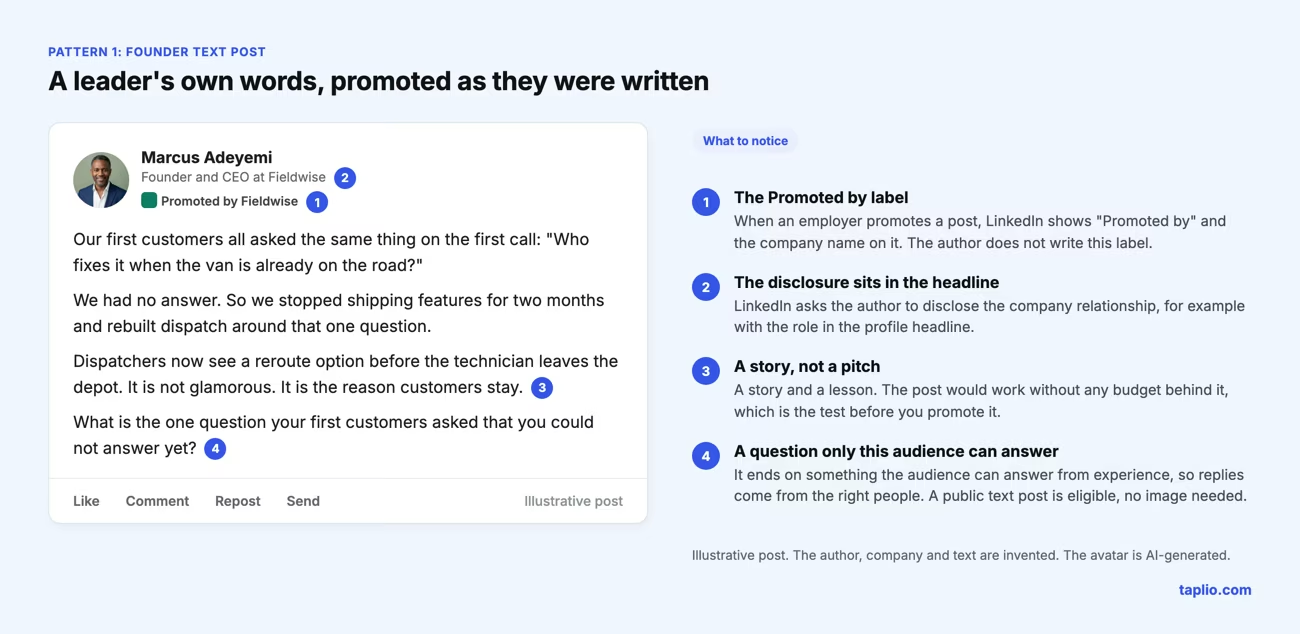
Pattern 1: a founder's text post
A public text post is eligible, so a founder's story needs no image. The post works when it would earn replies without any budget behind it.
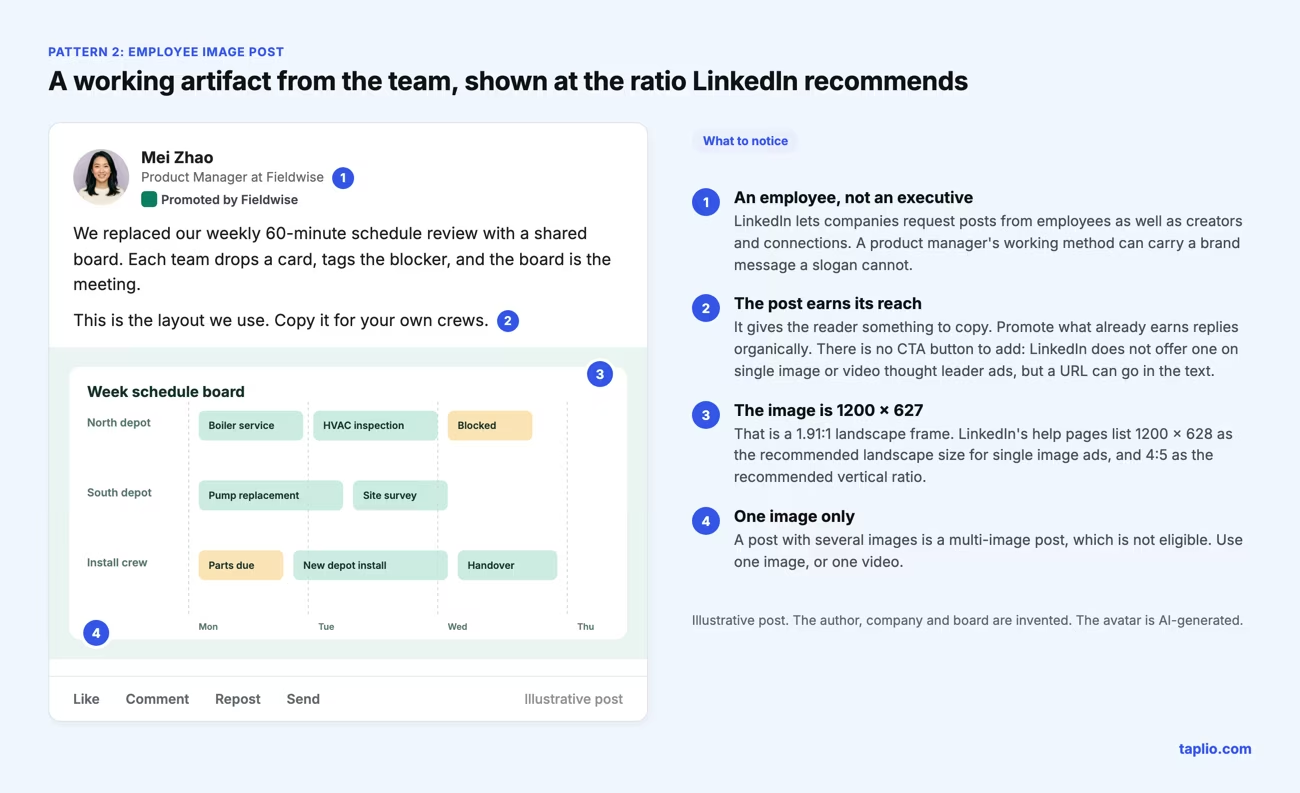
Pattern 2: an employee's image post
An employee below the executive level can carry a brand message through a working method others can copy. Keep to a single image, because multi-image posts are not eligible.
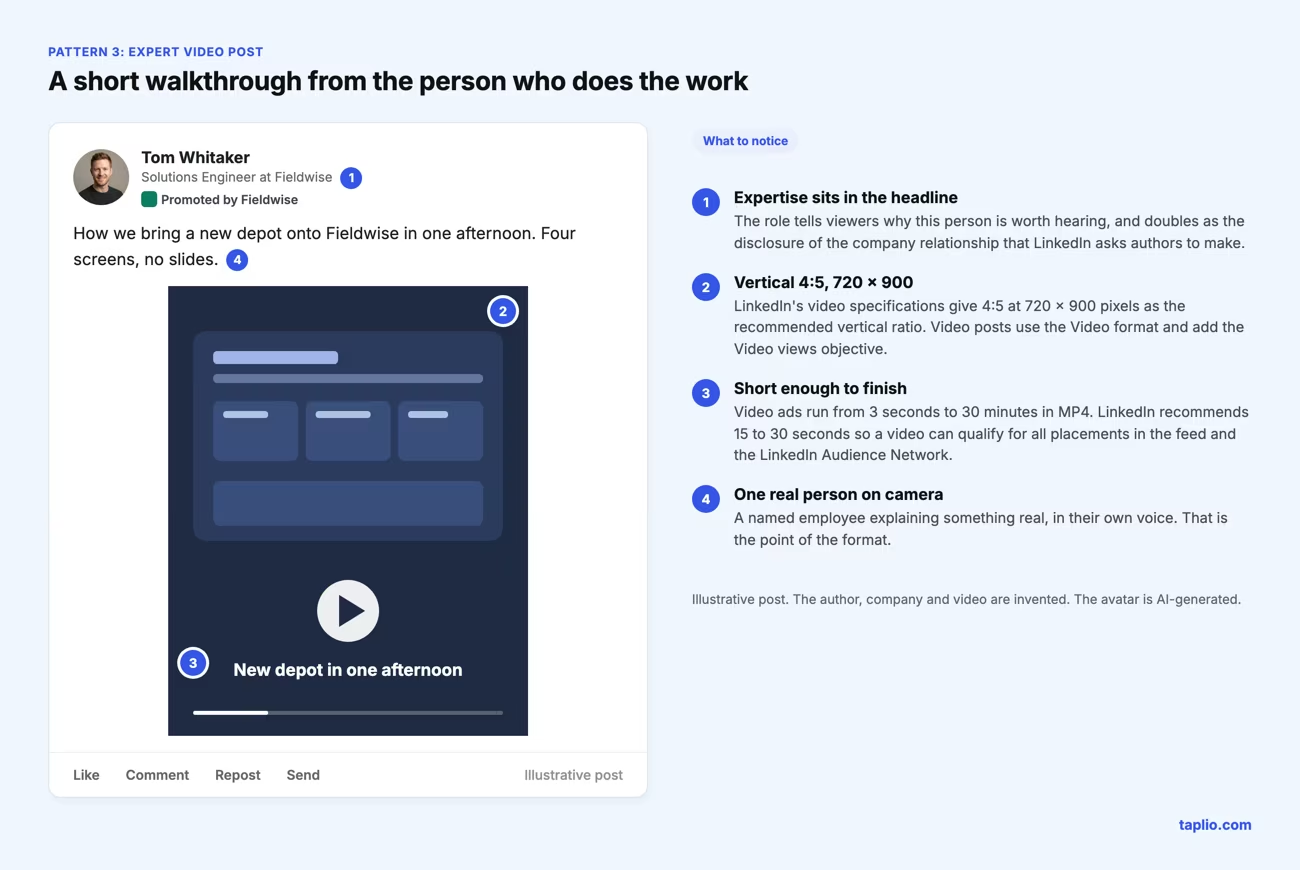
Pattern 3: an expert's video post
A short video from the person who does the work uses the video format and the Video views objective. LinkedIn recommends a 4:5 vertical ratio.
Thought leader ad formats, specs and objectives
Thought leader ads run in four formats, each with its own objectives. LinkedIn says the member's post content must meet its single image or video ad specifications, which its help pages list.
| Post type | Ad format | Objectives |
|---|---|---|
| Single image or text | Single image | Brand awareness, Engagement |
| Video | Video | Brand awareness, Engagement, Video views |
| LinkedIn Live Event | Event | Brand awareness, Engagement |
| Newsletter or article | Article and Newsletter | Brand awareness, Engagement |
From LinkedIn's single image ad specifications:
- File types are JPG, PNG or GIF, up to 5 MB. Animated GIFs must be 250 frames or shorter.
- Recommended sizes are 1200 x 628 pixels for landscape (1.91:1), 1200 x 1200 for square and 720 x 900 for vertical (4:5).
- Images under 401 pixels wide display as a thumbnail, and vertical paid images serve only on mobile.
From LinkedIn's video ad specifications:
- Length runs from 3 seconds to 30 minutes, and 15 to 30 seconds is recommended to qualify for all placements.
- The format is MP4 with an H.264 or VP8 codec, between 75 KB and 500 MB.
- Recommended ratios are 16:9 at 1920 x 1080, 4:5 at 720 x 900 and 9:16 at 720 x 1280.
One rule trips teams up: a call-to-action button is not available for single image or video thought leader ads. A URL can go in the intro text, and event thought leader ads do include a CTA button. Specs change, so check the "last updated" date on LinkedIn's pages before briefing an author.
How much LinkedIn thought leader ads cost
LinkedIn publishes no fixed price for thought leader ads. They sell through the same ad auction as other LinkedIn ads, so what you pay depends on your bid and on how desirable your target audience is.
LinkedIn's pricing page explains that charges follow the campaign objective: each objective has a billable event, and you pay only when that event occurs. The chart on that page maps each objective to its event, so read it for Brand awareness, Engagement or Video views before you set a budget.
Cost figures quoted in third-party posts vary with audience and year, so none are repeated here. A number that is not tied to your audience and objective cannot plan a budget, so run a small test and read your own cost per billable event.
How to measure thought leader ads
Measure thought leader ads in Campaign Manager against the objective you chose, and compare them with the post's organic results saved before the campaign. LinkedIn advises asking the author to save organic performance first.
Two metrics are specific to the format. Member follows counts people who follow the author through the ad, and Clicks to member profile counts clicks on the thought leader's profile.
Authors can view the combined organic and paid impressions and reach on their own post. LinkedIn notes that this total does not include LinkedIn Audience Network metrics.
Are thought leader ads worth it
Thought leader ads are worth testing when a named person already writes posts that earn replies from your buyers. They are a poor fit when no one posts regularly, because there is nothing proven to amplify.
LinkedIn's marketing guide lists three times to use them: when an employee's post earns meaningful engagement and you want to amplify it, when you want brand awareness, and when you want to build trust and community.
The evidence on LinkedIn's own page is testimony, not data. Cognism's head of paid acquisition says the ads raised click-through rate, lowered cost per click and created a non-stop content engine from employees' posts, but the page gives no figures.
A low-risk test is small: promote two posts from two different people to the same audience, and compare both against their saved organic baselines.
Common mistakes with thought leader ads
- Promoting a post that never proved itself. Budget multiplies a post's reach, not its quality. Start from posts that already earn replies.
- Picking an old post. LinkedIn advises sponsoring posts less than 30 days old and revisiting performance quarterly.
- Choosing an ineligible type. Documents, polls, celebrations, multi-image posts and reposts will not pass.
- Sending the request cold. The author receives an email from an ad account. Talk first, then use Copy link to send the request as a direct message.
- Skipping the disclosure. LinkedIn expects authors to disclose the company relationship, so agree on how before the ad runs.
- Expecting a button. Single image and video thought leader ads carry no CTA button, so write the next step into the post.
- Forgetting the baseline. Without saved organic numbers you cannot tell what the budget added.
How to build an organic post pipeline worth promoting
The constraint on thought leader ads is rarely budget. It is having a steady supply of posts from real people that are worth promoting. Build the organic pipeline first, and treat the paid step as a filter on top of it.
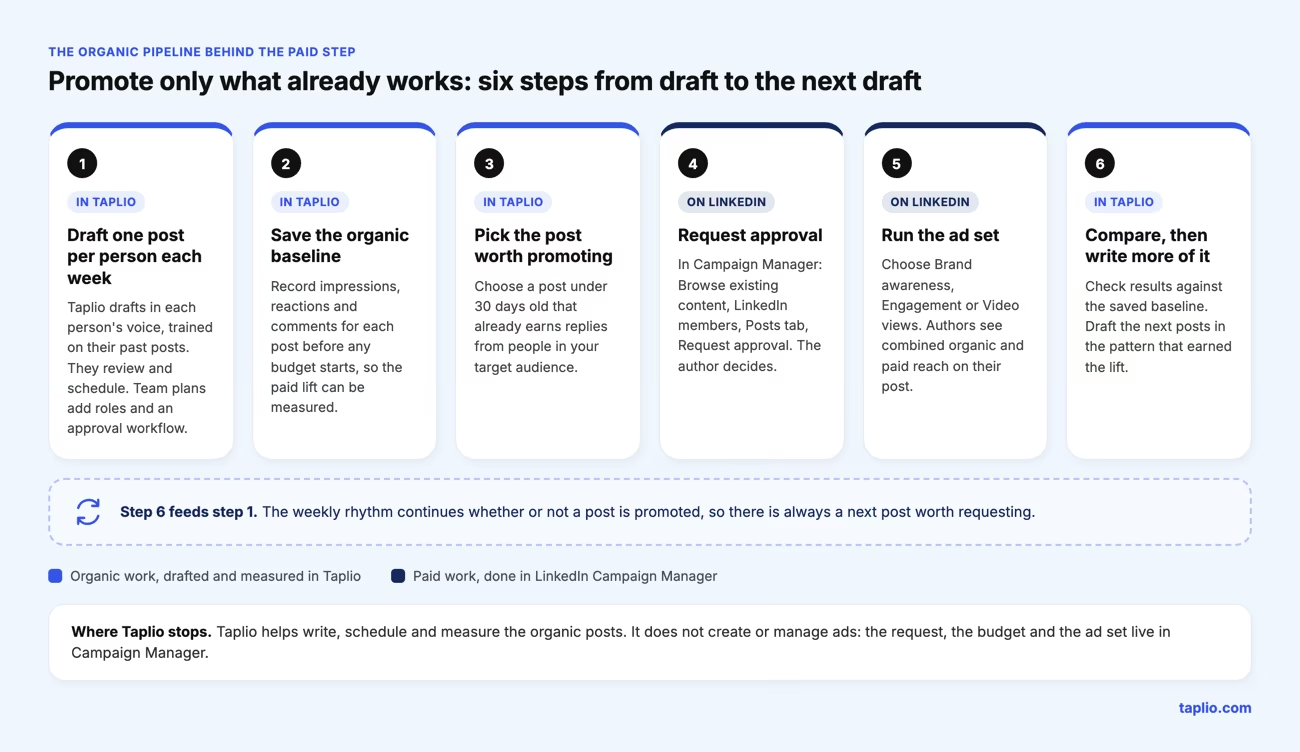
Taplio covers the organic half. It drafts posts in each person's voice from their past posts, schedules them, and tracks their results in analytics.
Taplio workspaces add multi-account access with an approval workflow, a shared content calendar and per-person dashboards. The setup is described on our page for employee advocacy, and the leader-led version on our page for corporate influencers.
Taplio does not create or manage ads. The request, the budget and the ad set stay in Campaign Manager, and Taplio plans start at $39 per month with a 7-day free trial and no free plan.
A workable rhythm is one post per person per week. Save each post's numbers, pick the one that earns replies from your target audience, and send the request while the post is still under 30 days old. Your Page's My Company tab also surfaces trending employee posts worth requesting.
What the author gets and gives up when they say yes
An author who approves a request lets a company put budget behind their post and keeps the right to stop it. The author's side is easy to overlook when planning a campaign.
The author controls the permission in three ways. They approve or decline each request from the Sponsorship Permissions page, turn on auto-approval per brand, and revoke approval from the My posts section, which stops any ad running with that post.
LinkedIn advises enabling auto-approval only for advertisers the author trusts. Turning it off later offers two choices: new posts only, or past and new posts, which also stops any auto-approved post running as an ad.
The author also carries a disclosure duty. When an employer promotes a post, LinkedIn shows "Promoted by" and the company name on it. If the company is not the author's employer, it shows "Promoted - Partnership with" and the company name, and the author should add any further disclosure that applies.
LinkedIn asks employees to disclose the relationship, for instance by putting their role in the profile headline or adding a hashtag such as #CompanyEmployee or #SponsoredPost in a visible part of the post. Read the full rules on LinkedIn's page on requests to sponsor your profile posts.
A promoted post can also bring a wave of connection requests. LinkedIn's guide to every LinkedIn ad type notes that an author who wants fewer can switch their profile call to action from connect to follow.
Frequently asked questions
Are LinkedIn thought leader ads worth it?
They are worth testing when a named person already posts content that earns replies from your buyers. LinkedIn's own page offers testimonials, such as Cognism's, but no figures, so measure against a saved organic baseline instead of assuming a lift. If nobody posts regularly, fix the organic pipeline first.
What are thought leadership ads on LinkedIn?
LinkedIn calls them Thought Leader Ads. They sponsor a public post written by an employee, creator or other member, with that author's permission, so the ad keeps the author's name and words. They run from Campaign Manager with Brand awareness, Engagement or Video views objectives.
How much do LinkedIn thought leader ads cost?
LinkedIn publishes no fixed price. The ads sell through the ad auction, so cost depends on your bid and on how desirable your target audience is, and charges follow the billable event of your objective. Check the chart on LinkedIn's pricing page for the objective you choose.
Who are the best thought leaders on LinkedIn?
LinkedIn publishes no official ranking of thought leaders, so any list reflects its author's criteria. For ads, a more useful question is who in your company or customer base has an audience your buyers trust. LinkedIn lets you request posts from employees and from 1st, 2nd or 3rd-degree+ connections.
Do thought leader ads need the author's permission?
Yes. The author receives an email showing the post and can approve or reject the request, and can turn auto-approvals on or off. Without approval the post cannot be used as an ad.
Can you promote a document post as a thought leader ad?
No. LinkedIn lists documents, polls, celebrations and multi-image posts as not eligible at this time. Promote a public text, single image, video, article or newsletter post instead.
Can an author stop a thought leader ad?
Yes. The author can revoke approval from the Sponsorship Permissions page, and any ad running with that post stops. The advertiser is notified, and the ad set keeps delivering only if it holds other ads.


Keep reading
All articlesRelated Articles


Your Linkedin AI coach is waiting for you
Join 12,000+ creators who let their coach turn the blank page into a plan and watch their audience compound.
7-day free trial · Cancel anytime